Yes . My 20 second loading time for 6 charts now takes me 6 MINUTES . WTF . I have sent email to support no response except the generic AI crap .
1 Like
Have sent two requests for help , but nothing . Just AI generated crap .
1 Like
Dob’t there is some thing seriously wrong with it . 6 minutes to load my charts . 3 minutes to swap a chart once loaded . before the update 20 seconds max to load charts and the change charts 5 to 10 seconds max .
1 Like
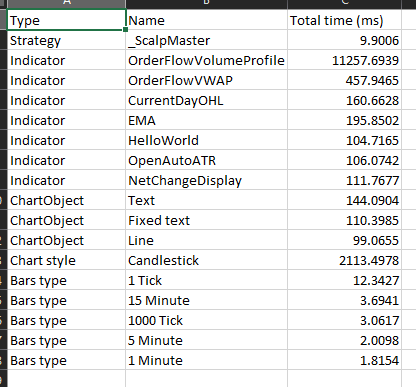
Most likely your indicators are not efficient when scaling. Most people here seems to be complaining about loading taking a long time. At “load time”, logic complexity and allocation matters because NinjaTrader has to build objects, initialize indicators and process the historical data. There is a difference between “load time” and “run time”. At “load time”, it takes longer to calculate and render, which is why you and others are seeing long load times and when you are swapping charts. Regardless if you have acceptable utilization during “run time” within a small window and only using 4% of your CPU. At “run time”, it’s just processing data after initialization. For comparison with Marcus’s 10 minute utilization, the below is mine with three charts for 20 minutes. Most of my calculations are constant time complexity, capped capacity if linear complexity and the rendering are cached. It took about 100ms for 20 minutes for each of my custom indicators. This obviously depends on what the indicators are doing too and lower ms does correlate with the indicator being more efficient. My HelloWorld, does some calculations that displays some visuals, but also sends out 100+ features to an external machine learning model.
Bottom Line:
- If NinjaTrader loads quickly without your custom indicators (or with simple defaults), the platform isn’t the issue.
- If it’s slow with your custom indicators, they likely don’t efficiently scale at “load time”.
- Over short “run time” windows, utilization may look acceptable, but the pain users feel is often front-loaded at load/refresh.
2 Likes
I thought you moved on to Sierra Charts. Again, if it works fine without custom indicators and strategies then it’s obviously the indicators and strategies. If the issue still persists without the custom indicators and strategies then it’s the platform. It’s not that difficult. It’s simply the process of elimination. It’s common for updated software to possibly break other parts of the software. In this case, the custom indicators and strategies. I understand your frustration, but if you want to continue developing software for the platform then you just have to accept this fact. It’s true regardless of platform and it doesn’t even have to be specific to trading platforms. Any software that relies on third party software may have this issue. If the new version doesn’t work then just stick with the older version until you migrate over. I don’t understand what you want them to do if it’s not the platform. See my comment about load time and run time. Like I previously mentioned, if it’s the platform then all of us will have issues. I think it’s most likely the custom indicators and strategies for anyone who is having issues. If your indicators can’t scale well during load time then you need to look at your indicators. I bet most people that are complaining about their indicators are not profession software engineers. If they are and complaining then they most likely have never needed to work on scaling issues.
1 Like
What ? I have not changed any thing . It took 20 seconds before the update and now takes 6 minutes plus . Absolutely there is a issue with the program after the update . Are you not reading the comments . It happening to lots of people . I am on a gaming PC too not some crappy laptop . Now having said that . I just loaded it up and it took about a minute so they must have done some thing on there end . I don’t use any custom indicators . Just a few moving averages and a couple stochastics .
1 Like
Hey, I saw that note on C# 13 too but can’t tell what .NET they’re supporting currently. How can I find this info going forward?
About to get started developing but want to make sure I setup correctly.
1 Like
Unfortunately, they are still on 4.8. You can just look at the .csproject file for the TargetFramework.
1 Like
If you are on a beefy computer and don’t have any custom indicators loaded… then contact them about their platform. My computer is 6+ years old with an older i7 and an RTX 2080. I have no issues.
Appreciate the response. Excuse my ignorance, but when I search the topic, it seems that C#13 only works with >.NET 9. .NET (Framework?) 4.8 supports up to C#7.3. What magic is this?
1 Like
It’s a bit weird going from having a team of support staff on the forum to no-one. I think the lack of communication is the problem.
2 Likes
You pretty much don’t get the full C# 13 on NinjaTrader because its still on 4.8. If a feature requires a modern .NET then it won’t work. C# version is a compiler thing and .NET version is a runtime thing. So you can compile C# 13 into 4.8 if you use a modern Rosyln compiler. If you really want to you can manually update the compiler yourself, but you probably shouldn’t.
1 Like
After upgrading my performance has tanked. Really hope they fix this soon. Had no issues before upgrading to 8.1.6
1 Like
I wonder if anyone can pinpoint the CHANGE in the latest update that has obviously detrimentally affected many long-time users. if long-time users have experienced little to no problems in the past with updates, accusing them with “un-optimized” code seems like a cop-out. what changed??
1 Like
Why is it a cop-out? It’s a simple process of elimination. I don’t understand why all these “developers” having such an issue with the idea of process of elimination. If it’s the platform then why is it that not everyone is affected? It’s affected the couple here and there are over 500,000 active NinjaTrader users. The very small fraction of that is having issues. This suggests that the root problem is not universal. Let me try to break it down further for you if you are having issues so you can separate platform issues from custom code issues.
Load the platform without indicators and strategies? Does it still run slow?
- Yes? Try repairing, uninstalling and reinstalling. Still have issues? Contact support and explain your setup. For example, give them detailed information such as the multiple series, indicators you are using and details, tick replay, your computer specs, etc. This could potentially be the platform issue.
- No? Try individually loading your indicators and strategies? Don’t have issues? Now try loading them all together. Chances are you may be having issues with multiple because you multiplied the workload for the platform. Can optimized code feel heavier after an update? Yes… figure out how to make your load time faster based on the optimized indicator.
“Most”? So out of the 500,000+ active NinjaTrader users… what is the number for most? You mean the few on here complaining because their old indicators is now taking a long time to load? If you are that frustrated with NinjaTrader then just move on to Sierra Charts and learn C++ and the environment. I might seem like I’m just defending NinjaTrader, but geesh… some of you refuse to believe that it’s possibly your code is horrible at scaling now and refuse to take the troubleshooting steps to see if its the platform or your code. If your code is crap with C# then it will most likely be crap with C++. If you think your code is just flawless, then just migrate over to a different platform.
Received this from emailing platform support on this latest release …
Thanks for reaching out,
We understand your frustration and want to assure you that the issues with 8.1.6.0 are being taken very seriously. Our team is actively testing a fix and will release an update as soon as it’s ready.
4 Likes
 Considering your posts, you are the one getting angry! I’m simply stating the facts. Environment changes and affects code. If you don’t understand that then you’ve never worked as a professional software engineer. I’ve been in the industry for 20+ years. Simple troubleshooting steps that nobody seems to want to follow but just want to blame the platform. If you are that angry then just move on to Sierra Charts.
If you have such flawless code… prove me wrong and feel free to share it here. 
Extremely slow insane 20min to load control panel and 40min to load my indicator, I decided to downgrade to previous version today, wow suprised they even released this absolute trash “upgrade”
1 Like
Oh no, it looks like Henry Dean III deleted his posts and left. So much negativity from that person. 