https://ninjatrader.com/support/helpguides/nt8/NT%20HelpGuide%20English.html?8_1_6.htm
NinjaScript access for Volume Profile
Feature # 28844
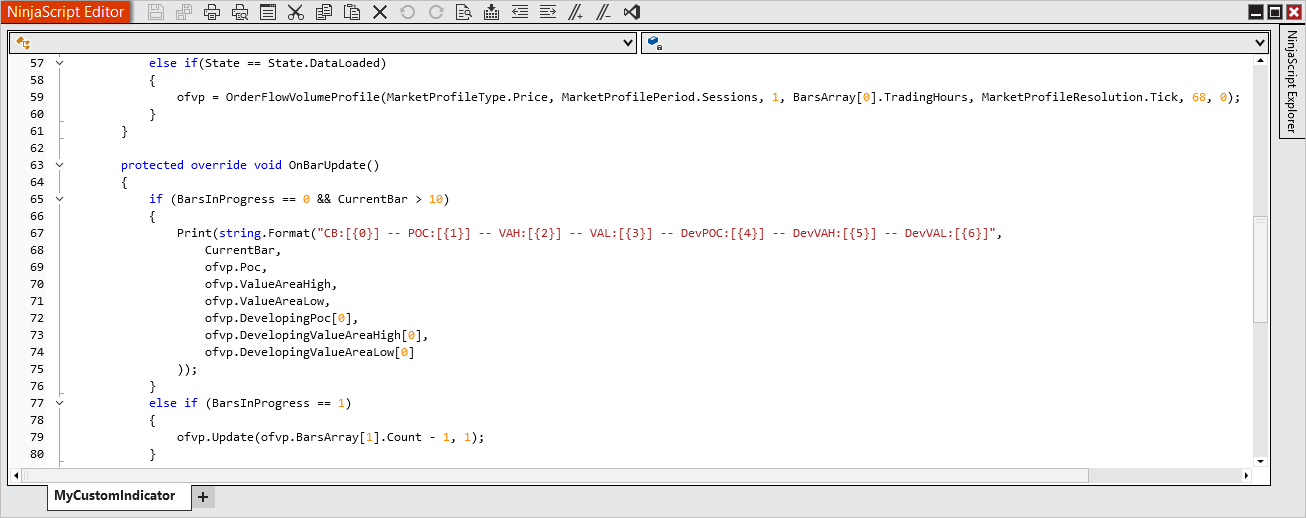
Developers now have direct programmatic access to Volume Profile values in NinjaScript. Use essential outputs like POC, Value Area High, and Value Area Low to unlock deeper customization and build next-generation strategies.
on this page it states that volume profile is now accessible via ninjascript, are there any examples of the values that can be used and how to use them? I can’t find anything anywhere outside of hte screenshots and im really struggling
if the screenshot is all we need, then that makes sense, would appreciate some help
2 Likes
Hi @imjustkaze,
Here’s a help page on the Order Flow Volume Profile indicator:
NinjaTrader Developer Community | NinjaScript Resources & Documentation
Do be aware thought that some other community members have reported issues with the Order Flow Volume Profile indicator that appeared in recent versions, which unfortunately for those that want to access the Order Flow Volume Profile indicator from code seem to be just about the same versions that currently support accessing the Order Flow Volume Profile indicator from code:
Upgrade to 8.1.6.1 is not displaying Order Flow Volume Profile Correctly - General Discussions - NinjaTrader Community Forum
Quality Control Concerns – Version 8.1.6.2 Volume Profile Issue Persistence Bug - General Discussions - NinjaTrader Community Forum
Once the community confirms that a new version of NinjaTrader no longer has the issues reported above, being able to access the Order Flow Volume Profile indicator from code sounds very promising!
3 Likes
Oof, just saw this, explains why I’m having a ton of issues. Was coming here to say it got it to plot the VAH and VAL and the POC BUT they’re all incorrect so… there’s that haha. Terrible.
I was actually just thinking of this today. Glad I popped in here to check and thanks for posting this!
1 Like
The bug with NT’s built-in Order Flow Volume Profile (Feature #28844) has been reported by multiple people across versions 8.1.6.1 and later. VAH/VAL/POC values coming back incorrect is a known issue and at this point it’s unclear when or if it gets a proper fix.
If you need reliable VAH, VAL and VPOC accessible from NinjaScript, the practical workaround is using a third-party volume profile indicator that exposes its values. I use SidiVolumeLevels from tpte.de. It calculates VWAP (daily/weekly/monthly/intraday), VPOC and VAH/VAL per session and those values are stable and accurate in code. No workaround needed and no dependency on NT’s broken native implementation.
It also lets you run multiple periods simultaneously and has a colorized background mode that shows where price is relative to value at a glance. Works well as a standalone chart tool or as a data source for strategy conditions.
The NT bug is frustrating because it seems like a core feature. Until it’s fixed, relying on their implementation for production code isn’t worth it.
1 Like
When I add the Orderflow Volume Profile indicator of Ninjatrader - with default settings on my 5 min chart, I notice that the VAH, VAL & POC that I get via code are not 100% the same. Sometimes with 30/40 ticks difference. I use the following script. Can someone help please? I’m using version 8.1.6.3.
#region Using declarations
using System;
using System.Collections.Generic;
using System.ComponentModel;
using System.ComponentModel.DataAnnotations;
using System.Linq;
using System.Text;
using System.Threading.Tasks;
using System.Windows;
using System.Windows.Input;
using System.Windows.Media;
using System.Xml.Serialization;
using NinjaTrader.Cbi;
using NinjaTrader.Gui;
using NinjaTrader.Gui.Chart;
using NinjaTrader.Gui.SuperDom;
using NinjaTrader.Gui.Tools;
using NinjaTrader.Data;
using NinjaTrader.NinjaScript;
using NinjaTrader.Core.FloatingPoint;
using NinjaTrader.NinjaScript.DrawingTools;
#endregion
namespace NinjaTrader.NinjaScript.Indicators
{
public class VPLevels : Indicator
{
private OrderFlowVolumeProfile ofvp;
    protected override void OnStateChange()
    {
        if (State == State.SetDefaults)
        {
            Description = "Indicator die Volume Profile waarden uitleest en print (POC, VAH, VAL, DevPOC, DevVAH, DevVAL).";
            Name        = "VPLevels";
            Calculate   = Calculate.OnPriceChange;
            IsOverlay   = true;
        }
        else if (State == State.Configure)
        {
            // Beide series zijn vereist door de OrderFlowVolumeProfile symbiote,
            // ook bij Minute resolutie (conform SDK documentatie)
            AddDataSeries(Data.BarsPeriodType.Tick, 1);
            AddDataSeries(Data.BarsPeriodType.Minute, 1);
        }
        else if (State == State.DataLoaded)
        {
            ofvp = OrderFlowVolumeProfile(
                MarketProfileType.Volume,         // Volume
                MarketProfilePeriod.Sessions,
                1,                                // 1 sessie
                BarsArray[0].TradingHours,        // trading hours van de input serie
                MarketProfileResolution.Minute,   // Minute resolutie
                68,                               // Value area % = 68
                0                                 // Initial balance minutes = 0
            );
        }
    }

    protected override void OnBarUpdate()
    {
        if (BarsInProgress == 0 && CurrentBar > 10)
        {
            Print(string.Format(
                "CB:[{0}] -- POC:[{1}] -- VAH:[{2}] -- VAL:[{3}] -- DevPOC:[{4}] -- DevVAH:[{5}] -- DevVAL:[{6}]",
                CurrentBar,
                ofvp.Poc,
                ofvp.ValueAreaHigh,
                ofvp.ValueAreaLow,
                ofvp.DevelopingPoc[0],
                ofvp.DevelopingValueAreaHigh[0],
                ofvp.DevelopingValueAreaLow[0]
            ));
        }
        else if (BarsInProgress == 1)
        {
            // Update het profiel via de Tick-dataserie (BarsInProgress index 1)
            ofvp.Update(ofvp.BarsArray[1].Count - 1, 1);
        }
    }
}
}
1 Like