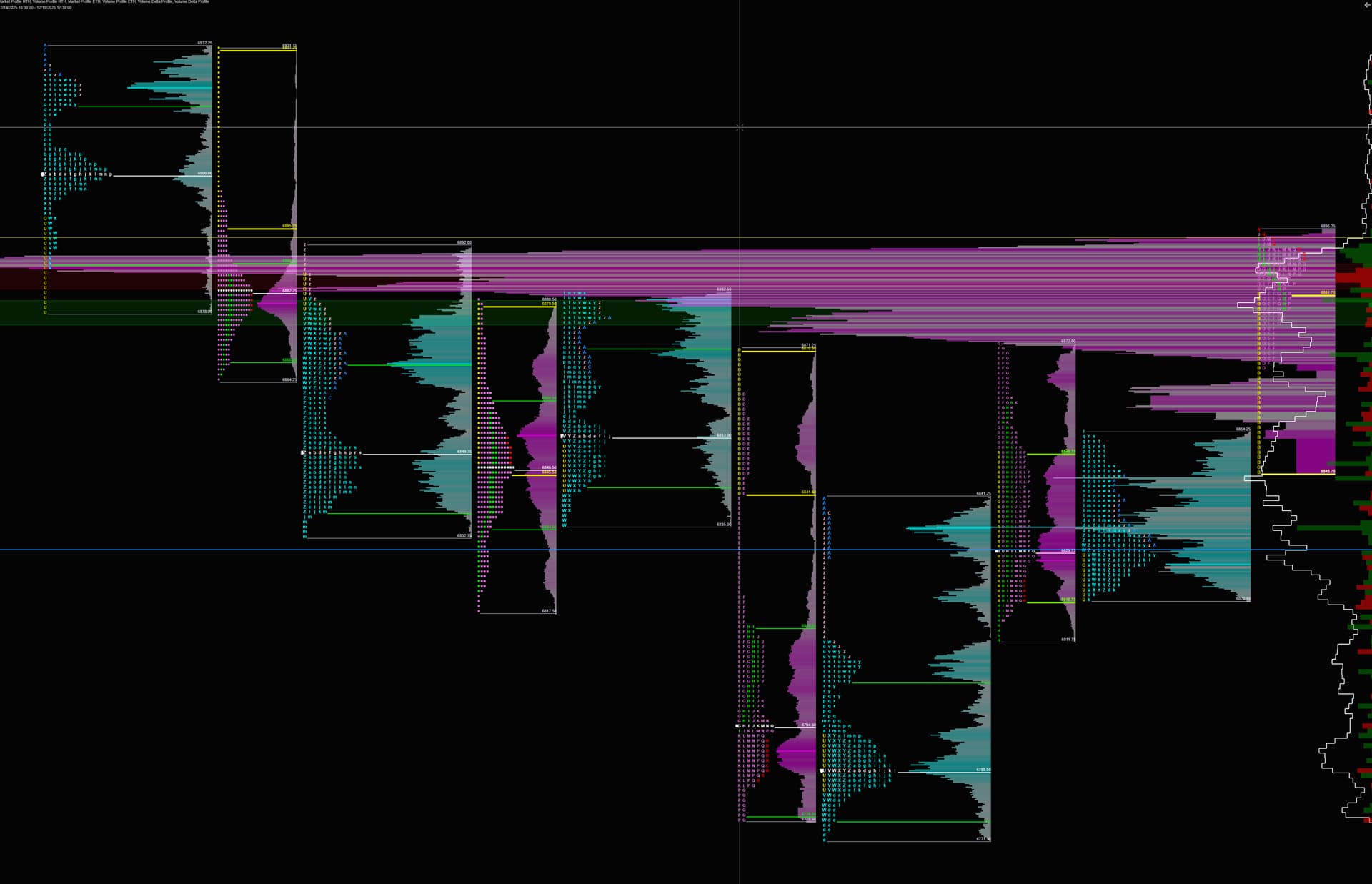
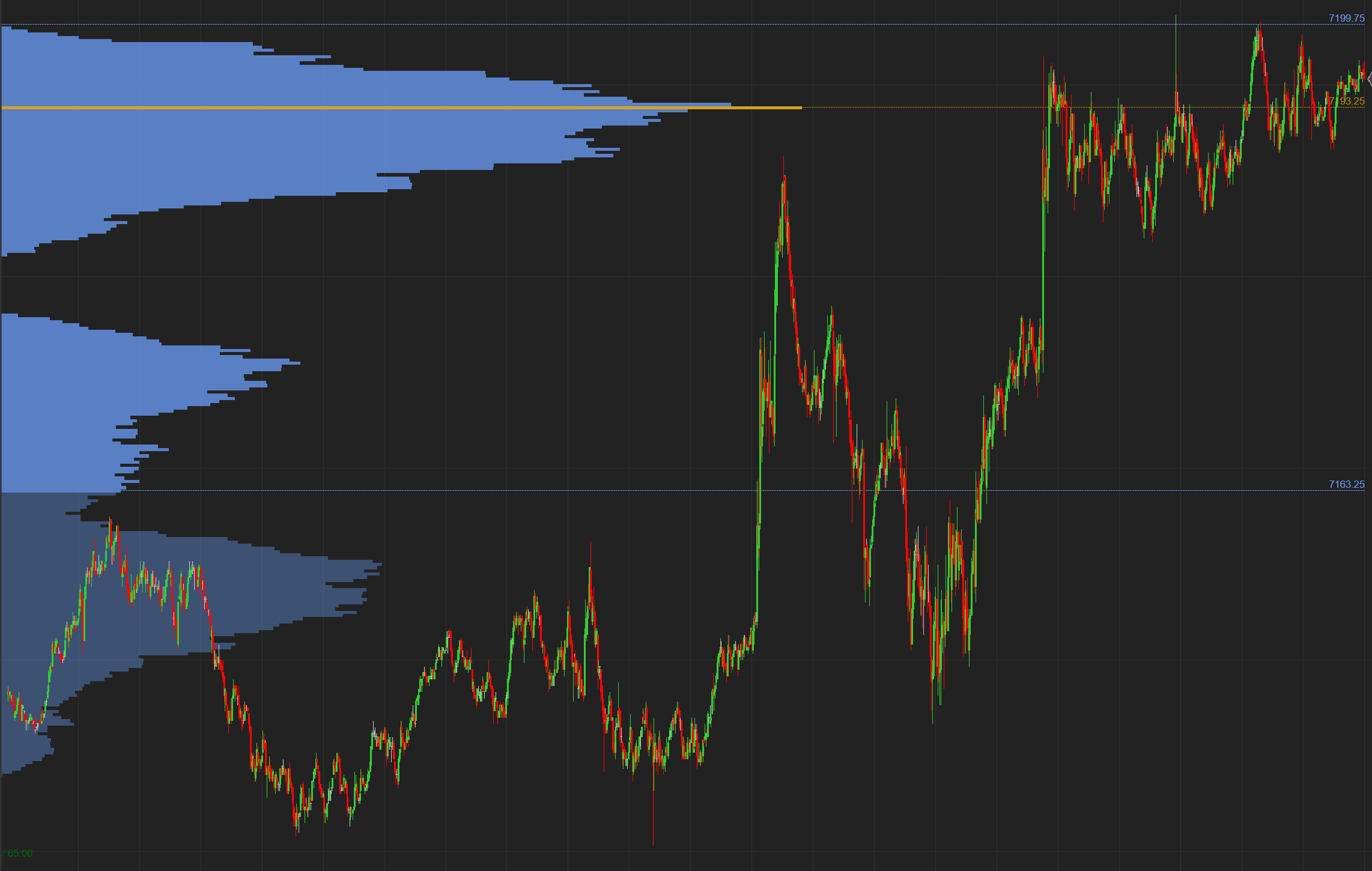
The latest update (8.1.6.2 64-bit) released today, still hasn’t fixed the Volume Profile issues reported by hundreds of traders. The lack of quality assurance in these releases is frankly ridiculous.
The state of the current 8.1.6.2 (64-bit) update is unacceptable. Despite exhaustive feedback from the community regarding the Volume Profile, the issue persists.
It is difficult not to draw a line between the recent acquisition by Kraken and the apparent lack of care regarding platform stability. The dissemination of updates that haven’t been properly vetted for quality is a disservice to your user base.
This is a screencast of the current persisting issue with the new udpate that NinjaTrader releaased today. The volume profile now has a new problem which could’ve been easily detected in the quality check. But alas, it was not.
If anyone is able to reach out to Martin Franchi, the CEO of Ninja Trader on LinkedIn, please do so and voice your concern as to what’s happening with the platform, maybe he can shed some light on the new strategy and the new direction because from the recent rollouts, something is happening.
I’ve noticed the same decline in update quality. The latest version rendered the platform nearly unusable for me, with 5x slower load times and significant chart lag. To make matters worse, support offered an irrelevant solution regarding software I don’t use. I’ve reverted to the previous version and hope these stability issues are addressed properly before we are forced to update again.
Just saw this, so went ahead and downloaded and upgraded from my 8.1.5.2 and tested out the volume profile again. I am no longer seeing improperly sized volume profiles. In addition, in 8.1.6.2, NinjaScript was returning the same value for VOH, VOL, and POC from an embedder indicator. Now with 8.1.6.3, it is returning proper values for all three.
So for me, looks like volume profile has been fixed, at least for my use cases.
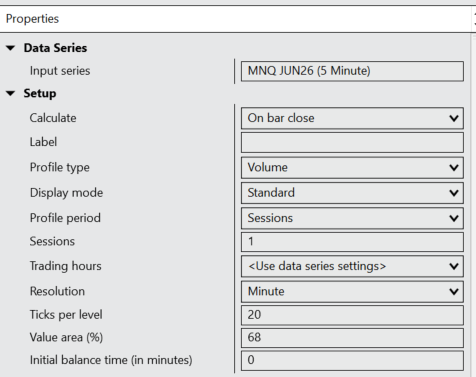
@Rayzzor when I add the Orderflow Volume Profile indicator of Ninjatrader - with default settings on my 5 min chart, I notice that the VAH, VAL & POC that I get via code are not 100% the same. Sometimes with 30/40 ticks difference. I use the following script. Can someone help please? I’m using version 8.1.6.3.
#region Using declarations
using System;
using System.Collections.Generic;
using System.ComponentModel;
using System.ComponentModel.DataAnnotations;
using System.Linq;
using System.Text;
using System.Threading.Tasks;
using System.Windows;
using System.Windows.Input;
using System.Windows.Media;
using System.Xml.Serialization;
using NinjaTrader.Cbi;
using NinjaTrader.Gui;
using NinjaTrader.Gui.Chart;
using NinjaTrader.Gui.SuperDom;
using NinjaTrader.Gui.Tools;
using NinjaTrader.Data;
using NinjaTrader.NinjaScript;
using NinjaTrader.Core.FloatingPoint;
using NinjaTrader.NinjaScript.DrawingTools; #endregion
namespace NinjaTrader.NinjaScript.Indicators
{
public class VPLevels : Indicator
{
private OrderFlowVolumeProfile ofvp;
    protected override void OnStateChange()
    {
        if (State == State.SetDefaults)
        {
            Description = "Indicator die Volume Profile waarden uitleest en print (POC, VAH, VAL, DevPOC, DevVAH, DevVAL).";
            Name        = "VPLevels";
            Calculate   = Calculate.OnPriceChange;
            IsOverlay   = true;
        }
        else if (State == State.Configure)
        {
            // Beide series zijn vereist door de OrderFlowVolumeProfile symbiote,
            // ook bij Minute resolutie (conform SDK documentatie)
            AddDataSeries(Data.BarsPeriodType.Tick, 1);
            AddDataSeries(Data.BarsPeriodType.Minute, 1);
        }
        else if (State == State.DataLoaded)
        {
            ofvp = OrderFlowVolumeProfile(
                MarketProfileType.Volume,         // Volume
                MarketProfilePeriod.Sessions,
                1,                                // 1 sessie
                BarsArray[0].TradingHours,        // trading hours van de input serie
                MarketProfileResolution.Minute,   // Minute resolutie
                68,                               // Value area % = 68
                0                                 // Initial balance minutes = 0
            );
        }
    }

    protected override void OnBarUpdate()
    {
        if (BarsInProgress == 0 && CurrentBar > 10)
        {
            Print(string.Format(
                "CB:[{0}] -- POC:[{1}] -- VAH:[{2}] -- VAL:[{3}] -- DevPOC:[{4}] -- DevVAH:[{5}] -- DevVAL:[{6}]",
                CurrentBar,
                ofvp.Poc,
                ofvp.ValueAreaHigh,
                ofvp.ValueAreaLow,
                ofvp.DevelopingPoc[0],
                ofvp.DevelopingValueAreaHigh[0],
                ofvp.DevelopingValueAreaLow[0]
            ));
        }
        else if (BarsInProgress == 1)
        {
            // Update het profiel via de Tick-dataserie (BarsInProgress index 1)
            ofvp.Update(ofvp.BarsArray[1].Count - 1, 1);
        }
    }
}
I think your code looks ok, though I haven’t used the OrderFlowVolumeProfile.Update() function in my use.
One thing to check is to make sure your TradingHours parameter value of the volume profile in your code matches the value used on the indicator or whatever you are using to validate. For example, I set my volume profile indicator to RTH hours rather than the data series default, so I need to make sure in code I do the same.
Here’s an example code snippet (almost same as your code) and results I tested on a 1 minute chart. I briefly switched to a 5 minute chart and got correct values there as well.
I really appreciate your reply @Rayzzor. Unfortunately the values of the standard Ninjatrader Orderflow Volume Profile don’t match with the indicator output. I just use default settings of the Volume Profile.
Output of the code:
----- Via values: CB: [4741] – POC: [27526,75] – VAH:[27539,25] – VAL:[27416,25]
----- Via names: CB: [4741] – POC: [27526,75] – VAH:[27539,25] – VAL:[27416,25] – DevPOC:[27526,75] – DevVAH:[27539,25] – DevVAL:[27416,25]
As you can see the values don’t match (screen vs code).
Code I’m using currently. Instrument MNQ (timeframe 5 minutes). Tradinghours = dataseries setting = instrument setting which is set to CME US Index Futures ETH.
namespace NinjaTrader.NinjaScript.Indicators
{
public class ExampleVP : Indicator
{
private OrderFlowVolumeProfile ofvp;
    protected override void OnStateChange()
	{
		if (State == State.SetDefaults)
		{
			Description									= @"Enter the description for your new custom Indicator here.";
			Name										= "ExampleVP";
			Calculate									= Calculate.OnBarClose;
			IsOverlay									= true;
			DisplayInDataBox							= true;
			DrawOnPricePanel							= true;
			DrawHorizontalGridLines						= true;
			DrawVerticalGridLines						= true;
			PaintPriceMarkers							= true;
			ScaleJustification							= NinjaTrader.Gui.Chart.ScaleJustification.Right;
			//Disable this property if your indicator requires custom values that cumulate with each new market data event.
			//See Help Guide for additional information.
			IsSuspendedWhileInactive					= true;
		}
		else if (State == State.Configure)
		{
            AddDataSeries(Data.BarsPeriodType.Tick, 1);
            AddDataSeries(Data.BarsPeriodType.Minute, 1);

        }
		else if (State == State.DataLoaded)
		{
            ofvp = OrderFlowVolumeProfile(
                MarketProfileType.Volume,		// ProfileType
                MarketProfilePeriod.Sessions,	// ProfilePeriod
                1,                              // SessionsToLoad
				Bars.TradingHours,				// TradingHours
                MarketProfileResolution.Minute,	// ProfileResolution
                68,								// ValueAreaPercentage
                0								// InitialBalanceMinutes
            );
        }
    }

	protected override void OnBarUpdate()
	{
		if (BarsInProgress != 0)
			return;

		if (CurrentBar < 20)
			return;

        Print(string.Format("----- Via values: CB: [{0}] -- POC: [{1}] -- VAH:[{2}] -- VAL:[{3}]",
            CurrentBar,
            ofvp.Values[0][0],
            ofvp.Values[1][0],
            ofvp.Values[2][0]
            ));

		Print(string.Format("----- Via names: CB: [{0}] -- POC: [{1}] -- VAH:[{2}] -- VAL:[{3}] -- DevPOC:[{4}] -- DevVAH:[{5}] -- DevVAL:[{6}]",
			CurrentBar,
			ofvp.Poc,
			ofvp.ValueAreaHigh,
			ofvp.ValueAreaLow,
			ofvp.DevelopingPoc[0],
			ofvp.DevelopingValueAreaHigh[0],
			ofvp.DevelopingValueAreaLow[0]
			));
	}
}
}
I’ll try to use that specific tradinghours in code, instead of default fallback and let you know.
I now get the exact values. I had to set the TicksPerLevel as a property. You can’t set it with constructor.
#region Using declarations
using System;
using System.Collections.Generic;
using System.ComponentModel;
using System.ComponentModel.DataAnnotations;
using System.Linq;
using System.Text;
using System.Threading.Tasks;
using System.Windows;
using System.Windows.Input;
using System.Windows.Media;
using System.Xml.Serialization;
using NinjaTrader.Cbi;
using NinjaTrader.Gui;
using NinjaTrader.Gui.Chart;
using NinjaTrader.Gui.SuperDom;
using NinjaTrader.Gui.Tools;
using NinjaTrader.Data;
using NinjaTrader.NinjaScript;
using NinjaTrader.Core.FloatingPoint;
using NinjaTrader.NinjaScript.DrawingTools; #endregion
// The NinjaTrader.NinjaScript.Indicators namespace holds all indicators and is required. Do not change it.
namespace NinjaTrader.NinjaScript.Indicators.DataManagementExamples
{
public class OFVolumeProfileExample : Indicator
{
private OrderFlowVolumeProfile volumeProfileMinuteResolution, volumeProfileTickResolution, volumeProfileRTHSessionMinuteResolution, volumeProfileRTHSessionTickResolution, volumeProfileFiveTicksPerLevel;
	protected override void OnStateChange()
	{
		if (State == State.SetDefaults)
		{
			Description			= @"Demonstrates calling the Order Flow Volume Profile indicator";
			Name				= "OFVolumeProfileExample";
			Calculate			= Calculate.OnEachTick;
			IsOverlay			= false;
			DrawOnPricePanel	= false;
		}
		else if (State == State.Configure)
		{
			// The OrderFlowVolumeProfile symbiote internally adds a 1-tick series and 1-minute series of the same instrument and tradingHours of the input series, which requires this host to also add a 1-tick and 1-minute series of the same instrument and trading hours of the input series, regardless of the VWAPResolution or tradingHoursInstance
			AddDataSeries(BarsPeriodType.Tick, 1);
			AddDataSeries(BarsPeriodType.Minute, 1);

			// If a custom trading hours is specified, a series must be also be added for tick, minute, and primary series bartype and interval using that custom trading hours to satisfy the symbiote's adds
			AddDataSeries(null, new BarsPeriod { BarsPeriodType = BarsPeriodType.Tick, Value = 1 }, "CME US Index Futures ETH");
			AddDataSeries(null, new BarsPeriod { BarsPeriodType = BarsPeriodType.Minute, Value = 1 }, "CME US Index Futures ETH");
			// A null value is supplied as the instrumentName and barsPeriod parameters to default to the primary bar series' properties
			AddDataSeries(null, null, "CME US Index Futures ETH");
		}
		else if (State == State.DataLoaded)
		{
			ClearOutputWindow();  // as this prints to the output window, clear the output window

			volumeProfileMinuteResolution			= OrderFlowVolumeProfile(MarketProfileType.Volume, MarketProfilePeriod.Sessions, 1, BarsArray[0].TradingHours, MarketProfileResolution.Minute, 68, 0);
			volumeProfileTickResolution				= OrderFlowVolumeProfile(MarketProfileType.Volume, MarketProfilePeriod.Sessions, 1, BarsArray[0].TradingHours, MarketProfileResolution.Tick, 68, 0);
			volumeProfileRTHSessionMinuteResolution	= OrderFlowVolumeProfile(MarketProfileType.Volume, MarketProfilePeriod.Sessions, 1, TradingHours.String2TradingHours("CME US Index Futures ETH"), MarketProfileResolution.Minute, 68, 999);
			volumeProfileRTHSessionTickResolution	= OrderFlowVolumeProfile(MarketProfileType.Volume, MarketProfilePeriod.Sessions, 1, TradingHours.String2TradingHours("CME US Index Futures ETH"), MarketProfileResolution.Tick, 68, 0);

			volumeProfileMinuteResolution.TicksPerLevel = 20;
			Print(volumeProfileMinuteResolution.TicksPerLevel);
			// The TicksPerLevel property is not an overload parameter. Modify a value in the overload method call to prevent the cached instance from being called and a new instance generated.
			// in this example the InitialBalanceMinutes parameter is set to 999 so the method call is unique
			volumeProfileFiveTicksPerLevel			= OrderFlowVolumeProfile(MarketProfileType.Volume, MarketProfilePeriod.Sessions, 1, BarsArray[0].TradingHours, MarketProfileResolution.Minute, 68, 999);
			// once an instance is generated, modify the InitialBalanceMinutes and TicksPerLevel or other properties to the desired values
			volumeProfileFiveTicksPerLevel.InitialBalanceMinutes	= 0;
			volumeProfileFiveTicksPerLevel.TicksPerLevel			= 20;

			Draw.TextFixed(this, "warning", "OFVolumeProfileExample prints to the New > NinjaScript Output window", TextPosition.BottomRight);
		}
	}

	protected override void OnBarUpdate()
	{
		if (BarsInProgress == 0)
		{
			Print(string.Empty);

			// Prints the standard indicator values with default parameters
			Print(string.Format("OF {0} | Resolution: {1}, ProfileType: {2}, ProfilePeriod: {3}, TicksPerLevel: {4}, TradingHours: {5}\r\n   | Poc: {6:0.00}, ValueAreaHigh: {7:0.00}, ValueAreaLow: {8:0.00}, DevelopingPoc[0]: {9:0.00}, DevelopingValueAreaHigh[0]: {10:0.00}, DevelopingValueAreaLow[0]: {11:0.00}", Time[0], volumeProfileMinuteResolution.Resolution, volumeProfileMinuteResolution.ProfileType, volumeProfileMinuteResolution.ProfilePeriod, volumeProfileMinuteResolution.TicksPerLevel, volumeProfileMinuteResolution.TradingHoursInstance, volumeProfileMinuteResolution.Poc, volumeProfileMinuteResolution.ValueAreaHigh, volumeProfileMinuteResolution.ValueAreaLow, volumeProfileMinuteResolution.DevelopingPoc[0], volumeProfileMinuteResolution.DevelopingValueAreaHigh[0], volumeProfileMinuteResolution.DevelopingValueAreaLow[0]));

			// Prints the indicator using Tick resolution
			Print(string.Format("OF {0} | Resolution: {1}, ProfileType: {2}, ProfilePeriod: {3}, TicksPerLevel: {4}, TradingHours: {5}\r\n   | Poc: {6:0.00}, ValueAreaHigh: {7:0.00}, ValueAreaLow: {8:0.00}, DevelopingPoc[0]: {9:0.00}, DevelopingValueAreaHigh[0]: {10:0.00}, DevelopingValueAreaLow[0]: {11:0.00}", Time[0], volumeProfileTickResolution.Resolution, volumeProfileTickResolution.ProfileType, volumeProfileTickResolution.ProfilePeriod, volumeProfileTickResolution.TicksPerLevel, volumeProfileTickResolution.TradingHoursInstance, volumeProfileTickResolution.Poc, volumeProfileTickResolution.ValueAreaHigh, volumeProfileTickResolution.ValueAreaLow, volumeProfileTickResolution.DevelopingPoc[0], volumeProfileTickResolution.DevelopingValueAreaHigh[0], volumeProfileTickResolution.DevelopingValueAreaLow[0]));

			// Prints the indicator with TicksPerLevel set to 5
			Print(string.Format("OF {0} | Resolution: {1}, ProfileType: {2}, ProfilePeriod: {3}, TicksPerLevel: {4}, TradingHours: {5}\r\n   | Poc: {6:0.00}, ValueAreaHigh: {7:0.00}, ValueAreaLow: {8:0.00}, DevelopingPoc[0]: {9:0.00}, DevelopingValueAreaHigh[0]: {10:0.00}, DevelopingValueAreaLow[0]: {11:0.00}", Time[0], volumeProfileFiveTicksPerLevel.Resolution, volumeProfileFiveTicksPerLevel.ProfileType, volumeProfileFiveTicksPerLevel.ProfilePeriod, volumeProfileFiveTicksPerLevel.TicksPerLevel, volumeProfileFiveTicksPerLevel.TradingHoursInstance, volumeProfileFiveTicksPerLevel.Poc, volumeProfileFiveTicksPerLevel.ValueAreaHigh, volumeProfileFiveTicksPerLevel.ValueAreaLow, volumeProfileFiveTicksPerLevel.DevelopingPoc[0], volumeProfileFiveTicksPerLevel.DevelopingValueAreaHigh[0], volumeProfileFiveTicksPerLevel.DevelopingValueAreaLow[0]));

			// Prints the indicator with RTH custom trading hours
			Print(string.Format("OF {0} | Resolution: {1}, ProfileType: {2}, ProfilePeriod: {3}, TicksPerLevel: {4}, TradingHours: {5}\r\n   | Poc: {6:0.00}, ValueAreaHigh: {7:0.00}, ValueAreaLow: {8:0.00}, DevelopingPoc[0]: {9:0.00}, DevelopingValueAreaHigh[0]: {10:0.00}, DevelopingValueAreaLow[0]: {11:0.00}", Time[0], volumeProfileRTHSessionMinuteResolution.Resolution, volumeProfileRTHSessionMinuteResolution.ProfileType, volumeProfileRTHSessionMinuteResolution.ProfilePeriod, volumeProfileRTHSessionMinuteResolution.TicksPerLevel, volumeProfileRTHSessionMinuteResolution.TradingHoursInstance, volumeProfileRTHSessionMinuteResolution.Poc, volumeProfileRTHSessionMinuteResolution.ValueAreaHigh, volumeProfileRTHSessionMinuteResolution.ValueAreaLow, volumeProfileRTHSessionMinuteResolution.DevelopingPoc[0], volumeProfileRTHSessionMinuteResolution.DevelopingValueAreaHigh[0], volumeProfileRTHSessionMinuteResolution.DevelopingValueAreaLow[0]));

			// Prints the indicator with RTH custom trading hours using Tick resolution
			Print(string.Format("OF {0} | Resolution: {1}, ProfileType: {2}, ProfilePeriod: {3}, TicksPerLevel: {4}, TradingHours: {5}\r\n   | Poc: {6:0.00}, ValueAreaHigh: {7:0.00}, ValueAreaLow: {8:0.00}, DevelopingPoc[0]: {9:0.00}, DevelopingValueAreaHigh[0]: {10:0.00}, DevelopingValueAreaLow[0]: {11:0.00}", Time[0], volumeProfileRTHSessionTickResolution.Resolution, volumeProfileRTHSessionTickResolution.ProfileType, volumeProfileRTHSessionTickResolution.ProfilePeriod, volumeProfileRTHSessionTickResolution.TicksPerLevel, volumeProfileRTHSessionTickResolution.TradingHoursInstance, volumeProfileRTHSessionTickResolution.Poc, volumeProfileRTHSessionTickResolution.ValueAreaHigh, volumeProfileRTHSessionTickResolution.ValueAreaLow, volumeProfileRTHSessionTickResolution.DevelopingPoc[0], volumeProfileRTHSessionTickResolution.DevelopingValueAreaHigh[0], volumeProfileRTHSessionTickResolution.DevelopingValueAreaLow[0]));
		}
		else if (BarsInProgress == 1)
		{
			// We have to update the secondary tick series of the cached indicator to ensure it is up-to-date and has processed ticks
			volumeProfileMinuteResolution.Update(volumeProfileMinuteResolution.BarsArray[1].Count - 1, 1);
			volumeProfileTickResolution.Update(volumeProfileTickResolution.BarsArray[1].Count - 1, 1);
			volumeProfileFiveTicksPerLevel.Update(volumeProfileFiveTicksPerLevel.BarsArray[1].Count - 1, 1);
			volumeProfileRTHSessionMinuteResolution.Update(volumeProfileRTHSessionMinuteResolution.BarsArray[1].Count - 1, 1);
			volumeProfileRTHSessionTickResolution.Update(volumeProfileRTHSessionTickResolution.BarsArray[1].Count - 1, 1);
		}
	}
}