One-click link-to-indicator button

Hello, all.

I’m still trying to develop some automation that bypasses the whole "right-click, select the order, go to ‘Attach to Indicator’, click ‘Properties’, select the plot, click the checkbox and then click OK" nonsense. I have searched and found something on the old forum that claims to virtualize this, but on my chart it doesn’t appear to do anything at all.

Even if it did, I can tell by reading the code that what it’s trying to do is just duplicate the process that the whole slew of commands I listed earlier sets up, minus the checkbox. It seems to just act as another indicator that monitors the change in the value of one plot, and changes the order price based on that plot. But, like I said, it doesn’t even do that on my chart.

Anyway, I have my ATM set up to create three TPs and three corresponding SLs. And that’s it. There are no auto-BEs or trailing stop parameters, because I want the SLs to be linked to an indicator, which I’m tired of having to do manually.

Now, I’ve already written an indicator that reproduces the behavior of the checkbox, so all I need is a button that links the SLs (that the ATM placed, but should now be totally detached from because no other function was asked of the ATM beyond that) to that indicator’s plot.

I would have two buttons, one that operates when I’m in long, and one that operates when I’m short.

Any ideas?

P.S. I haven’t tried doing this with Strategy Builder because, frankly, it seems way too complicated, and I was a Computer Science minor in college, so writing my own code is often easier than trying to prybar my ideas into someone else’s menu screen.

Thank you in advance!
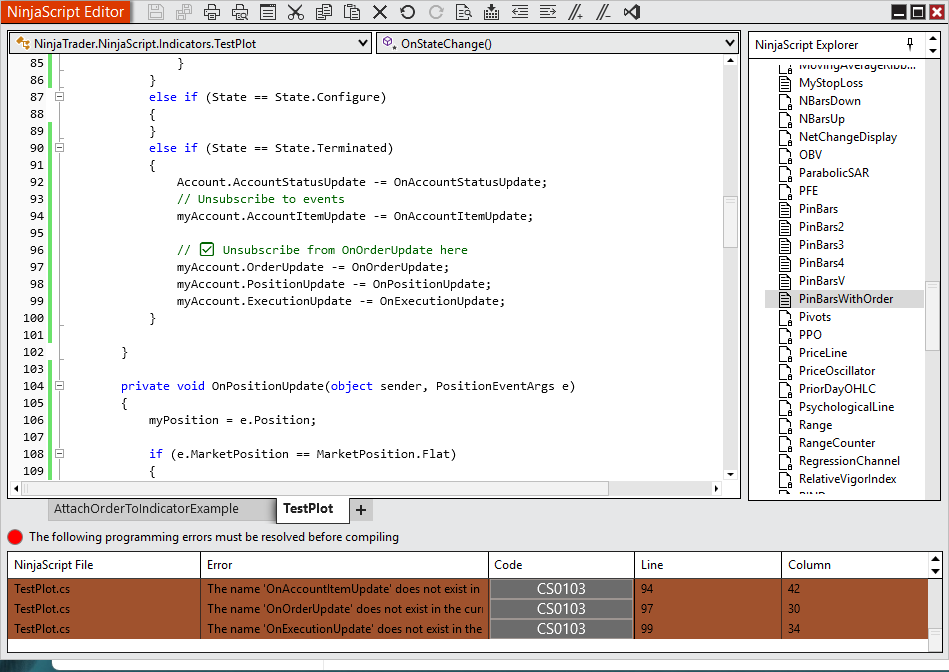
Okay, I am attempting to get this working on my own, but so far I can’t even get a simple, indicator-driven order change to work.

Here’s what I’ve got:

		private Order stopOrder = null;

		protected override void OnBarUpdate()
		{
			//Add your custom indicator logic here.
		
		BlueLine[0]			= Low[0] - 1.75;
		YellowLine[0]		= High[0] + 1.75;
		
			
	    // Link stop loss to indicator when you are at least 10 ticks in profit
		if (stopOrder != null && stopOrder.StopPrice < Position.AveragePrice && Close[0] >= Position.AveragePrice + 10 * TickSize)
		{ ChangeOrder(stopOrder, stopOrder.Quantity, 0, YellowLine); }

		}

I get the following errors:

“An object reference is required for the non-static property ‘Position.AveragePrice’”
and
“The name ‘ChangeOrder’ does not exist in the current context”

I basically cut-and-pasted this code straight off of the Ninjascript knowledge center web page. Why is not working?

Indicators don’t have access to the Position object, nor do they have access to any managed order functions. What you’re looking for is a Strategy, not an Indicator. The distinction between indicators “indicate something” and strategies “do something” is a defining characteristic. Without that separation of concerns there wouldn’t be a need for both to exist.

Position is available to indicators via the Account subscription:

You need something like this:

private Account myAccount;
private Position myPosition;


				if (myAccount != null)
				{

					// ✅ Subscribe to OnOrderUpdate here, where we KNOW myAccount is valid
					myAccount.OrderUpdate -= OnOrderUpdate; // in case we subscribed before
					myAccount.OrderUpdate += OnOrderUpdate;
					myAccount.PositionUpdate -= OnPositionUpdate;
					myAccount.PositionUpdate += OnPositionUpdate;
					myAccount.ExecutionUpdate -= OnExecutionUpdate;
					myAccount.ExecutionUpdate += OnExecutionUpdate;

then

private void OnPositionUpdate(object sender, PositionEventArgs e)
		{
myPosition = e.Position;

if (e.MarketPosition == MarketPosition.Flat)
			{ // do something`

Then you also have to handle all the un-subscription/re-subscription when the user switches accounts in ChartTrader.

3 Likes

Okay, so if I were going to do this as a Strategy, would the Strategy have the Indicator built in? It seems like that would be easiest, and the Strategy Builder does ask you for Plots.

I would recommend you use an AI, upload the sample script and explain what you want to do and work with it.

I don’t see how that would help, when the exact code provided by NinjaTrader doesn’t even work.

I went ahead and created an empty Strategy, and then populated it with the code I included in my earlier post. It gave me an error about the YellowLine variable, so I just changed it to use Position.AveragePrice again and set the order to BE. Now, it compiles, but it does absolutely nothing on my chart.

If an AI used Ninjatrader’s resources to spit out regurgitated code, this it what it would probably give me. So, what’s the point?

As I said, the Strategy compiles and loads, and reports to the Output screen that I’ve activated it, but when a candle closes with the price ten ticks or more in profit, absolutely nothing happens. The SLs stay right where they are.

If I could get this to work, I could handle assigning the proper value to where I want the SLs to actually be, but if it’s not even changing the order using cut-and-pasted sample code, I don’t see how an AI would be able to assist.

And, Yes, I did create the “IsUnmanaged = true;” assignment in the State.Defaults.

Using Prints, I am able to determine that the “if” condition isn’t being met because it appears not to detect the presence of the existing Stop Loss orders.

According to the documentation, using StartBehavior.ImmediatelySubmit should activate the strategy in accordance with my currently open orders. I deleted the ‘= null’ assignment from the stopOrder declaration, but it still isn’t acknowledging the existing SLs.

Okay, so I just read this on the NinjaTrader knowledge center “Syncing Account Positions” page:

The account and instrument the strategy is started on must not have any working orders which were submitted outside of the strategy, or by another instance of the same strategy. If an order is detected, the strategy can not be started until these orders have been manually managed.

So, clearly, I have to use an Indicator and not a Strategy.

This also explains why the Strategy I was working on earlier didn’t do anything.

@several is correct. Positions, Executions and Orders are all available in Indicators.
And the code snippets he provided are the basic building blocks.
You’ll have to figure out the rest which shouldn’t be too hard to do.
With subscriptions, it’s best to subscribe in State.DataLoaded and unsubscribe in State.Terminated.

So something like this:

in State.DataLoaded:

selectedAccount.PositionUpdate += OnPositionUpdate;

and in State.Terminated:

selectedAccount.PositionUpdate -= OnPositionUpdate;

Then

		private void OnPositionUpdate(object sender, PositionEventArgs e)
        {
	        	// do something
1 Like

Okay, I tried this, but it gives me the “does not exist in the current context” error on all three of the On[blank]Update items, on every line in which they appear.

I realized as I was reviewing my last post that the OnPositionUpdate was NOT giving an error, and that was because it was the only one that I had actually defined. So, I created dummy definitions for the others and was able to get the indicator to compile.

Thank you for all the help so far, but now I’ve run into a different problem, which is preventing me from even testing to see how my newly compiled indicator works: I no longer see the indicator in the list, and therefore cannot add it to my chart.

Any ideas?

This is why I recommend using an AI. It will tell you the error(which is causing your indicator to not be listed) way quicker than anyone here can.

I’m not sure what the issue was, but once I loaded the Playback connection, it was there and I am able to test it.

Okay, baby steps. I’m trying to see if all of the Account information is now accessible in the Indicator.

I used your code sample:

	private void OnPositionUpdate(object sender, PositionEventArgs e)
	{
		myPosition = e.Position;

		if (e.MarketPosition == MarketPosition.Flat)
		{ 
			// do something
			Print("No open positions.");
		}
	}

I just added the Print to test if it was working. Shouldn’t “MarketPosition.Flat” be the state of no open positions? I am not seeing it, even though you’re never in a position when you first connect to Playback.

I do get the some Print output, based on this code in State.Defaults in OnStateChange, so it appears to be seeing the Account.

	              if (myAccount != null)
    	    	  {
  		    	    // Print some information about our account using the AccountItem indexer
  		    	    Print(string.Format("Account Name: {0} Connection Name: {1} Cash Value {2}",
	           	    myAccount.Name,
   		           	myAccount.Connection.Options.Name,
  		            myAccount.Get(AccountItem.CashValue, Currency.UsDollar)
	              	));

Thank you, again, for all your help.

BREAKTHROUGH!

Okay, I am now able to get the Indicator to report data based on the order that it is, itself, creating.

I added some Prints to the various On…Update methods, and now I get the following Output when the different commands fire.

Execution updated at 3/9/2026 6:30:20 AM
Order updated at 3/9/2026 6:30:20 AM
Execution updated at 3/9/2026 6:30:20 AM
No open positions.
No open positions.
Order updated at 3/9/2026 6:30:20 AM

This is great progress! I am a little confused, however, about why all of the calls appear to be happening at the same time, when the Print statement includes a call to Time[0].ToString().

Add milliseconds and you’ll likely see a difference, also you’re on a sim account?

Playback. And this is where it’s really starting to get irritating.

The Indicator doesn’t show up in the list unless I hard code the Account name into the Indicator, which means it only works on the Playback connection. If I already have the Indicator loaded on the chart and I change the code to use the account chosen in Chart Trader, it errors out.

There has to be a way to assign myAccount to the chosen Account name in State.SetDefaults or State.Historical or State.DataLoaded, because, without that, none of the subscriptions are valid.

I haven’t figured out how to do that yet, though. Whenever I change the assignment to something that references the GUI, it stops working.

You have some silent error in your code causing it not to show in the indicator list.

STATE DATA LOADED, grab the account from the account list:

         	myAccount = Account.All.FirstOrDefault(a => a.Name == "Sim101");

Or grab it from the account selector ;

			// Account Selector
			ChartControl.Dispatcher.InvokeAsync((Action)(() =>
			{
				// You have to put the stuff below within this ChartControl.Dispatcher.InvokeAsync((Action)(() =>, because you are trying to access something on a different thread.
				myAccountSelector = Window.GetWindow(ChartControl.Parent).FindFirst("ChartTraderControlAccountSelector") as NinjaTrader.Gui.Tools.AccountSelector;

			if (myAccountSelector != null)
				{

                     mySelectedAccount = myAccountSelector.SelectedAccount;
			myAccount = Account.All.FirstOrDefault(a => a.Name == "Sim101");

This is the line I was referring to when I mentioned having to have the account “hard coded.” In my code, this was set to “Playback101,” and if I removed this line the Indicator was no longer visible on the list. And, even when that line was present, the Indicator was only visible on the Playback Connection.

On the old forum I found a piece of similar code:

				ChartControl.Dispatcher.InvokeAsync((Action)(() =>
				{
					myAccount = ChartControl.OwnerChart.ChartTrader.Account;
				}));

It looks a lot simpler, and seems to work just as well.

What was hanging me up was the need to have all of the subscriptions in State.[whatever]. I’ve since realized that you can subscribe to those events basically anywhere, so I put the subscriptions in a section of code that only fires after an order has already been placed, which obviously means that myAccount has been set to a readable value.

Now, the question becomes: Can I get the orders, which have been placed by the Dispatcher through the ChartTrader thread, to update based on code within my Indicator?

I’m going to work on that right now. Updates to follow…

The code you posted is simply getting the Account from ChartTrader, it’s not submitting orders via the dispatcher. The same principles apply that were described earlier regarding the Account object and Order event subscriptions .

I have all that code, I just didn’t transcribe it in my post.

I’m able to submit orders, and get all kinds of information about them from the various event subscriptions. The part I’m still working on is taking that information and using it to make changes to the existing orders.

I know that the Stop Loss orders are called ‘Stop 1’ and ‘Stop 2,’ etc., with names like ‘ATM 1-1’ and what-not, but I don’t know how to tell it to adjust the Stops to correspond with the Indicator plot. That’s the last step.