myAccount.Change(new[] { order });
I’ve been working with this. The problem is, after the ATM Strategy goes through, there are now 6 orders associated with the variable “order.” Obviously, the parameters for the new “order” would need to be specified before this code fires, but I don’t know how to tell it that it is only the Stop orders that I want changed, nor do I know the syntax for doing that.
You know the name of the orders, you just have to find the ones with the name you want.
So ATM brackets are Stop1, Target1 etc…
Okay. So, here’s the code that created the original order:
order = myAccount.CreateOrder(instr, OrderAction.Buy, OrderType.StopMarket, OrderEntry.Automated, TimeInForce.Day, qty, 0, newVariable + 2, "", "Entry", Core.Globals.MaxDate, null);
Which was then executed through the Dispatcher using the following code:
NinjaTrader.NinjaScript.AtmStrategy.StartAtmStrategy(atm, order);
And resulted in the creation of these orders:
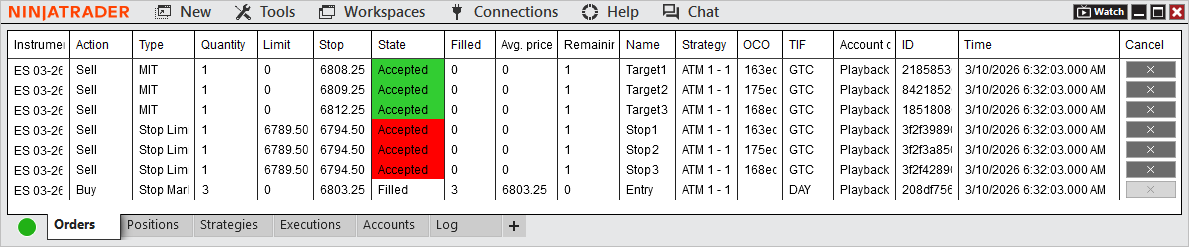
Now, I’m assuming that ChangeOrder() would have to have some definition for the new order given as its argument. So, how do I structure the command for creating that new order so that it references the Stops? And, how do I change all three stops, when they are all still referred to only by the original variable name, “order?”
ChangeOrder() uses this format:
ChangeOrder(Order order, int quantity, double limitPrice, double stopPrice)
see NinjaTrader 8
So I’m guessing it would be: ChangeOrder(Stop 1, 1, 0, NewStopPrice);
I don’t think ChangeOrder() works in Indicators. I think I need to use Account.Change(). And, to do that, I need to assign the parameters of the new order to a variable, which then gets passed to Account.Change(). That’s the part I can’t figure out.
When I reassign the variable with new parameters, including the name “Stop1” I get the following state:
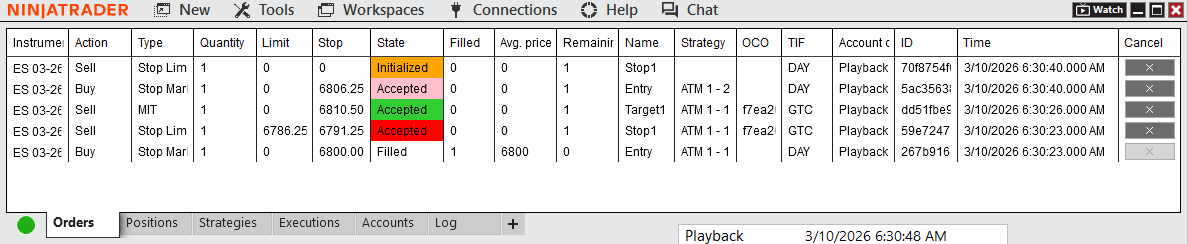
It’s like the new Stop1 is there, waiting for the old Stop1 to get cancelled. Although, it has the wrong Stop Price value, so it would be useless even if it went through.
You know the names of the orders. You can assign ANY order to an order variable inside onOrderUpdate or OnExecutionUpdate based on it’s name.
So with this in mind…
NjTMatthew I think you would benefit from using AI to help you here. Clearly you are new to NT coding and it’s a long slow climb to get proficient with many stumbling blocks. An AI agent will help you understand the issues and code for you - but better to understand why it’s doing something than just blindly accepting it. NT silent fails can be a nightmare to sort out and I find Claude Code is really good ( occasionally very bad ) at identifying possible causes. And knowing where the problems are is half the battle. Have fun:-)
You know the names of the orders. You can assign ANY order to an order variable inside onOrderUpdate or OnExecutionUpdate based on its name.
Okay, but all I ever get is a continuous stream of “Initialized” Stop1 orders that never go through, and the existing Stop1 stays right where it is.
I’ve made some progress. The problem that I’m running into now is that it seems like the various On…Updates aren’t running when, or as often as, they should.
For example, this is the output from my code once a position has been opened:
Account Item updated at 3/16/2026 6:30:30 AM, inPos = False
Order placed: Entry - Buy
Order placed: Stop1 - Sell
Order placed: Target1 - Sell
Account Item updated at 3/16/2026 6:30:30 AM, inPos = False
Order placed: Entry - Buy
Order placed: Stop1 - Sell
Order placed: Target1 - Sell
Account Item updated at 3/16/2026 6:30:30 AM, inPos = False
Order placed: Entry - Buy
Order placed: Stop1 - Sell
Order placed: Target1 - Sell
Account Item updated at 3/16/2026 6:30:30 AM, inPos = False
Order placed: Entry - Buy
Order placed: Stop1 - Sell
Order placed: Target1 - Sell
Account Item updated at 3/16/2026 6:30:30 AM, inPos = False
Order placed: Entry - Buy
Order placed: Stop1 - Sell
Order placed: Target1 - Sell
Account Item updated at 3/16/2026 6:30:30 AM, inPos = False
Order placed: Entry - Buy
Order placed: Stop1 - Sell
Order placed: Target1 - Sell
Account Item updated at 3/16/2026 6:30:30 AM, inPos = False
Order placed: Entry - Buy
Order placed: Stop1 - Sell
Order placed: Target1 - Sell
Account Item updated at 3/16/2026 6:30:30 AM, inPos = False
Order placed: Entry - Buy
Order placed: Stop1 - Sell
Order placed: Target1 - Sell
Account Item updated at 3/16/2026 6:30:30 AM, inPos = False
Order placed: Entry - Buy
Order placed: Stop1 - Sell
Order placed: Target1 - Sell
Account Item updated at 3/16/2026 6:30:30 AM, inPos = False
Order placed: Entry - Buy
Order placed: Stop1 - Sell
Order placed: Target1 - Sell
Account Item updated at 3/16/2026 6:30:30 AM, inPos = False
Order placed: Entry - Buy
Order placed: Stop1 - Sell
Order placed: Target1 - Sell
Account Item updated at 3/16/2026 6:30:30 AM, inPos = False
Order placed: Entry - Buy
Order placed: Stop1 - Sell
Order placed: Target1 - Sell
Account Item updated at 3/16/2026 6:30:30 AM, inPos = False
Order placed: Entry - Buy
Order placed: Stop1 - Sell
Order placed: Target1 - Sell
Account Item updated at 3/16/2026 6:30:30 AM, inPos = False
Order placed: Entry - Buy
Order placed: Stop1 - Sell
Order placed: Target1 - Sell
All of that is from only the OnAccountItemUpdate method. The Print commands in each of the OnPositionUpdate, OnOrderUpdate and OnExecutionUpdate methods are not showing up, which means they’re not being executed. If I’m already in a position, shouldn’t all of those others have been triggered by now?
inPos is a boolean that I set up to show whether there is an open position (to prevent my order change code from firing when there are no positions open), but it only gets updated in OnPositionUpdate, which I would think should have been triggered if I’m already in a position, but clearly it’s not.
Where are your print statements in OnOrderUpdate and OnExecutionUpdate? Are they at the very beginning? Or are they nested in some code? Both? Is OnOrderUpdate and OnExecutionUpdate being triggered while certain conditions not being triggered?
private void OnOrderUpdate(object sender, OrderEventArgs e)
	{

		Print($"Name:          {e.Order.Name}");
Will always print if you’re subscribed to the correct account and event.
Okay, using the information that I gathered in my other threads, I think that I am in the final stages of finally getting this to work.
The approach that I need to take at this point seems to be to collect information about the remaining orders, cancel them, and then replace them with new orders that can then be linked to the Indicator plot.
Let’s see how this goes…