Is available now. I’m most happy about the basic stuff that should have been default features years ago like Platform volume control and customisable toolbar.
4 Likes
Does anyone know, with authority, what the following MEANS?
“Faster last price updates on charts
Feature # 31708
Charts now feel more responsive with 5X faster visual updates to the LAST PRICE MARKER. The last traded price refreshes every 50ms rather than every 250ms, so you can track fast-moving markets with greater confidence.
This improvement applies automatically and does not change overall chart performance or behavior.”
“5X faster visual updates to the LAST PRICE MARKER’. IF this means the numerical value of price in the price marker updates 5x more frequently but the charts are still limited to 250ms rendering refresh (“and does not change overall chart performance or behaviour”…. I smell a rodent”) then I am at a loss for words. IF it means chart render refresh, why specifically focus on price marker? I can’t envisage last price updating in the price marker making my charts feel more responsive if they’re still hamstrung at 250ms refresh. I don’t use price markers, but does this mean if I do in .1.7 my charts will suddenly feel responsive without use of TickRefresh indicator to circumvent the retrograde 250ms restriction? What secret sauce and sorcery is this? If it’s what I suspect, what a load of twaddle.
AKA I fear our old friends #NinjaSpeak/#NinjaGarbage are in our midst once again. My BS detector is stirred from its slumber
(The required logical ‘fix’ imho is to allow user-selectable Refresh Rate to match one’s monitor(s)s’ (& user accountability for performance consequences if changed from default settings. I.e. back to NT7, with ‘built-in’ TickRefresh indicator functionality. Especially prescient given markets are becoming faster/more volatile, and all other aspects of trader tech are becoming faster).
“Charts now feel more responsive….”….
Rant vented. Hope I’m wrong & someone will put me back in my box
Kind regards,
1 Like
Uninstalled .6.3, time to load workspace & sync charts (load data & calc indies no lag) <1m
Stable since, well can’t remember…., 8.0.something
Installed 7.0, same everything >3m, global crosshairs laggy, charts keep falling behind etc
Rinse & repeat, same.
When will I ever learn!
No, I won’t be recoding my indicators or any other such nonsense
Just a heads up
3 Likes
I just upgraded ONE PC to 8.1.7. I can’t get the Market Watch to populate now.
Is this a bug or something new with 8.1.7
I did not want to believe it, but you’re right, it’s just a price marker jumping 5x faster. lol
EDIT: after using it today with fast market, even if not what we really want, it’s still helpful. Observing quantower, which updates very fast I can tell that price marker and the line update independently of chart also (but chart updates are almost as fast it’s hard to tell). I suppose next logical step would be for NT to add a line to the price marker that spans the chart.
2 Likes
So much lag using tick chats … I reverting back to prev version
|—|—|
|Processor|Intel(R) Core™ i9-14900KF (3.20 GHz)|
|Installed RAM|96.0 GB (95.7 GB usable)|
|Graphics card|NVIDIA RTX A4500 (20 GB)|
|Storage|440 GB of 4.55 TB used|
|Device ID|D466B9F7-CF99-4DCC-95D7-35478535B4A6|
|Product ID|00355-61560-55941-AAOEM|
|System type|64-bit operating system, x64-based processor|
|Pen and touch|No pen or touch input is available for this display|
Probably a new feature. 
I had to uninstall and reinstall 8.16.3
Everything was slow.
I think it was due to the 5 ms refresh rate.
Just a guess with 0 research, but the change might just be them tweaking the already built-in but hidden admin option: ‘ChartRefreshInterval’. Few months ago I used to set the value via addon. In the end decided it was overkill for my needs so ended up actually setting it slower than default to help reduce any lag.
3 Likes
Faster last price updates on charts
Feature # 31708
Charts now feel more responsive with 5X faster visual updates to the last price marker. The last traded price refreshes every 50ms rather than every 250ms, so you can track fast-moving markets with greater confidence.
This improvement applies automatically and does not change overall chart performance or behavior.
Just installed NT 8.1.7
Is there a trick I am not seeing in getting my sound back?
I don’t have the “Compile” sound while in NS Editor.
The script compiles, no log errors. Just no sound.
I have the volume at 100% and my speakers are functioning normally.
Anyone else?
>Tools>Settings:
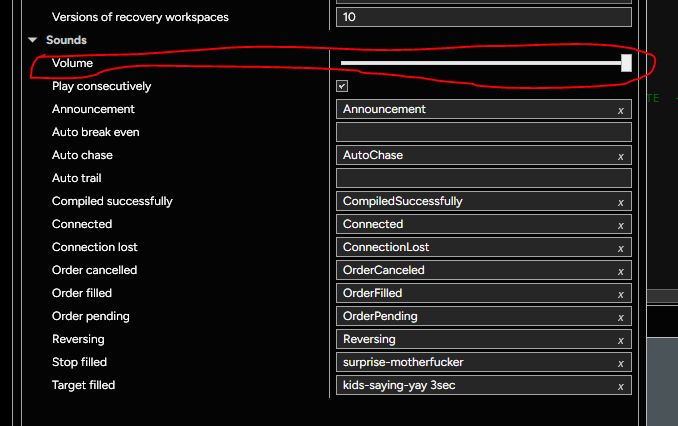
The 8.1.7.0 installer path routing resets the default directory mappings for native event wave files inside the Windows registry, your compiler is working fine, but the execution thread is looking for Compile.wav inside an orphaned subfolder path that the update didn’t preserve
To fix the sound output without waiting for a patch, open your Windows File Explorer and navigate to Documents\NinjaTrader 8\sounds\, verify if the default audio files are still sitting inside that specific folder. If they are there, go back into your NinjaTrader control center, head to Tools > Options > General > Sounds, and manually re-assign the absolute local file path for the ‘Compile’ event line item, hit apply and restart the editor pipeline. It’s an assembly installer glitch, not a code defect.
1 Like
Thanks, Eduardo.
But the default NT location for Sound files is:
“C:\Program Files\NinjaTrader 8\sounds”
Are you saying, in order to use 8.1.7.0, I need to move the sound directory to :
“…Documents\Ninjatrader 8\sounds” ?
____________________
I copied the sound directory to “…Documents\Ninjatrader 8\sounds” , restarted NT, re-set the path for “Compiled Successfully” in settings, and still no luck.
I also searched regedit for “Ninjatrader 8\sounds” and every reference was to: “C:\Program Files\NinjaTrader 8\sounds”
____________________
After updating to NT 8.1.7.0 I had no system sounds.
After re-installing NT 8.1.6.3 NT system sounds are back to normal.
Thanks! ~Robotman
I would say it’s a code issue. The fact that other users are reporting it’s not even being listed in System > Sound > Volume mixer tells me all I need to know.
Please provide details as to where we can get this indicator, or how to build one ourselves! Thank you! And yes, I wholeheartedly agree. NT8 is the only trading platform I have found that is still stuck with a 1/4 second interval for updating the live candle on the chart. What the heck are they thinking?
Please provide some more details about this hidden admin option. I can write my one code. I just need to know where to find it in the language reference. Unless that is also “hidden”. Thanks!
NinjaTrader.Core.Globals.AdminOptions
According to dnSpy tool the ChartRefreshInterval property accepts values 25 to 1000.
I assume the value represents the refresh interval in milliseconds.
3 Likes
expect you could have found it yourself… 
2 Likes
Yes, I did find it by searching in the old NT support forum. And thanks for posting this link so others can find it easily. I installed it yesterday and it works great. I set it to update on price change and NT8 candle performance finally matches every other trading platform known to man. Makes you wonder… what on earth are those developers at NT8 thinking? Updating a candle only 4 times each second?
1 Like
I finally found some time to try to hunt this down and I cannot find any details on how to use NinjaTrader.Core.Globals.AdminOptions to set the ChartRefreshInterval property through any means. I first tried getting more details by typing this into a new indicator in the NinjaScript editor. But it does not provide any notes on how to apply it. Then I decided to search through the .xml files to see if it was just a setting in one of those files I could adjust. Nothing there. Please provide some details on exactly how I can implement this. Thanks!