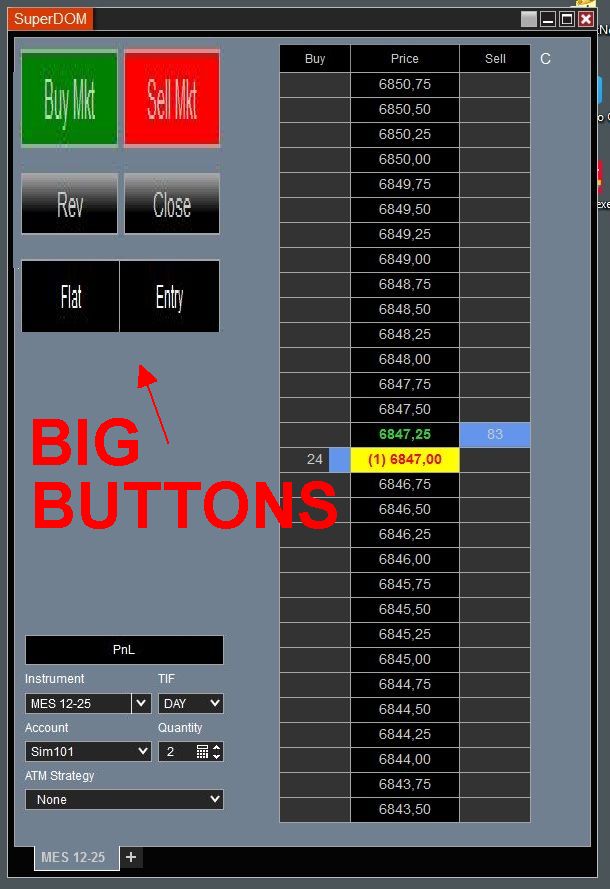
I don’t understand why NT8 makes the same mistake as all their competitors.
If you trade using the DOM and have a lot of things to do in short time, this thing would be a dream to have: BIG BUTTONS TO CLICK ON.
Why does everybody make such a small, sometimes even microscopic small buttons on their DOM. The programmers who created this DOM are clearly not traders and probably have even no idea what these buttons are for.
Ok, thats a good solution. But I had a friend who lost in 1 day 50% of his account with hotkeys. Apparently hotkeys were by default activated when he installed Ritmic. He was working in Excel on an extra screen and used there hotkeys.
After he saw his loss he found out that there were still over 1,000 orders that were cancelled because of limitation from his account size. He send everything to his broker and asked why these hotkeys were activated by default when the program was installed. He never got an answer. He also asked how to switch off these hotkeys. Never got an answer on that question too.
Cancelled Rithmic.
So I am nervous to use hotkeys…
And I still don’t understand why these buttons are so small, while 25% of the window is not used.
I would use AHK v2. You can have the hotkey active only when the SuperDOM window is active.
“SuperDOM” is probably the title of that window, so you would do something like this: #HotIf WinActive(“SuperDOM“)
z::Send(”{F1}”)
c::Send(“{F2}”)
x::Send(“{F3}”)
AHK v2 is like the holy grail for automating trading software or anything on PC.
Very lightweight.
Sometimes the platform is part of your antagonist in this whole trading game. You’ve got to learn it like the back of your hand, and sometimes it’s not there to help you in anyway,
#marcus - just an additional suggestion as it hasn’t been made by others, have you considered alternative DOMs and/or custom add-ons? I can’t advise that any such will offer a solution ‘cos haven’t looked for or used myself (although I hear your pain - I successfully use Order Entry Hotkeys to overcome the issue, programmed to a Gamepad in a similar way to #PCAutomation’s suggested use of AHK). Jigsaw’s DOM is well-respected but I don’t know if it offers what you want; there are multiple DOM add-ons free and paid on the Ecosystem which again I don’t know if offer a solution to your want, just that it’s not a new issue and may already have a solution.
A ‘hybrid’ workaround method which overcomes the small buttons but avoids Order Entry hotkeys is to use AHK or similar to move your mouse to the appropriate Buy/Sell -Market side of your DOM ladder and mouse-click to place the order (you can code in ‘Center DOM’ if that floats your boat/so you’re always right side of price for the Entry). I used this method to good effect for a long time pre the advent of Order-Entry Hotkeys
Best,
I second this. NinjaTrader is a very very customisable platform but every now and again it ‘babysits’ users ( I always feel they should have a new user version and an advance user version - one where everything automatic is turned off by default). Like turning hotkeys on automatically. Why would you do such a thing? And it ships with baked in keycombos which is really really irritating because it basically means you can’t use those as every time you upgrade you would have to go in and delete all those codes that you have re used. I mean why bake in a code for next Active workspace but not all the others , like previous workspace, etc ? And NT makes sure they use every combo. Crl, Alt, Ctrl + alt, Shift, Ctrl+ shift , FNos and keypad numbers. Who decides that? Just leave it to the user, please.
After that rant :-)…
Yes learn the platform thoroughly before you commit your real money and remember - there are things you cannot test on sim accounts that only happen in live trading. So even when you start - start tiny so that you can modify your approach if necessary. Losing 50% of your account in one session is just plain avoidable with a little preparation and planning.