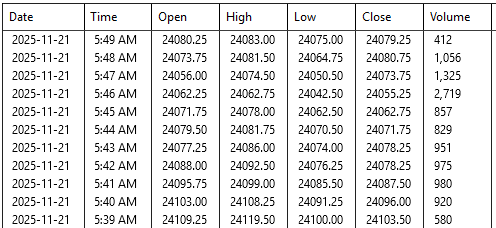
As you can see, the last data saved is around 6am AST, when i saved my workspace at EOD (5pm AST). Is this fixable to save the whole day? Thx.
The “Break at EOD” setting in NinjaTrader charts can affect how data is handled at the end of the trading session. If this is enabled, it might be causing charts to reset or not fully save. You can try disabling this property if you prefer bars to complete before creating a new one, regardless of the time of day.
1 Like
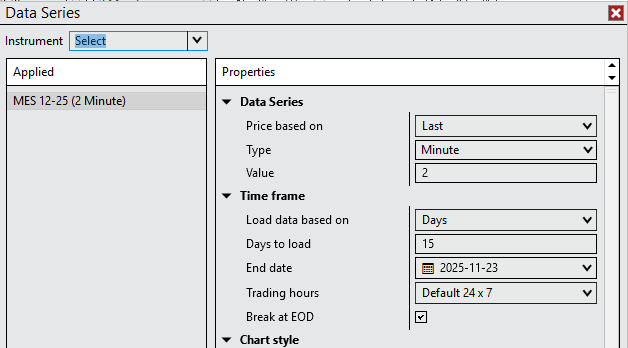
First try to reopen your workspace and right click on “RELOAD ALL HISTORICAL DATA”. This should fix your problem. If it does not, right click on a chart and select DATASERIES, watch then what settings are mentioned in TRADING HOURS. Normally it should be “CME US Index Futures ETH”, or “CME US Index Futures RTH”.
I many times saved workspaces during a session. I never had any problem at all. When I later reopened the workspace, all the data was there. It doesn’t matter when you save a workspace, I just saves the workspace. There is not an action incorporated programmed to cut off the datafeed. After reopening it will always show all data that it has according to the settings in your NT8.
Did you change the default settings of the trading hours for that market? Check the hours at TOOLS and then TRADING HOURS. Because then the data will not appear because you ordered the system to use a different time setting. NT8 normally keeps ALL data for each instrument. It will only show what you ask to be shown (ETH or RTH).
Most Likely Fix: Change Global Merge Policy
This issue frequently occurs with Futures contracts when the platform tries to merge data from the current contract and the previous one. The “Merge back adjusted” setting can sometimes cause data requests to terminate early (often around 6 AM or the session break).
- Go to the Control Center.
- Click on Tools > Options.
- Select the Market Data category.
- Find Global Merge Policy.
- Change it to “Do not merge” (or “Merge non-backadjusted” if you prefer, but “Do not merge” is the safest test).
- Click OK.
- Go back to your chart, Right-click on the chart background, and select Reload All Historical Data.
Secondary Fix: Reset Instruments
If the above does not resolve it, your local database definitions for the instrument might be corrupt or out of sync.
- Go to Control Center > Tools > Database Management.
- Under “Update instruments,” ensure General properties and Symbol mappings are checked.
- Click Update.
- Restart NinjaTrader.
Third Fix: Clear Historical Data Cache
Sometimes the “saved” data is a corrupted cache file that stops at 6 AM, and the platform keeps loading that bad file instead of fetching new data.
- Close NinjaTrader completely.
- Navigate to your Documents folder:
Documents\NinjaTrader 8\db - Delete the contents of the cache, day, minute, and tick folders. (Do not delete the folders themselves, just the files inside).
- Restart NinjaTrader and connect to your data feed.
- The charts will take longer to load initially as they re-download fresh data.
Summary of the Issue
The “6 AM stop” usually happens because the platform believes it has successfully loaded the “End of Day” data for the previous session, but due to a merge setting or a session template conflict (e.g., using “Default 24/7” vs “CME US Index Futures RTH”), it stops requesting data at the perceived end of the previous session rather than loading through the gap.
Quick Workaround: If you need the data immediately without changing settings, right-clicking the chart and selecting “Reload All Historical Data” typically forces the platform to ignore the local “saved” stopping point and fetch the full dataset again.
You can ask your questions to any of the Core AI systems, Gemini and ChatGPT, and they will help you solve a lot of your issues.
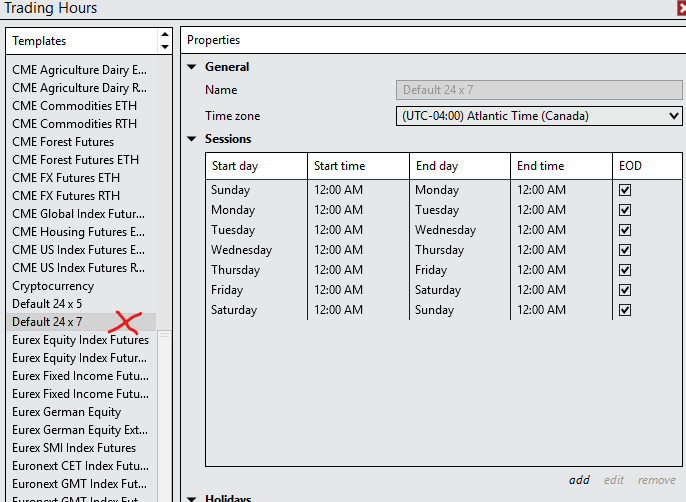
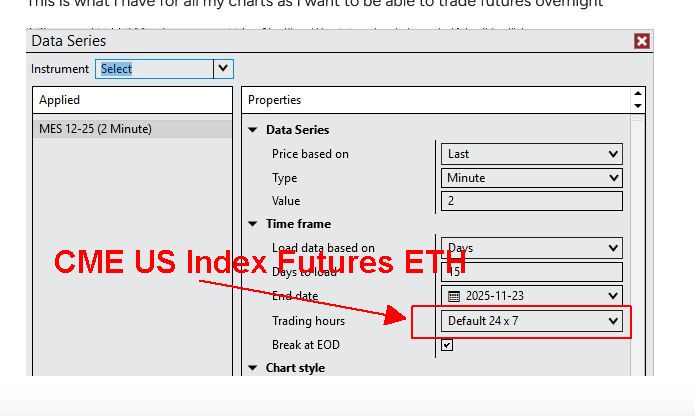
You should change “Default24x7”, REPLACE it with "CME US Index Futures ETH**
It will change the EOD closing for your futures.
1 Like
If you trust AI, you risk in the first three “fixes” to do a lot of damage and still have no solution.
Better trust people on this forum who have a lot of experience; there are many here.
If Delta_man would have read carefully my solution, the second step would already have fixed the problem.
AI is not a magical solution. Too many people don’t realize that.
the first solution seemed to work, which was to clear the Break at EOD tick box on the individual charts
1 Like
Marcus, you’re abosolutely right, however I use AI in the absense of knowledgeable people like you. And, in that absense, any light is a path.
I feed it the link to the Ninjatrader manual and and knowledgebase and ask it to consume the content, it learns it, and it guides me along.
1 Like
https://support.ninjatrader.com/s/article/Trading-Hours-Desktop?language=en_US
And go to: How to Edit an Instrument’s Default Trading Hours Template
That is the correct way. You don’t need to change the setting from EOD.
With what you did, you risk problems if the CME exchange makes any changes on their trading hours.
i’ve tried your method as well, and i’m left with the conclusion that this platform is not stable as it never saves the data in a repeatable manner. Sometimes I can go in and see that it saved right up to where saved it, other times it hangs up hours behind
Its stable. Contact support directly @ platformsupport@ninjatrader.com
there’s other problems, there’s a serious lag that’s been showing up lately between my IB data feed and what Ninja is showing. might just buy TV Black Friday sale…this is becoming a time vampire
I thought the same when I first started about 4 years ago, but its better to think of these types of sofware products as a data streaming products. When you start connecting other data streams, you yourself have to be adept, and learning everything that software products like this can do, is in and of itself a task.
What I do know is to give the link of the instrustions to one of the core AI tools, have it peruse and learn the instructional content, and then from there I can ask it questions, and get back reponses with sources.
Its taking me 4 years to learn all the different ways that I can organize data in Ninjatrader in order to see it better and that is an edge in and of itself.
You’re going to have the same issues with Sierra, Ninjatrader, ToS, ie; the learning curve. Although you have other perhaps automatic, easier, and mass-intended platforms like Trading View.
I’ve learned trading is not only about understanding the market, but also becoming familiar with the lenses, (ie; application) one uses to better see the market.