Hello, good morning. I am testing volume charts and wanted to know if it is possible to program a strategy where, once a condition is met on the 1,000-volume chart, a check is performed on the 3,000-volume chart, and—if the conditions are met—an order is placed.
Thank you very much.
Yes, this is a standard multi-series strategy. Run the strategy on the 1,000-volume chart (that becomes the primary series), add the 3,000-volume series in code, and do both checks in OnBarUpdate. If you use the Strategy Builder instead of writing code, the same works: add the 3,000-volume series under Additional data, then pick it as the data series in the condition.
A minimal skeleton, with placeholder EMA conditions to replace with your own:
private EMA ema1000;
private EMA ema3000;

protected override void OnStateChange()
{
    if (State == State.SetDefaults)
    {
        Name                = "VolumeTwoSeries";
        Calculate           = Calculate.OnBarClose;
        BarsRequiredToTrade = 20;
    }
    else if (State == State.Configure)
    {
        // Series 1: same instrument, 3000-volume bars
        AddDataSeries(BarsPeriodType.Volume, 3000);
    }
    else if (State == State.DataLoaded)
    {
        ema1000 = EMA(BarsArray[0], 20);
        ema3000 = EMA(BarsArray[1], 20);
    }
}

protected override void OnBarUpdate()
{
    // OnBarUpdate runs once per series; decide only when a 1000-volume bar closes
    if (BarsInProgress != 0)
        return;

    // Both series need history; the 3000 series fills three times slower
    if (CurrentBars[0] < BarsRequiredToTrade || CurrentBars[1] < BarsRequiredToTrade)
        return;

    bool trigger = CrossAbove(Closes[0], ema1000, 1);   // condition on the 1000 chart
    bool confirm = Closes[1][0] > ema3000[0];           // check on the 3000 chart

    if (trigger && confirm && Position.MarketPosition == MarketPosition.Flat)
        EnterLong("Vol1000");
}
What makes it work: Closes[1], Highs[1], Volumes[1] and so on read the 3,000-volume series, an indicator built on BarsArray[1] runs on it, and EnterLong() called while BarsInProgress == 0 sends the order against the 1,000-volume series. NinjaTrader ships the same pattern with minute bars as SampleMultiTimeFrame (NinjaScript Editor, Strategies folder), and the help guide page “Multi-Time Frame & Instruments” covers the details. Swapping minutes for volume changes nothing in the logic.
Three things that tend to bite with this setup:
- Which 3,000 bar you are reading. With OnBarClose,
Closes[1][0]is the last completed 3,000 bar. When a 1,000 bar and a 3,000 bar complete on the same trade (often, since 3,000 is a multiple of 1,000), the primary series is processed first, so at that moment the 3,000 series still shows the previous bar. For most filters a one-bar lag on the higher series is fine, but decide it on purpose. APrint(Times[0][0] + " | " + Times[1][0]);inside the check shows exactly which two bars you are comparing. - Backtest vs live. If you switch to OnEachTick or OnPriceChange to read the 3,000 bar while it is still building, that only happens in real time. Historical processing, the Strategy Analyzer included, calls OnBarUpdate once per closed bar unless Tick Replay is on, so a rule that reads the forming bar will trade differently live than it did in the backtest. Checking closed bars on both series keeps the two the same.
- Hard-code the 3,000. NinjaTrader’s documentation asks for the AddDataSeries arguments to be hard-coded rather than taken from user inputs or runtime values, which are not reliably available in State.Configure. To compare sizes, keep one copy of the strategy per size.
If the 3,000 confirmation may come a few bars after the 1,000 trigger rather than on the same bar, store the bar number (CurrentBars[0]) when the trigger fires and keep checking the 3,000 condition on the following bars until an expiry you choose.
If you post your two conditions, I can show where they go in the skeleton.
3 Likes
Hello, good afternoon, and thank you very much for your reply. I will examine it carefully and patiently, as my knowledge of programming and Ninja’s syntax is quite limited.
To complicate matters a bit, I also use an indicator (buy/sell volume).
For example, one idea would be: if the indicator on the 1,000-tick chart shows sales of less than 150, I would need to check the bar currently forming (or the one that just closed) on the 3,000-tick chart to see if sales are below 1,000; if both conditions are met, I would place a market order.
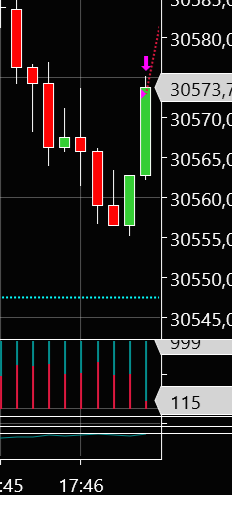
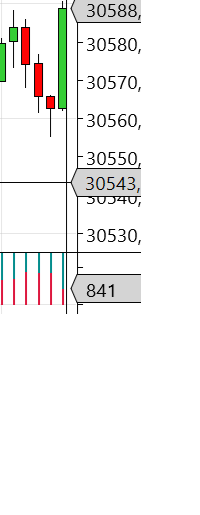
Your idea fits the same structure; the indicator changes a few things. From your screenshots this is NinjaTrader’s built-in BuySell Volume, and the red part, Sells, is the value you are testing. They also look like volume charts (the teal bars in the indicator panel all reach about 1,000, the size of each bar), so the code keeps Volume. If they really are tick charts, change BarsPeriodType.Volume to BarsPeriodType.Tick and run the strategy on a 1,000-tick chart.
In the NinjaScript Editor, right-click the Strategies folder, choose New…, name it SellsTwoCharts and click Generate. In the file that opens, keep the using lines at the top and replace everything from the namespace line to the end with this, then press F5 to compile. If you already pasted the earlier code into another file, delete that file first: NinjaTrader compiles all scripts together, so one file with errors blocks the others.
namespace NinjaTrader.NinjaScript.Strategies
{
	public class SellsTwoCharts : Strategy
	{
		private BuySellVolume bsv1000;
		private BuySellVolume bsv3000;

		protected override void OnStateChange()
		{
			if (State == State.SetDefaults)
			{
				Name                = "SellsTwoCharts";
				Calculate           = Calculate.OnEachTick;   // BuySell Volume counts trades tick by tick
				BarsRequiredToTrade = 25;
			}
			else if (State == State.Configure)
			{
				AddDataSeries(BarsPeriodType.Volume, 3000);
				SetStopLoss(CalculationMode.Ticks, 20);        // placeholders: set your own exit
				SetProfitTarget(CalculationMode.Ticks, 40);
			}
			else if (State == State.DataLoaded)
			{
				bsv1000 = BuySellVolume(BarsArray[0]);
				bsv3000 = BuySellVolume(BarsArray[1]);
			}
		}

		protected override void OnBarUpdate()
		{
			// Keep each indicator current on every trade of its own chart
			if (BarsInProgress == 1)
			{
				bsv3000.Update();
				return;
			}
			bsv1000.Update();

			// Without Tick Replay the indicator reads 0 on historical bars, so skip them
			if (State == State.Historical && !BarsArray[0].IsTickReplay)
				return;

			if (CurrentBars[0] <= BarsRequiredToTrade || CurrentBars[1] <= BarsRequiredToTrade)
				return;

			// Decide once per 1,000 bar: on the first tick of a new bar, [1] is the bar that just closed
			if (!IsFirstTickOfBar)
				return;

			bool fewSells1000 = bsv1000.Sells[1] < 150;      // the 1,000 bar that just closed
			bool fewSells3000 = bsv3000.Sells[1] < 1000;     // the last closed 3,000 bar
			// bool fewSells3000 = bsv3000.Sells[0] < 1000;  // or: the 3,000 bar still forming (sells so far)

			if (fewSells1000 && fewSells3000 && Position.MarketPosition == MarketPosition.Flat)
				EnterLong("FewSells");                        // market order; EnterShort for the other side
		}
	}
}
What changes compared with the first version:
- Tick by tick. BuySell Volume sorts each trade into buy or sell as it prints, so the strategy has to run on each tick. OnBarUpdate then runs on every trade, and
IsFirstTickOfBaris what tells you a 1,000 bar has just closed; on that tick[1]is the closed bar. ReadingSells[0]there would look at a bar that has just started, whose sells are near zero, so “less than 150” would pass on every bar. - Forming or closed 3,000 bar.
Sells[1]is the last closed 3,000 bar; the commented line withSells[0]reads the one still forming, meaning its sells so far. Early in a bar “below 1,000 so far” is almost always true, so the closed bar is the stricter test. Pick one on purpose. - Update(). An indicator used inside a strategy only calculates when the strategy asks it for a value; these two calls keep both current on every trade.
- History and testing. BuySell Volume needs Tick Replay to calculate on historical bars. Without it every historical bar reads 0 sells and would pass your test, which is why the strategy skips history unless Tick Replay is on. To use it on history, enable Tick Replay on the data series (the option only appears after Tools > Options > Market Data > Show Tick Replay). NinjaTrader states that Tick Replay is not built for accurate fills in backtests, so use it to check the signals land where you expect, and judge the strategy on the Sim account or on the Playback connection with Market Replay data.
The stop and target are placeholders so the position always has an exit; replace them with your own rules. If it does not compile or behaves oddly, post what the Output window or the Log tab shows and I will take a look.
Hello, good afternoon. First of all, I’d like to thank you for your help.
I’ve put the strategy into action to see how it performed. Right after starting it up, it executed a trade (this is something that happened to me with another strategy I used to have, which I was never able to fix).
Anyway, the bottom line is that it hasn’t done anything in the hour it’s been running.
Based on the parameters set—unless I’m mistaken—it should have entered the market three times, yet it hasn’t done anything.
30/09/2026 15:31:37 30749.5 30766 30748.25 30765.75 1000 149
30/09/2026 15:31:39 30765.75 30788.75 30764 30787.75 3000 956
30/09/2026 15:45:01 30770 30789.25 30770 30789.25 1000 105
30/09/2026 15:45:09 30770 30790.75 30770 30783 3000 957
30/09/2026 15:59:37 30799.5 30811.75 30799.25 30811.75 1000 137
30/09/2026 15:59:37 30803.25 30819.25 30797.75 30819 3000 818
Here are the three lines where the conditions are met (those from the 1000-chart and the 3000-chart).
Nothing appears in the NinjaScript output except when I started the strategy.
Many thanks.
Best regards.
Thanks for the numbers, they show what happened. There are two separate things.
The trade right after starting. Without Tick Replay, BuySell Volume only counts trades it sees live. The 1,000 and 3,000 bars that were already open when you enabled the strategy were built partly before it was running, so their sells read 0 or close to it, and the first check passed on missing data. The version below ignores those bars and only judges bars it has counted from their first trade. (In your older strategy the cause may be different: a strategy first runs through the chart’s history, and if it ends that history in a position, a Start behavior with “synchronize account” can send a real order at start to line the account up with it. Worth a look there.)
Why it did not enter at 15:31, 15:45 and 15:59. The code decides the moment a 1,000 bar closes, and at that moment it reads the last 3,000 bar that has already closed. In each of your three lines, the 3,000 bar you paired with closed after the 1,000 bar: 2 seconds later at 15:31, 8 seconds later at 15:45, and later within the same second at 15:59. When the strategy decided, those three bars were still open, their 956, 957 and 818 did not exist yet, and it tested the 3,000 bar before each of them, which is not in your list.
Your lines describe this rule: when a 1,000 bar closes with fewer than 150 sells, wait for the 3,000 bar that was open at that moment to close, and enter if it closed with fewer than 1,000 sells. The version below does exactly that, so the entry comes when that 3,000 bar closes (0 to 8 seconds after the 1,000 bar in your examples), not when the 1,000 bar closes. If you would rather enter at the 1,000 close, the only thing known then is the open 3,000 bar’s sells so far, which is the commented Sells[0] line in the previous version.
The empty Output window was expected: the earlier code printed nothing. This version writes one line for each closed bar of both series and one for each check.
In the NinjaScript Editor, open SellsTwoCharts, replace everything from the namespace line to the end with the code below and press F5. Then remove the strategy from the chart and add it again, so the chart runs the new version, and open the Output window (Control Center, New > NinjaScript Output) before you enable it.
namespace NinjaTrader.NinjaScript.Strategies
{
	public class SellsTwoCharts : Strategy
	{
		private BuySellVolume bsv1000;
		private BuySellVolume bsv3000;
		private int firstFull1000 = -1;   // first bars counted from their first trade
		private int firstFull3000 = -1;
		private int wait3000      = -1;   // the 3,000 bar to check after a 1,000 trigger

		protected override void OnStateChange()
		{
			if (State == State.SetDefaults)
			{
				Name                = "SellsTwoCharts";
				Calculate           = Calculate.OnEachTick;   // BuySell Volume counts trades tick by tick
				BarsRequiredToTrade = 25;
			}
			else if (State == State.Configure)
			{
				AddDataSeries(BarsPeriodType.Volume, 3000);
				SetStopLoss(CalculationMode.Ticks, 20);        // placeholders: set your own exit
				SetProfitTarget(CalculationMode.Ticks, 40);
			}
			else if (State == State.DataLoaded)
			{
				bsv1000 = BuySellVolume(BarsArray[0]);
				bsv3000 = BuySellVolume(BarsArray[1]);
			}
			else if (State == State.Realtime)
			{
				Print(Name + " is live");
			}
		}

		protected override void OnBarUpdate()
		{
			// Keep each indicator current on every trade of its own series
			if (BarsInProgress == 0)
				bsv1000.Update();
			else
				bsv3000.Update();

			// Without Tick Replay the indicator reads 0 on historical bars, so skip them
			if (State == State.Historical && !BarsArray[0].IsTickReplay)
				return;

			if (CurrentBars[0] <= BarsRequiredToTrade || CurrentBars[1] <= BarsRequiredToTrade)
				return;

			// Bars already open when the strategy went live were only partly counted: start with the next ones
			if (firstFull1000 < 0)
			{
				firstFull1000 = BarsArray[0].IsTickReplay ? 0 : CurrentBars[0] + 1;
				firstFull3000 = BarsArray[0].IsTickReplay ? 0 : CurrentBars[1] + 1;
			}

			// Act only when a bar closes: on the first tick of the next bar, [1] is the closed bar
			if (!IsFirstTickOfBar)
				return;

			if (BarsInProgress == 0)
			{
				if (CurrentBars[0] - 1 < firstFull1000)
					return;

				double sells1000 = bsv1000.Sells[1];
				bool   trigger   = sells1000 < 150 && CurrentBars[1] >= firstFull3000;
				if (trigger)
					wait3000 = CurrentBars[1];   // the 3,000 bar this 1,000 bar ended in; checked when it closes

				Print(string.Format("{0}  1000 bar  sells {1}{2}", Times[0][1].ToString("HH:mm:ss"), sells1000,
					trigger ? "  trigger, waiting for the 3000 bar" : ""));
				return;
			}

			// BarsInProgress == 1: a 3,000 bar has just closed
			if (CurrentBars[1] - 1 < firstFull3000)
				return;

			Print(string.Format("{0}  3000 bar  sells {1}", Times[1][1].ToString("HH:mm:ss"), bsv3000.Sells[1]));

			if (wait3000 < 0 || CurrentBars[1] <= wait3000)
				return;   // no trigger, or its 3,000 bar is still open

			double sells3000 = bsv3000.Sells[CurrentBars[1] - wait3000];
			wait3000 = -1;
			bool enter = sells3000 < 1000 && Position.MarketPosition == MarketPosition.Flat;

			Print(string.Format("   check: 3000 sells {0}, enter {1} (strategy {2}, account {3})",
				sells3000, enter, Position.MarketPosition, PositionAccount.MarketPosition));

			// The entry goes to the 1,000 series: the stop and target need orders on the first series
			if (enter)
				EnterLong(0, DefaultQuantity, "FewSells");   // market order; EnterShort for the other side
		}
	}
}
Two things to watch in the Output:
- The strategy builds its own 3,000 series. If its 3,000 lines do not match your 3,000 chart’s times and sells, the two are cut at different trades, and the strategy acts on the lines in the Output.
- The check line shows the strategy’s position next to the account’s. If it says strategy Long while the account is Flat, a position was closed outside the strategy (by hand in Chart Trader, for example) and the strategy still believes it is in the trade. It only enters when flat, so it will not trade again until you disable and re-enable it. If you closed the startup trade yourself, that alone explains the silent hour.
If a signal you expect does not come, post the Output lines around it and I will look at them.
Hello, good afternoon. I’ve been observing the strategy’s behavior, and here is what I’ve found:
- It writes the log to the Ninja output.
- I’ve changed the parameters. On the 1000-tick chart, if the volume is less than 300, it has to check the 3000-tick chart; if the volume on the 3000-tick chart is below 1300, it should enter the market.
How does it behave?
Well, if the trigger fires during the first or second bar that makes up the 3000-tick chart, it performs the check on the 3000-tick bar currently forming, and if the condition is met, it places the order.
However, if the trigger fires on the third bar of the 1000-tick chart (which completes the candle on the 3000-tick chart), it performs the check on the next bar of the 3000-tick chart.
It’s a bit complicated—sorry if I’m not explaining it clearly.
I’m sending you the log that shows exactly what I’m describing.
19:31:20 1000 bar sells 437
19:31:58 1000 bar sells 417
19:32:16 1000 bar sells 299 trigger, waiting for the 3000 bar
19:32:16 3000 bar sells 1153
19:32:29 1000 bar sells 211 trigger, waiting for the 3000 bar
19:33:04 1000 bar sells 584
19:33:51 1000 bar sells 601
19:33:51 3000 bar sells 1396
check: 3000 sells 1396, enter False (strategy Flat, account Flat)
19:34:38 1000 bar sells 421
19:35:37 1000 bar sells 484
19:42:33 1000 bar sells 490
19:43:23 1000 bar sells 507
19:43:30 1000 bar sells 74 trigger, waiting for the 3000 bar
19:43:30 3000 bar sells 1071
19:43:30 1000 bar sells 231 trigger, waiting for the 3000 bar
19:43:42 1000 bar sells 475
19:44:00 1000 bar sells 493
19:44:00 3000 bar sells 1199
check: 3000 sells 1199, enter True (strategy Flat, account Flat)
19:44:13 1000 bar sells 457
19:44:20 1000 bar sells 312
19:44:28 1000 bar sells 373
19:44:28 3000 bar sells 1142
19:44:37 1000 bar sells 359
19:44:38 1000 bar sells 128 trigger, waiting for the 3000 bar
19:44:42 1000 bar sells 322
19:44:42 3000 bar sells 809
check: 3000 sells 809, enter True (strategy Flat, account Flat)
19:44:49 1000 bar sells 455
19:44:52 1000 bar sells 415
19:44:57 1000 bar sells 393
19:44:57 3000 bar sells 1263
19:45:02 1000 bar sells 493
19:45:05 1000 bar sells 407
20:26:51 1000 bar sells 372
20:27:20 1000 bar sells 483
20:27:40 1000 bar sells 242 trigger, waiting for the 3000 bar
20:27:40 3000 bar sells 1097
20:27:45 1000 bar sells 324
20:28:00 1000 bar sells 594
20:28:12 1000 bar sells 410
20:28:12 3000 bar sells 1328
check: 3000 sells 1328, enter False (strategy Flat, account Flat)
20:28:30 1000 bar sells 619
20:28:43 1000 bar sells 324
20:28:46 1000 bar sells 241 trigger, waiting for the 3000 bar
20:28:46 3000 bar sells 1184
20:29:06 1000 bar sells 553
20:29:26 1000 bar sells 643
20:29:48 1000 bar sells 546
20:29:48 3000 bar sells 1742
check: 3000 sells 1742, enter False (strategy Flat, account Flat)
20:30:16 1000 bar sells 392
20:30:31 1000 bar sells 651
20:30:51 1000 bar sells 486
20:30:51 3000 bar sells 1529
Thank you very much for your help.
Did you see this guide:
Anyway, to avoid sync issues and delays I tend to use secondary tick data series to execute orders.
Your log gives a useful clue: the 19:32:16 trigger has no check beside the 1,153-sells bar. A second trigger arrives at 19:32:29, and the eventual check uses 1,396. So I would first check whether a new trigger replaces the pending target before that target is evaluated.
In the posted code, every trigger assigns wait3000 = CurrentBars[1]. That can replace an earlier pending target. Also, with OnEachTick, the first tick of a new bar is where this code reads the closed bar. A timestamp printed from that closed bar does not show the callback’s arrival order. Equal second-level timestamps alone cannot establish which series advanced first.
For one reproduction, add a trace at the assignment and at the secondary-series check containing: BarsInProgress, both CurrentBars values, the old and new wait3000, and the two bar timestamps with milliseconds. Keep the target unchanged until its check runs, then clear it. That separates a replaced target from a boundary-index mismatch. Test on Playback or simulation, with the existing startup guards retained.
NinjaTrader explains the series-processing distinction here: NinjaScript > Educational Resources > Multi-Time Frame & Instruments
This is a source/log diagnosis, not a tested replacement strategy. Should the pending trigger use the 3,000 bar containing the last trade of the closed 1,000 bar, even when both close together? That choice decides the correct target at the boundary.
Hello, good morning. I’ve read your explanation several times, but… there are certain things I still don’t quite understand.
Let me try to explain using the log I posted the other day:
When the condition is met on the 1000-bar chart and it coincides with the first bar of the 3000-bar chart:
19:43:30 1000 bar sells 231 trigger, waiting for the 3000 bar
19:43:42 1000 bar sells 475
19:44:00 1000 bar sells 493
19:44:00 3000 bar sells 1199
check: 3000 sells 1199, enter True (strategy Flat, account Flat)
When the condition is met on the 1000-bar chart and it coincides with the second bar of the 3000-bar chart:
19:44:37 1000 bar sells 359
19:44:38 1000 bar sells 128 trigger, waiting for the 3000 bar
19:44:42 1000 bar sells 322
19:44:42 3000 bar sells 809
check: 3000 sells 809, enter True (strategy Flat, account Flat)
Here, the condition is met (19:44:38 is less than 300 on the 1000-bar chart); therefore, the check should be performed at the close of the 3000-bar chart (19:44:42 3000 bar sells 809)—is it less than 1300? Yes, it issues the order
check: 3000 sells 809, enter True (strategy Flat, account Flat)
Everything is correct up to this point
When the condition is met on the third bar of the 3000-tick chart
20:26:51 1000 bar sells 372
20:27:20 1000 bar sells 483
20:27:40 1000 bar sells 242 trigger, waiting for the 3000 bar
20:27:40 3000 bar sells 1097
20:27:45 1000 bar sells 324
20:28:00 1000 bar sells 594
20:28:12 1000 bar sells 410
20:28:12 3000 bar sells 1328
check: 3000 sells 1328, enter False (strategy Flat, account Flat)
20:27:40 1000 bar sells 242 trigger, waiting for the 3000 bar
20:27:40 3000 bar sells 1097
20:27:40 1000 bar sells 242; on the 1000-tick chart, is it <300? Yes; it should check the bar close on the 3000-tick chart
20:27:40 3000 bar sells 1097; is it <1300? Yes; it should issue the order, but it skips this bar and checks the next one instead
check: 3000 sells 1328, enter False (strategy Flat, account Flat)
Is it <1300? No, it doesn’t do anything.
Let’s look at the fourth case, which is the example you mentioned:
19:31:20 1000-bar sells 437
19:31:58 1000-bar sells 417
19:32:16 1000-bar sells 299 (trigger), waiting for the 3000-bar
19:32:16 3000-bar sells 1153
19:32:29 1000-bar sells 211 (trigger), waiting for the 3000-bar
19:33:04 1000-bar sells 584
19:33:51 1000-bar sells 601
19:33:51 3000-bar sells 1396
Check: 3000 sells 1396, enter False (strategy Flat, account Flat)
The condition is met on the third bar:
19:32:16 1000-bar sells 299 (trigger), waiting for the 3000-bar
The condition is also met on the 3000-bar chart:
19:32:16 3000-bar sells 1153
Therefore, it should place the order, but it skips to the next bar on the 3000-bar chart.
And on the next bar of the 3000-bar chart, the condition is met again on the 1000-bar chart—but this time on the first bar—so it runs the check:
Check: 3000 sells 1396, enter False (strategy Flat, account Flat)
But here, on the 3000-bar chart, the condition isn’t met, so it does nothing.
By the way, regarding the other thing you mentioned: can a backtest be run using volume charts to… …test the strategies—because I’ve managed to do it using time-based charts (minute intervals), but not with volume charts.
Many thanks for your help, and please excuse my lack of knowledge regarding certain things—points that might be perfectly clear to you but aren’t to me.
Ricardo, your third example makes the intended rule clear. You want the 3,000 bar that contains the triggering 1,000 bar, including when both close together.
For your 20:27:40 example, that means testing 1,097, not the later 1,328. That describes the software condition; it does not establish an executable fill at that earlier time.
My earlier focus on a later trigger replacing the pending target was too narrow. Your third example has no second trigger before the missed check, so replacement alone cannot explain it. The boundary target also needs checking.
In the posted version, the trigger stores CurrentBars[1], while the secondary check waits until CurrentBars[1] is greater than that stored value. If the secondary series has already advanced when the trigger is stored, that records the next bar rather than the one you intended. That is a possible explanation, not a confirmed diagnosis from these second-level timestamps.
For one simulation reproduction, print a sequential event number, BarsInProgress, both CurrentBars values, wait3000 before/after assignment, and CurrentBars[1]-1 when the secondary check runs. That will show which absolute bar was stored and which one was evaluated. Keep the startup guards. Please paste your current OnBarUpdate, since the posted version still uses 150/1,000 while your logs use 300/1,300.
On backtesting: ordinary Volume bars can be selected under Strategy Analyzer > Data Series > Type, with the required historical tick data. Your BuySellVolume logic adds another requirement: historical calculations need Tick Replay, and the posted code explicitly skips history when it is off. Tick Replay does not make Analyzer fills equivalent to live fills; use simulation/Playback to investigate this event-order problem.
Also confirm whether these are Volume or Tick bars. Your description uses both, and 1,000 trades is different from 1,000 contracts.
Multi-series processing, backtest settings, BuySellVolume requirements, Tick Replay limits.