I have a custom strategy that I am testing that runs on 60 minute candles. I have noticed some issues with data lag and syncing. I have a couple questions I’m hoping to get advice on.
I use the NT brokerage CMEGROUP_TOP data feed. Is it recommended to restart/reload your strategies every day or at a certain time? Is there a way to get NT to do this automatically?
Also, I currently use a screen saver (monitor and computer power stays on) for my monitors. I have noticed when I stop the screen saver upon first movement the charts are not updated and then will update within a few seconds. Is it not recommended to use a screen saver because this is causing data issues? Or do you think this is a symptom of something else?
Appreciate any info or suggestions you can provide.
Don’t use a screensaver or use something like ‘Amphetamine’ (ios) to disable your screensaver whenever Ninjatrader is active. There similar software for Windows.
On trading machines I try to keep everything as simple as possible. I don’t install or run anything I don’t need for trading. Many things are fine, but some things aren’t.
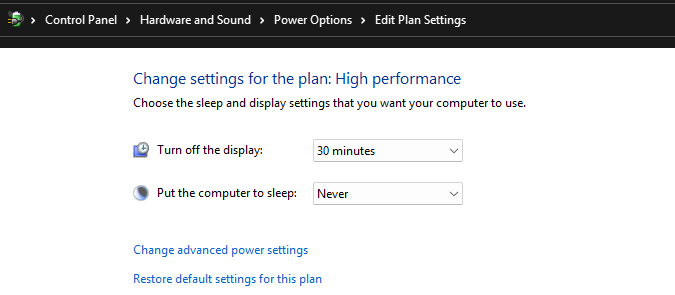
I disable any screen saver and instead just allow Windows to turn off the screen after X minutes. I ensure that the machine is configured to never sleep or hibernate so that it continues to run even if the screen is off.
You don’t necessarily need to reload or restart your strategies every day, although that wouldn’t hurt and might help with stability. You should develop a routine where every day or few you run through a checklist. One of those things should be to right click your charts and select Reload all historical data. NinjaTrader data becomes out of sync surprisingly often and can render incorrect bars especially if you’ve recently made several changes to the data. The reload will often clear up those potential issues.
Thank you all for the suggestions and info. I already disabled the screen saver and plan to reload all the data or disconnect/connect the data feed again on daily or at least a few times every week.
One question Steve. It seems universal to not utilize a screen saver. But you said that you allow the monitors to power off. Does this cause any issues similar to the screen saver in your experience?
I should have been more precise. I’m allowing windows to turn off the display. It’s not a true power-off like pressing the power button on your monitor. Windows just blanks the screen after some inactivity. Then when you move the mouse or press a key, Windows turns the display on again.
There are no problems with allowing Windows to control when it turns off the display so long as you’ve configured Windows to never put the computer to sleep or hibernate.
You can apply these settings in Power Options settings.
A screen saver is different though because it’s consuming resources and interacts with your display graphics.