I have a two plots that use PlotStyle.PriceBox just to put a label in the scale for an indicator I am drawing. I like to hide the plot controls for these by using ArePlotsConfigurable. Is there a way to choose which plots can have controls vs hiding all of them? Thank you for your help.
1 Like
ArePlotsConfigurable is all or nothing. If you want more control over which plot menus show up in the properties grid, you’ll need an IndicatorBaseConverter which will allow you fine control over what does/doesn’t show up on the properties grid. You’ll need the property descriptor labels for plots which are simply Plot0, Plot1, …, Plot10, Plot11, … etc. I don’t think this is documented anywhere.
I think you should be able to find some code snippets if you search for Sample Indicator Typeconverter in the old forum. If you get stuck, let me know and I can probably dig up some code where I did this a while back.
4 Likes
Thanks for your reply on this. Here is the code I have. At first inspection of the Indicator window, it appeared to hide the plots. However, after looking harder, it also changed the window in some other ways (see screenshot under code):
//this is above my indicator class
[TypeConverter(typeof(SelectivePlotConverter))]
public class BillsFancyIndicator : Indicator

#region TypeConverter hide plots
public class SelectivePlotConverter : IndicatorBaseConverter
{
	public override PropertyDescriptorCollection GetProperties(
		ITypeDescriptorContext context,
		object value,
		Attribute[] attributes)
	{
		// Get all properties normally
		var props = base.GetProperties(context, value, attributes);
		var filtered = new PropertyDescriptorCollection(null);

		foreach (PropertyDescriptor prop in props)
		{
			// Skip the first three plots by internal name
			if (prop.Name == "Plot0" || prop.Name == "Plot1" || prop.Name == "Plot2")
				continue;

			filtered.Add(prop);
		}

		return filtered;
	}
}
#endregion
Here is the screenshot:
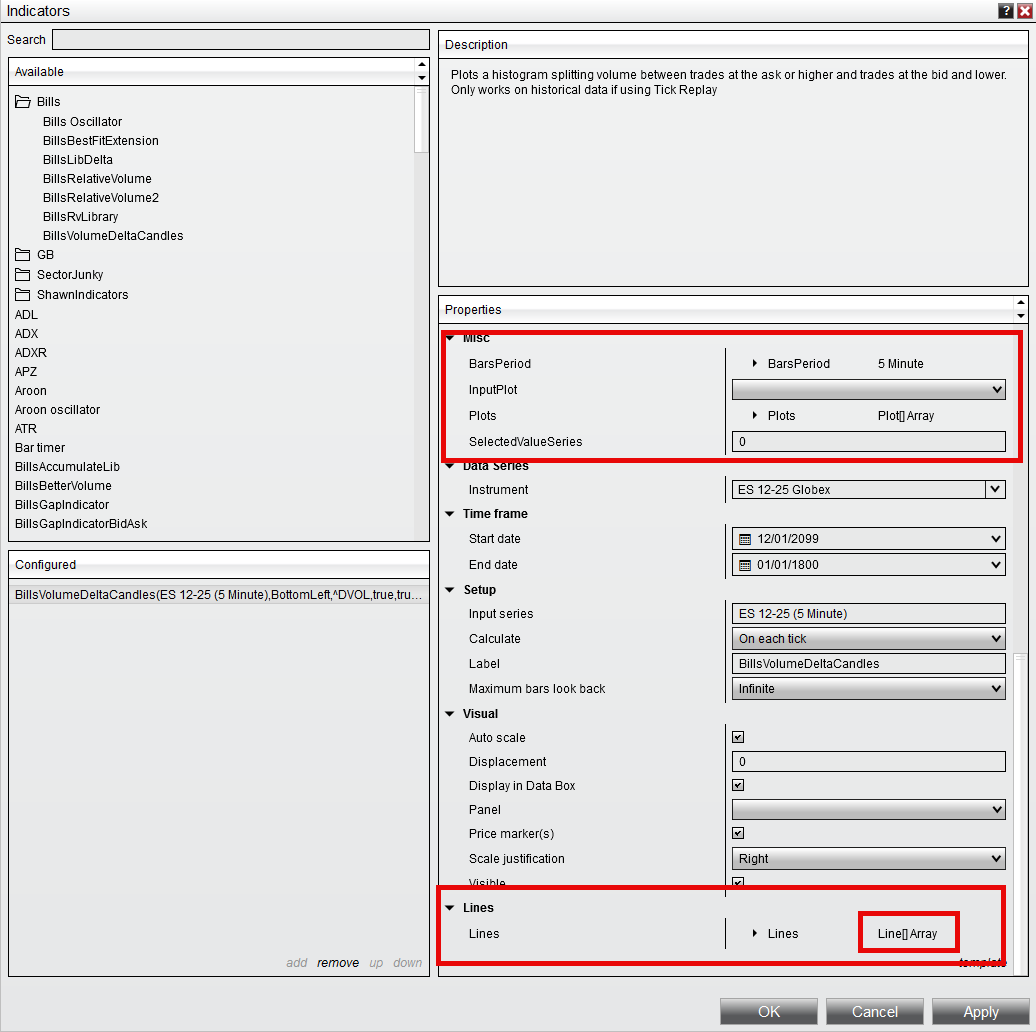
Thank you for you help on this.
Replace the typeof with the string “namespace . name”:
[TypeConverter("NinjaTrader.NinjaScript.Indicators.SelectivePlotConverter")]
1 Like
Thanks! I gave that a try but still seeing the same strangeness in the UI that was in the screenshot above. I created a SampleHidePlots Indicator which contains nothing but the Plots and TypeConverter however I don’t see a way to attach it to this reply so I am sharing a link to it from my Google Drive Thanks again for any guidance.
This works
namespace NinjaTrader.NinjaScript.Indicators
{
	[TypeConverter("NinjaTrader.NinjaScript.Indicators.SelectivePlotConverter")]
	public class Zi8Borrar00 : Indicator
	{
		protected override void OnStateChange()
		{
			if (State == State.SetDefaults)
			{
				// bla, bla, bla, ...

				AddPlot(Brushes.Orange, "MiPlot-Cero");
				AddPlot(Brushes.Orange, "MiPlot-Uno");
				AddPlot(Brushes.Orange, "MiPlot-Dos");
				AddPlot(Brushes.Orange, "MiPlot-Tres");
			}
		}
	}


	public class SelectivePlotConverter : IndicatorBaseConverter
	{
		public override PropertyDescriptorCollection GetProperties(ITypeDescriptorContext context, object value, Attribute[] attributes)
		{
			var props = base.GetProperties(context, value, attributes);
			var filtered = new PropertyDescriptorCollection(null);

			foreach (PropertyDescriptor prop in props)
			{
				if (prop.Name == "Plot0" || prop.Name == "Plot1" || prop.Name == "Plot2")
					continue;

				filtered.Add(prop);
			}

			return filtered;
		}
	}
}
1 Like
Would you mind sharing a screenshot of the Indicator window on your working version? Mine is below and still has the issue. I included the Indicator Settings window next to my revised code that matches yours and I still get strange artifacts in the window:
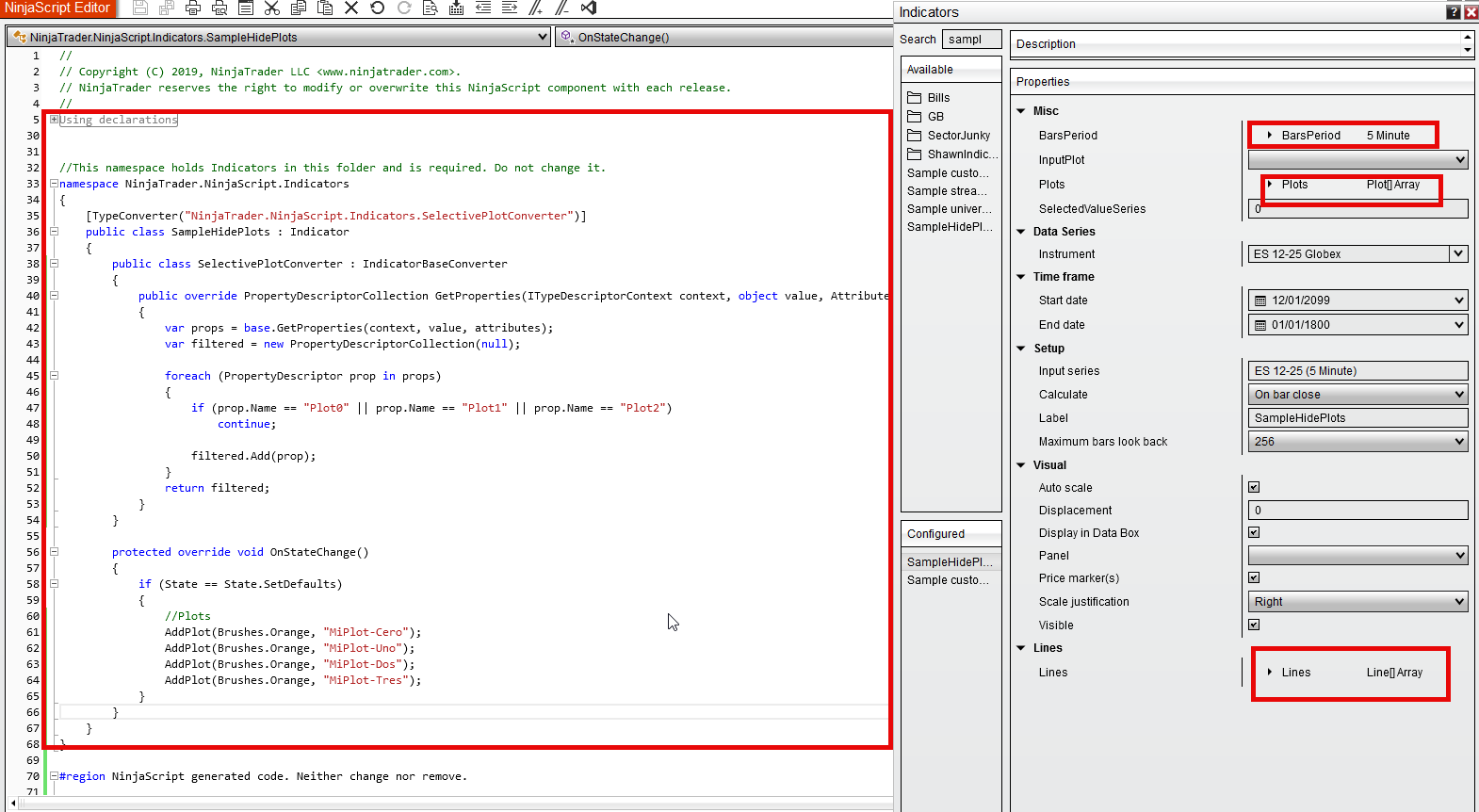
The “SelectivePlotConverter” class is not an inner class. You need to write it outside of “SampleHidePlots.” Check my code carefully (pay attention to where the braces are).
2 Likes
You are awesome. Thank you so much for your help.
One final question, when using this with other NinjaScript properties I seem to get an error for each one of them that prevents me from compiling. I tried changing it up like this but still got the error:
NinjaScript File Error Code Line Column BillsVolumeDeltaCandles.cs ‘SelectivePlotConverter’ does not contain a definition for ‘DrawFutures’ and no accessible extension method ‘DrawFutures’ accepting a first argument of type ‘SelectivePlotConverter’ could be found (are you missing a using directive or an assembly reference?) CS1061 1271 87
public class SelectivePlotConverter : IndicatorBaseConverter
{
public override PropertyDescriptorCollection GetProperties(
ITypeDescriptorContext context, object value, Attribute attributes)
{
var props = base.GetProperties(context, value, attributes);var filtered = new PropertyDescriptorCollection( props.Cast<PropertyDescriptor>() .Where(prop => prop.Category != "Plots" || // preserve anything not a plot (prop.Name != "Plot0" && prop.Name != "Plot1" && prop.Name != "Plot2")) .ToArray() ); return filtered; }}
Same error occurs. Thanks again.
Just a quick note. If you place 3 back tick characters (`) on a line by themselves, before and after your code, the code will format cleanly on the browser and would be a lot easier to read. FYI.
Thanks to @cls71 for his guidance and code snippets.
@Shawn_Cooke, honestly I think you may be complicating things by looping through all property descriptors. You can simply Remove() and Add() them based on indicator properties. I don’t see this syntax in your code. If I’m not mistaken, I think your original point was to be able to have different set of plots appear on Properties grid based on the state of other inputs.
Instead of creating my own code snippet, it might be quicker if I can update yours, but your posted link requires google authentication. Either make it a readonly to everyone or post your entire code here using back ticks for proper formatting and I’ll show you how to do it.
Also, when working with and debugging IndicatorBaseConverter code, scan through your trace files to make sure you’re not filling up your trace logs with warnings and errors. I’m pretty sure IndicatorBaseConverter warnings show up in trace logs. If not, check the log folder too.
Cheers.
2 Likes
Remove the condition prop.Category != "Plots" from the Where clause. The Plots aren’t under the “Plots” category but under “Misc.” — and it will work.
However, the error you’re getting isn’t related to this code. You probably have a property called DrawFutures, which is causing the issue.
Check the trace and log files as @fc77 mentioned, and if you can’t find the cause, debug the TypeConverter code in Visual Studio to see what’s happening with that DrawFutures property.
2 Likes
Issue Resolved and a huge thanks for the help. The issue was I had the my converter class above the Indicator Class and not below it. Moving it below allowed it to compile with my other controls. I put a test control property in and made comments where I mistakenly had the Converter and where to correctly put it in case it helps anyone else:
{
	//Converter was here which was causing the issue
	[TypeConverter("NinjaTrader.NinjaScript.Indicators.SelectivePlotConverter2")]
	public class SampleHidePlots : Indicator
	{
		protected override void OnStateChange()
		{
			if (State == State.SetDefaults)
			{
				//Plots
				AddPlot(Brushes.Orange, "MiPlot-Cero");
				AddPlot(Brushes.Orange, "MiPlot-Uno");
				AddPlot(Brushes.Orange, "MiPlot-Dos");
				AddPlot(Brushes.Orange, "MiPlot-Tres");
				TestProperty = true;
			}
		}
		[NinjaScriptProperty]
		[Display(Name = "Test Property", Order = 0, GroupName = "Test Settings")]
  		public bool TestProperty
		{ get; set; }
	}
	//make sure the Coverter goes here, below the Indicator class and not above the Indicator class
	public class SelectivePlotConverter2 : IndicatorBaseConverter
	{
		public override PropertyDescriptorCollection GetProperties(ITypeDescriptorContext context, object value, Attribute[] attributes)
		{
			var props = base.GetProperties(context, value, attributes);
			var filtered = new PropertyDescriptorCollection(null);

			foreach (PropertyDescriptor prop in props)
			{
				if (prop.Name == "Plot0" || prop.Name == "Plot1" || prop.Name == "Plot2")
					continue;

				filtered.Add(prop);
			}
			return filtered;
		}
	}
}
Thanks so much. I really appreciate the community support.
2 Likes