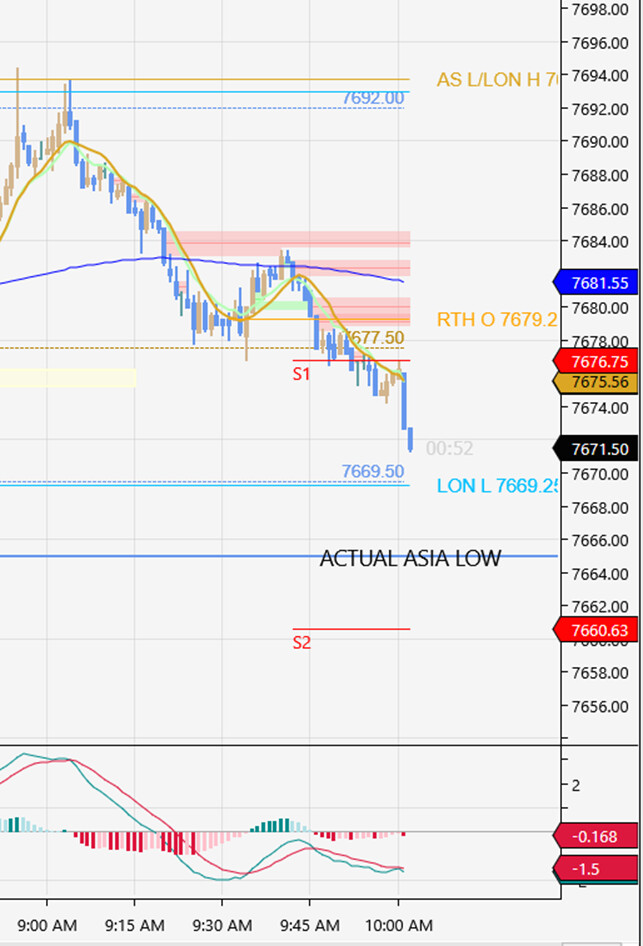
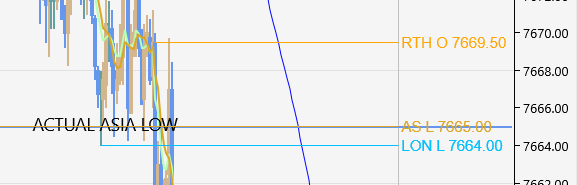
Have just installed Salma’s key level indicator, does anybody know how I can set it for the London a.m. session? I found once installed that it wasn’t showing the right levels e.g. for Asia low - in this pic, time is London time, October 30th '26. Asia Low is showing at the top, actual level shown in blue below. I looked at settings but couldn’t see a way of rectifying this. Thanks for any advice!
p.s. Or is there another similar indicator that’s good for London
For that misplaced Asia Low, I’d compare the indicator session inputs with the chart session template and time zone. Keep the chart on London time and reload it with fresh data after each change. That check shows whether the London morning levels sit on the right bars. Which session template and time zone does that chart use?
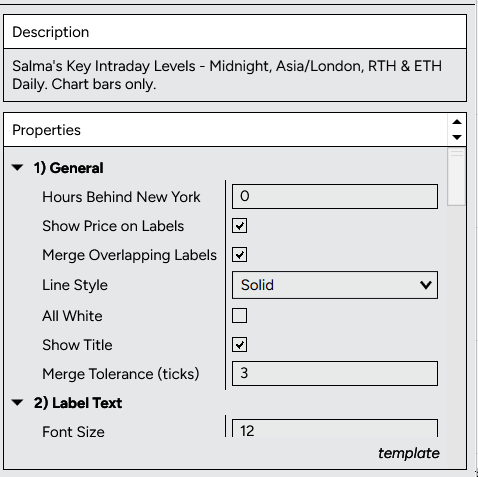
I can’t access the session inputs data - the actual session hours it uses - for this indicator and it only gives the option of ‘how many hours behind NY’, when I’m ahead of it by (usually) 5 hours.
In the data series window for MES, ‘Trading hours’ is set to ‘Use Instrument Settings’ - I’ve never changed it. The chart has been set to London by default - again, haven’t ever changed that.
When you say reload data after each change, do you mean this: “To reload Historical Data, right-click on your Chart and select “Reload Historical Data” or hit Ctrl+Shift+R on your keyboard.”
As you can probably tell I’m at the edge of my technical competence here! I can always just draw Asia hours in each day myself, not the end of the world.
Yes, that’s the reload command, but reloading won’t fix an incorrect session offset. Keep your chart settings for now. Today London is four hours ahead of New York because their clock changes differ. Could you post a screenshot of the ‘hours behind NY’ field and its current value? That’ll help avoid guessing the sign.
That field is set to 0, so the first thing to check is the time offset. For your 30 October chart, London was 4 hours ahead of New York, not 5. If “Hours Behind New York” accepts negative values, try -4 on a copy of that chart, then reload historical data. Leave the chart time zone and trading-hours template unchanged.
Treat that as a test, not a confirmed fix: I cannot tell how this indicator applies the offset from its settings screen alone. Compare the Asia High/Low against the actual bars for the same session. If -4 is rejected or the levels move the wrong way, stop there rather than trying random values. Does it accept -4, and does the Asia Low then match your marked low?
This is great, will try this out later today or tomorrow - thanks very much again for taking the time, will report back.
Edit, just went and did that and look! Worked like a charm. So I have my chart still set to UK time, -4 in the ‘hours behind NY’ field (will remember to change that on Monday morning) and it’s all correct. Can’t thank you enough, a simple but genius solution, wonderful!
Another edit - also, I’ve found a thing called the ‘Repeater’ add-on and set it to mark out Asia session each day so I’ll see immediately if this fix doesn’t keep it fixed. And of course I do have my eyes and brain, which I can use in extreme situations… Thanks again, StratCoreAlpha, you really helped me out.
I think I’ve got it now and will set it to -5 hours behind NYC where I currently have it set at -4. But if that isn’t right I don’t mind if you message me, you’re clearly a very proper person. And I’ll work out how to view messages on here, haven’t done that before. I do normally have a rule of no dm-ing anywhere on the interwebs but the NT community feels like an unusually good place. Thanks a million again for your help with this.
Yes, -5 is the setting to check for Monday 2 November, in the same input where -4 worked. New York’s clocks went back today, so 09:00 in London is now 04:00 in New York.
For a separate comparison chart showing 30 October, keep -4. On Monday, check the first session bar and the levels against your Repeater marks before relying on them.
We can keep this here, so there’s no need to work out DMs. If a level is out on Monday, can you post the marked bar and your settings here?
Hello again, thanks very much for this, all of the levels are good now that I’ve updated them to -5 hr, your solution plus the Repeater is working a treat, thanks so much! I’ll set a note to self somewhere to remind me to change them again the next time they mess about with the clocks, SO wish they’d stop doing it.