Anyone have issues with NT8 not starting up at all this morning ?
Data stopped pumping in, so I restarted.
I click on my NT8 icon on my desktop…I enter my password, the orange logo shows up
I then hear window alerts sound and the logo dissapears. Thats it.
PC restart did nothing to help.
Same here.
Got this message:
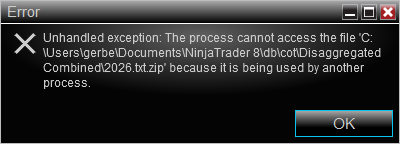
Didn’t change anything myself. Maybe triggered by a “Windows Tuesday” update?
1 Like
Glad to know I am not alone!
i’ve been digging into this all this morning with Claude
I didnt see your pop up…but was 99% sure it had to do with COT data, logs pointed to itand your pop up comfirms it
i’ve tried to delete/rename COT data and folders with no luck
i’ve emailed support and asked for escalation and rollback of whatever did they last night
Claude says:
Crash is in CotData during startup. Trace shows:
IOException: '...\db\cot\Disaggregated futures\2026.txt' already exists
  at ZipFileExtensions.ExtractToFile

*** unhandled exception trapped ***
Cannot access '...\2026.txt.zip' — used by another process
  at File.InternalDelete → ThreadPoolWorkQueue.Dispatch()
The archive now has two entries — a zero-length one first, then the real data as f_year.txt. NT extracts the first, writes a 0 KB 2026.txt, never releases the handle, then fails to delete the zip. That exception is unhandled and kills startup.
Affects Disaggregated futures and Disaggregated Combined only.
Doesn’t help: deleting or renaming 2026.txt, deleting the folders, reinstalling. Resource Monitor shows nothing external holding the files, so it’s not antivirus or sync software.
All of sudden the exact same problem as described this morning. I’m windows 10 still there no updates that might have done this. I closed and backed up last night, as I usually do on the first trading of the month no issues.
Saw a few guys posting about it tonight at the Ninjatrader Discord channel. But others seem to have no issues.. Maybe those guys didn’t log out yesterday?
Digging into the files and I see that all the subfolders in the COT folder are showing modified dates of this morning from my failed start up. Has to be on there file end.
Where’s the link to the discord forum? Never knew there was one.
That could be a possibility that they stay on overnight.
Can’t share links here. Just search on discord ninjatrader server
1 Like
Same issue this morning for me. Never log out or never update. 
I am still unable to login
I’ve tried to delete these COT folders and the COT files and they just re-create on the a new attempt to start… wait for support to get back to me
I am sure they know about it by now
If anyone has a great workaroud to log in, please share !
1 Like
Add me to the list…same error message concerning the COT data.
I am having issues too. It was fine until I restarted my computer this morning. Now when I enter my password it just shuts down with no error message. I just get a noise like it wanted to give me a error message but it doesn’t. Funny that its on election day.. 
1 Like
I think that might be it. It was fine this morning until I restarted my computer.

Yep just saw that in the discord. I did it and it works. I am back up!
I did the workaround and it works! Can’t believe I was so techy.
1 Like
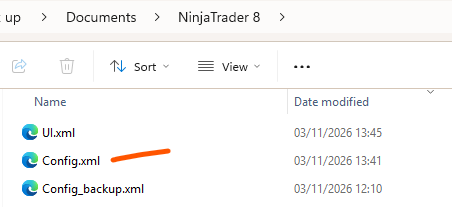
I’m having the same issue. I want to try the workaround. But Config.xml does not appear in my documents list. I have Config.123a4a, Config, and Config.xml.bak. Is one of those the one that I need to use? Thanks.
Should be there ! adding a screeshot from what I see
(maybe View > Show > Hidden Items (ensure you are not hidding anything)
1 Like
@gerby That was helpful as fishing in the middle of the ocean with bambo rod.
2 Likes
Thanks@ajk1 That worked!
1 Like