NT8 AddOn to download Market Replay by date range

Hi everyone,

Full disclosure: I’m the developer of this tool.

I built a NinjaTrader 8 AddOn to solve a workflow issue I kept running into when preparing Market Replay sessions: downloading replay data one day at a time from Historical Data > Get Market Replay data .

The AddOn does not provide external data, does not modify NinjaTrader data, and does not extend NinjaTrader’s server availability. It simply automates and organizes the official NinjaTrader Market Replay download workflow.

The goal is to save time when preparing several replay sessions, multiple instruments, or data for practice, validation, and backtesting.

Main features:

  • multiple instruments in one queue;
  • date range preparation;
  • skip Saturday and/or Sunday;
  • detection of already downloaded sessions;
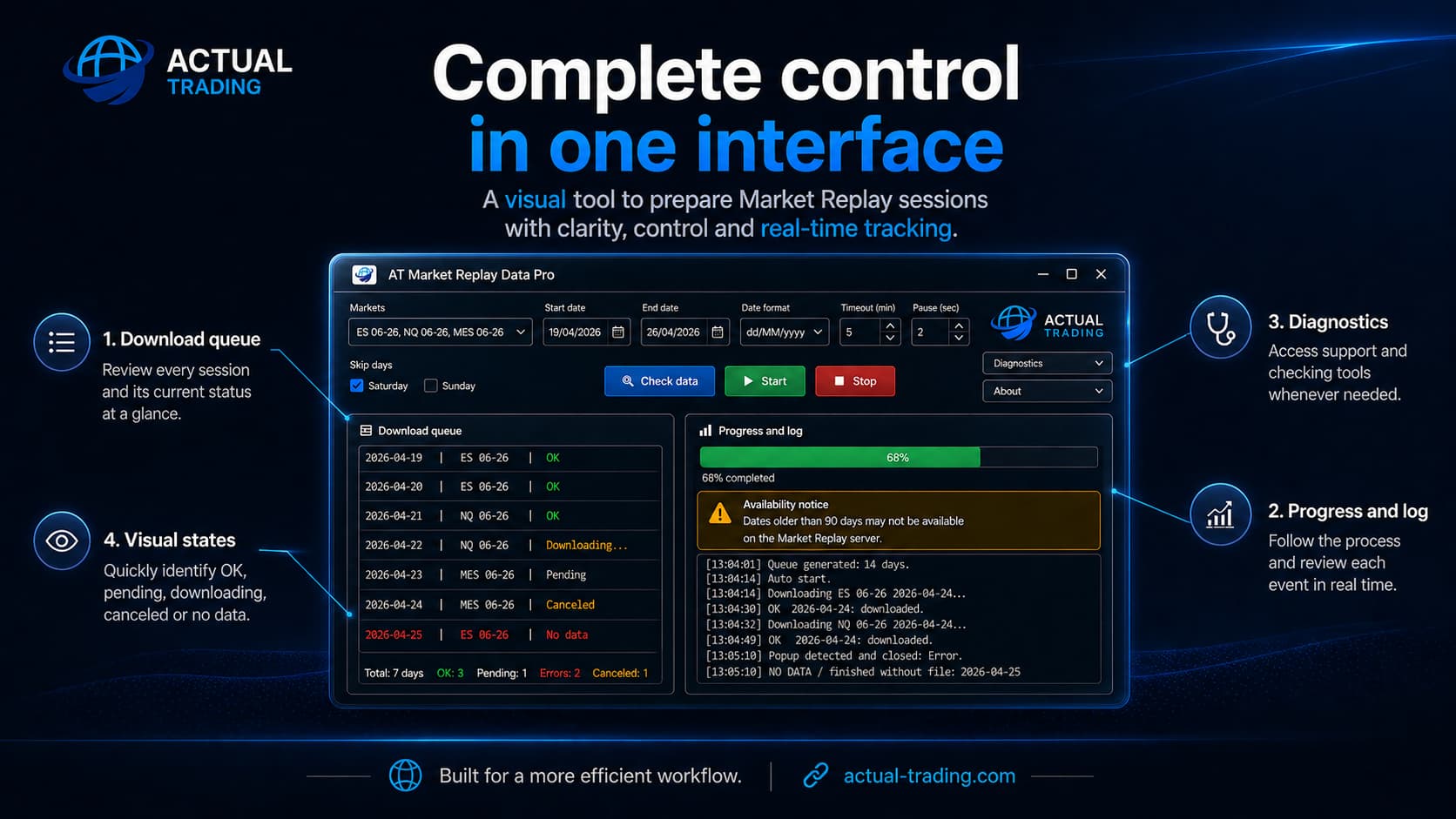
  • visual status per session: OK, pending, downloading, no data, error, or cancelled;
  • progress bar and process log.

The tool is called AT Market Replay Data Pro .

It is a paid AddOn, designed as a productivity tool for users who regularly work with Market Replay, Playback, practice sessions, or backtesting preparation.

If anyone is interested, I can share more details.

2 Likes

@ActualTrading Sounds like something that would be valuable to a large percentage of NinjaTrader users. I for one would like more information about your app, and I bet many members of this forum feel the same way.

2 Likes

Thanks, @Quagensia, I really appreciate that.
I tried to add the video and product page, but it looks like links are not allowed here at the moment, so I’ll attach a couple of images instead.

The tool is called AT Market Replay Data Pro, developed by Actual Trading .

The idea is simple: make the official NinjaTrader Market Replay download workflow less manual and easier to control visually. It helps prepare a queue by instrument and date range, with session status, progress information and a process log.

It does not provide external data and it does not extend NinjaTrader’s data availability limits. It just helps organize the official Market Replay download process in a more practical way.

The software is available in both English and Spanish.

I’ll be happy to answer any specific questions here about the workflow, limitations, installation, licensing, pricing, or anything else.

2 Likes

Is there anything extra in your add-on that is absent in the add-on by the intentional trader.

I am irritated by the fact that i need to manually copy tick data files in order to get continuity on the chart because of the inherent problem of the futures instrument that it expires and gets a new name every couple of months.

1 Like

The interesting thing about the age that we’re living in now is that just from seeing this idea, I can replicate it perfectly for myself. It’s an interesting age.

1 Like

Hi Maverick and Vipinb,

Thank you both for your comments.

@Maverick - yes, that is definitely one of the realities of the current age. Ideas are much more visible now, and many concepts can be understood very quickly once someone sees the problem being solved.

At the same time, I think there is an important difference between being inspired by a general need in the market and simply copying another developer’s work, product execution, UI, documentation, branding, implementation details or commercial positioning.

For me, the value of a professional NinjaTrader AddOn is not only the initial idea. It is the implementation, reliability, workflow design, error handling, user experience, testing, support, updates and long-term maintenance.
That is the part I have focused on with AT Market Replay Data Pro, providing a polished and supported workflow for users who regularly work with NinjaTrader Market Replay data and prefer to save time using a ready-to-use solution instead of having to build and maintain their own tool from scratch.

@Vipinb - regarding The Intentional Trader’s AddOn, I don’t want to make an unfair comparison because I have not tested their current version in detail. From what I understand, their tool is also focused on making Market Replay downloads easier, so there may be some overlap in the general idea.

The focus of AT Market Replay Data Pro is to make the official NinjaTrader Market Replay download workflow more structured, visual and easier to control: selecting a date range, selecting one or more instruments/contracts, generating the download queue, monitoring the process and reducing repetitive manual work.

Regarding the futures contract rollover point, I’m not completely sure what you mean by having to manually copy tick data files to get continuity on the chart. In my normal use, I don’t need to touch tick data files for charts to work correctly across futures contracts.

Since futures contracts expire and each contract has its own symbol, continuity usually depends on how the instrument, contract month, chart settings and replay data are being used. It may be a configuration or workflow issue rather than something that requires manually editing or copying tick files.

I would be careful with manually moving or copying tick/replay files, because doing that incorrectly could create confusing or inaccurate test conditions. If you explain the exact workflow you are using, I can better understand the problem you are trying to solve.
what i am saying is, if i put all my trades on MES in the last 6 months in one database and i write my indicator which renders these trades on the chart by connecting the entry and exit points with a line, i cannot see all the 6 months trade in one chart because really these 6 months trades are across 3 different instruments MES 12-25 MES 03-26 and MES 06-26, although from my point of view they are all just simply MES.

In such a case i have no other option but to manually copy the tick data of MES 12-25 and MES 03-26 to the folder containing the tick data for MES 06-26…once i do that then on the MES 06-26 my indicator will correctly render the trades I made in the last 6 months.

I hope I am making sense, maybe there is some other solution to my problem that I am not aware of.

Thanks.

I’m more a realist than an idealist. I’m building $200,000 applications in a weekend and there are many doing the same. Anyone still paying for tools, is the liquidity. The market is everywhere bro, and its everyting.

Feed this thread to Claude and build your own will all the features you want. Don’t sell it, so the 2 people here on this Ninjatrader thread can sell theirs :slight_smile:

Yes, now I understand what you mean, and yes, there are different ways to prevent an indicator that spans different contracts from being affected by what you mentioned.

That said, keeping it separate also makes some sense, so that entry and exit connections do not appear across different contracts. First, you would need to close your position before the contract expires, and in any case reopen the position in the contract that becomes active.

no no mate, all my trades close within 1 minute to 1 hour, thats not the point. k think of it this way, you simply want to open a day chart of MES and use your mouse wheel to go through last 2 years of chart…you cannot do that today because beyond 60 days the chart will go empty blank…for you to really be able to browse through 2 years of chart you will have to copy tick data across the 12 expiration dates of that instrument into one single folder.
I hope it makes sense now.