I am trying to set up a paper trading account connected to Rithmic in preparation for a prop firm challenge with Apex, but every time I try to connect my configured account from Rithmic onto NinjaTrader desktop, the log shows this error message: “The IB ‘1877808’ you are trying to connect to is not authorized to use.”
Would anyone be able to help with this? I am assuming IB stands for Interactive Brokers but I am not too sure what’s going on.
Assuming you’ve create your connection with the “Rithmic for NinjaTraderBroker” template, I would guess the IB stands for Introducing Broker. It means Rithmic doesn’t recognize (or is not allowing) your apex account. Double check your user name and password are correct, in my case the user name begins with “APEX-” (not sure if this is the case for challenge accounts). Has the challenge started yet? They may not allow you to connect until it does. Also, make sure you connection has the System property set to “Apex”.
Thank you for your reply. Well I have not purchased an eval from Apex yet, because I was hoping to practice with paper trading first on the same system that the Apex challenge I would like to enter uses. That way I can get good at using their system before entering the challenge. The Apex challenge I would like to enter is the $150k full account using Rithmic, and since Rithmic uses NinjaTrader I downloaded it and I created an account on Rithmic.com as well, which apparently gives a 14-day trial. I am not sure if I am doing this all correctly though. The connection status bubble shows as yellow and that is the error message I am getting. I thought it was trying to connect to another broker.
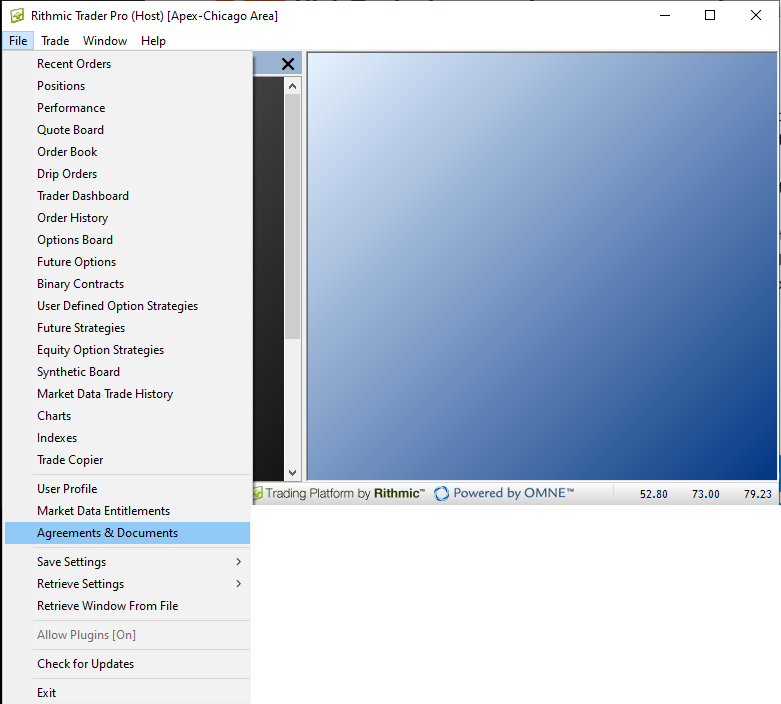
Ahh, sounds good. In that case you’ll likely want your NT Connection System property set to “Rithmic Paper Trading (Chicago)”. Also, have you signed the documents yet in Rithmic? They won’t let you start until then. Fire up the Rithmic Trader Pro app (you’ll want to download and install it from Rithmic if you haven’t already) and take a look here: