Maverick - color your chart tabs (Indicator)

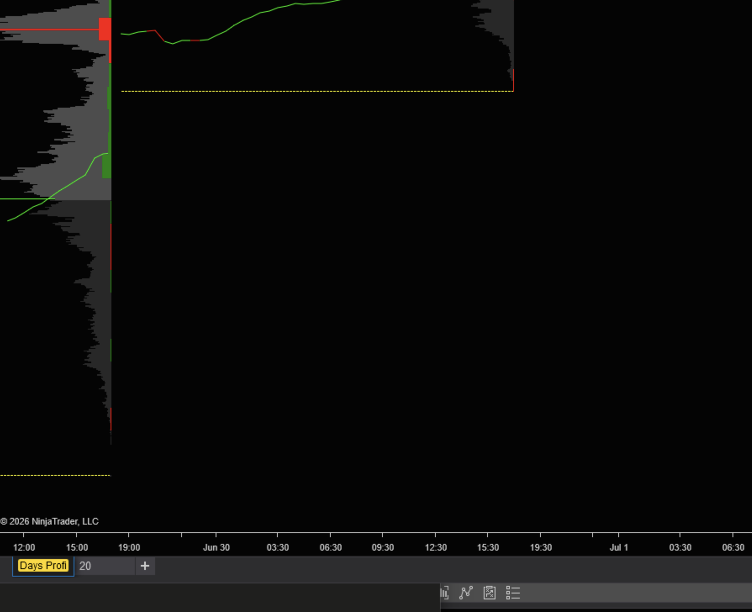
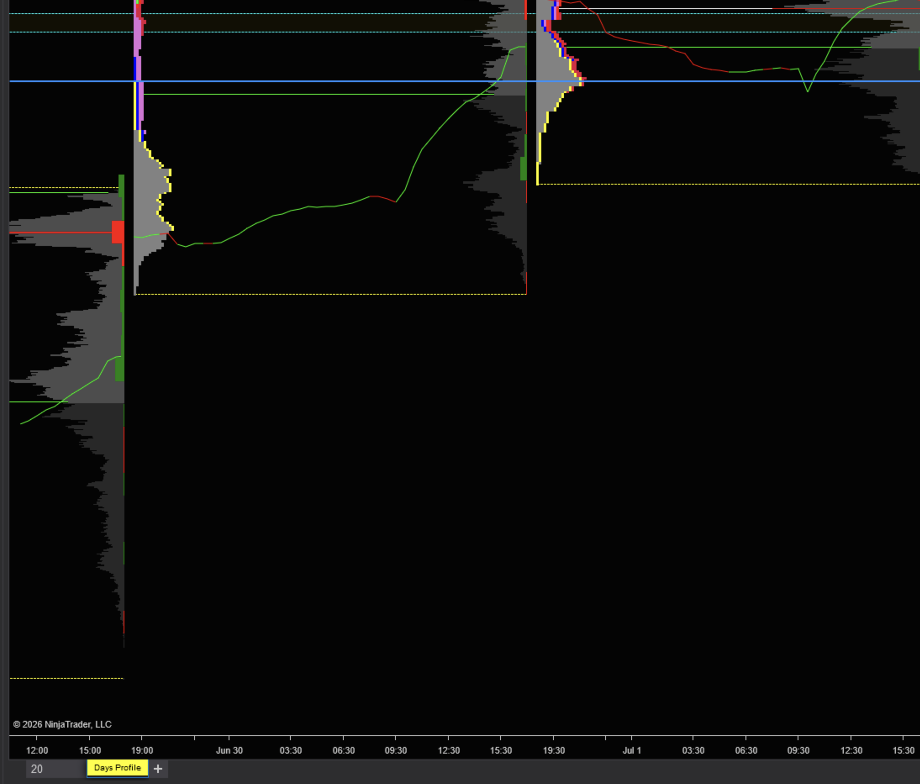
NinjaTrader 8 has no way to color chart tabs. Maverick adds it: apply one instance to each chart in a multi-tab window and pick a color per tab, so you can identify charts at a glance — ES yellow, NQ cyan, etc.

The color holds whether the tab is selected or not, survives renames and workspace save/restore, and leaves the tab’s X button intact. Zero runtime cost — it does all its work once at chart load, nothing while you trade.

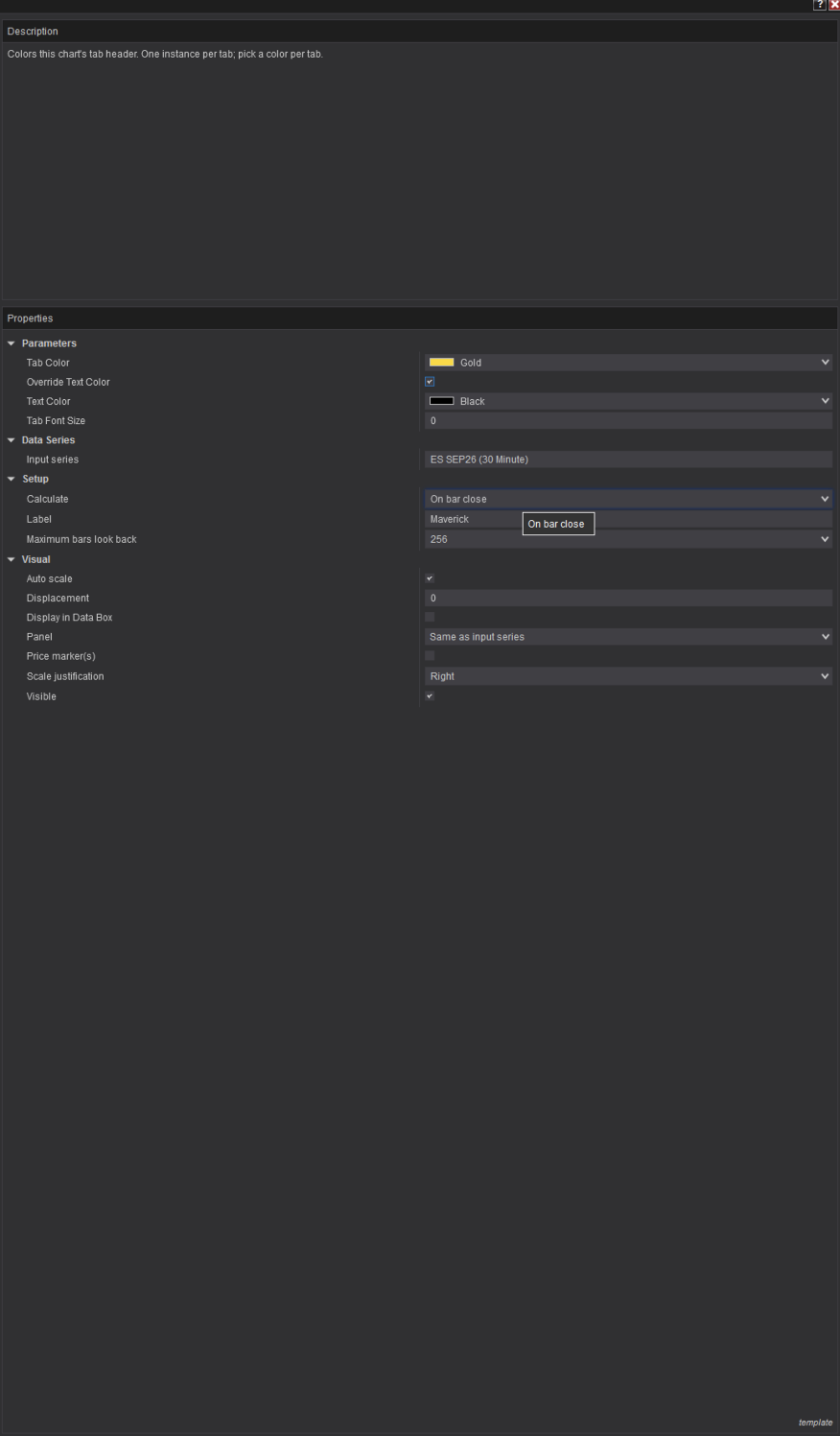
Properties: Tab Color, Override Text Color, Text Color, Tab Font Size (for long tab names).
#region Using declarations
using System;
using System.Collections.Generic;
using System.ComponentModel;
using System.ComponentModel.DataAnnotations;
using System.Linq;
using System.Text;
using System.Threading.Tasks;
using System.Windows;
using System.Windows.Controls;
using System.Windows.Documents;
using System.Windows.Input;
using System.Windows.Media;
using System.Xml.Serialization;
using NinjaTrader.Cbi;
using NinjaTrader.Gui;
using NinjaTrader.Gui.Chart;
using NinjaTrader.Gui.SuperDom;
using NinjaTrader.Gui.Tools;
using NinjaTrader.Data;
using NinjaTrader.NinjaScript;
using NinjaTrader.Core.FloatingPoint;
using NinjaTrader.NinjaScript.DrawingTools;
#endregion

namespace NinjaTrader.NinjaScript.Indicators
{
    /// <summary>
    /// Colors this chart's tab header. Add one instance per tab and pick a color per tab.
    ///
    /// Why header-content wrap instead of TabItem.Background / Style / Template:
    ///  - Style setters lose to the skin's IsSelected triggers (color reverts when the tab is selected).
    ///  - Replacing the ControlTemplate removes the tab's X close button.
    ///  - Wrapping the Header CONTENT in a colored Border is untouched by the chrome triggers,
    ///    so the color holds in all states (selected / unselected / hover) and the X survives.
    /// NT's original header object is preserved inside the wrapper, so @INSTRUMENT-style
    /// tab-name updates continue to work. A HeaderProperty change hook re-wraps if NT
    /// replaces the header (rename, workspace restore ordering).
    /// </summary>
    public class Maverick : Indicator
    {
        private const string WrapperName = "MaverickWrapper";

        private Chart      chartWindow;
        private TabItem    tabItem;
        private object     originalHeader;
        private bool       isWrapping;   // reentrancy guard: our own Header writes must not re-trigger the hook
        private bool       subscribed;
        private System.Windows.Threading.Dispatcher uiDispatcher;   // captured at apply time; Terminated can fire with ChartControl null

        protected override void OnStateChange()
        {
            if (State == State.SetDefaults)
            {
                Description                 = @"Colors this chart's tab header. One instance per tab; pick a color per tab.";
                Name                        = "Maverick";
                Calculate                   = Calculate.OnBarClose;
                IsOverlay                   = true;
                IsChartOnly                 = true;
                DisplayInDataBox            = false;
                PaintPriceMarkers           = false;

                TabBrush                    = Brushes.Gold;
                ApplyTextBrush              = false;
                TextBrush                   = Brushes.Black;
                TabFontSize                 = 0;
            }
            else if (State == State.Historical)
            {
                // UI work must run on the chart's dispatcher (official WPF-modifications sample pattern)
                if (ChartControl == null)
                    return;
                ChartControl.Dispatcher.InvokeAsync((Action)(() => { FindTabAndApply(); }));
            }
            else if (State == State.Terminated)
            {
                if (ChartControl != null)
                {
                    // Chart survives (F5 reload, indicator removed) — restore the original header
                    ChartControl.Dispatcher.InvokeAsync((Action)(() => { RemoveAndRestore(); }));
                }
                else if (subscribed)
                {
                    // Tab/window closing — the TabItem dies with it, nothing visual to restore,
                    // but the DPD value-changed table strongly roots the TabItem AND this instance
                    // until unsubscribed. Release it, on the window dispatcher if still alive.
                    if (uiDispatcher != null && !uiDispatcher.HasShutdownStarted)
                        uiDispatcher.InvokeAsync((Action)(() => { ReleaseHeaderHook(); tabItem = null; }));
                    else
                    {
                        ReleaseHeaderHook();
                        tabItem = null;
                    }
                }
            }
        }

        #region Tab location / wrap / restore
        private void FindTabAndApply()
        {
            chartWindow = Window.GetWindow(ChartControl.Parent) as Chart;
            if (chartWindow == null)
                return;

            // Match this indicator's ChartControl to its owning tab (official sample pattern)
            foreach (TabItem tab in chartWindow.MainTabControl.Items)
                if ((tab.Content as ChartTab) != null && (tab.Content as ChartTab).ChartControl == ChartControl)
                {
                    tabItem = tab;
                    break;
                }

            if (tabItem == null)
                return;

            uiDispatcher = tabItem.Dispatcher;

            ApplyWrap();

            // Re-wrap if NT replaces the header out from under us (tab rename, restore ordering)
            DependencyPropertyDescriptor dpd = DependencyPropertyDescriptor.FromProperty(TabItem.HeaderProperty, typeof(TabItem));
            if (dpd != null)
            {
                dpd.AddValueChanged(tabItem, OnHeaderChanged);
                subscribed = true;
            }
        }

        private void OnHeaderChanged(object sender, EventArgs e)
        {
            if (isWrapping)
                return;
            ApplyWrap();
        }

        private void ApplyWrap()
        {
            if (tabItem == null)
                return;

            isWrapping = true;
            try
            {
                // Already ours (e.g. a second instance, or hook re-entry after restore) — recolor only
                Border existing = tabItem.Header as Border;
                if (existing != null && existing.Name == WrapperName)
                {
                    existing.Background = TabBrush;
                    if (ApplyTextBrush)
                        TextElement.SetForeground(existing, TextBrush);
                    if (TabFontSize > 0)
                        TextElement.SetFontSize(existing, TabFontSize);
                    return;
                }

                originalHeader = tabItem.Header;

                ContentPresenter presenter = new ContentPresenter();
                Border wrap = new Border
                {
                    Name         = WrapperName,
                    Background   = TabBrush,
                    CornerRadius = new CornerRadius(2),
                    Padding      = new Thickness(2, 0, 2, 0),   // minimal: horizontal padding is stolen from the width-constrained tab text
                    Child        = presenter
                };
                if (ApplyTextBrush)
                    TextElement.SetForeground(wrap, TextBrush);
                if (TabFontSize > 0)
                    TextElement.SetFontSize(wrap, TabFontSize);

                // Order matters: detach the original from the TabItem's logical tree first,
                // then attach it inside the wrapper — never two parents at once.
                tabItem.Header    = wrap;
                presenter.Content = originalHeader;
            }
            finally { isWrapping = false; }
        }

        private void RemoveAndRestore()
        {
            if (tabItem == null)
                return;

            ReleaseHeaderHook();

            Border existing = tabItem.Header as Border;
            if (existing != null && existing.Name == WrapperName)
            {
                isWrapping = true;
                try
                {
                    // Restore from the wrapper's live content — the true original even if
                    // another instance recolored this wrapper after we created it.
                    ContentPresenter presenter = existing.Child as ContentPresenter;
                    object orig = presenter != null ? presenter.Content : originalHeader;
                    if (presenter != null)
                        presenter.Content = null;    // detach before reattaching as Header
                    tabItem.Header = orig;
                }
                finally { isWrapping = false; }
            }

            tabItem        = null;
            originalHeader = null;
            chartWindow    = null;
            uiDispatcher   = null;
        }

        private void ReleaseHeaderHook()
        {
            if (!subscribed || tabItem == null)
            {
                subscribed = false;
                return;
            }
            try
            {
                DependencyPropertyDescriptor dpd = DependencyPropertyDescriptor.FromProperty(TabItem.HeaderProperty, typeof(TabItem));
                if (dpd != null)
                    dpd.RemoveValueChanged(tabItem, OnHeaderChanged);
            }
            catch { }   // best-effort on the shutdown fallback path; on-dispatcher this never throws
            subscribed = false;
        }
        #endregion

        #region Properties
        private Brush tabBrush;
        [XmlIgnore]
        [Display(Name = "Tab Color", Description = "Background color applied to this chart's tab header", Order = 1, GroupName = "Parameters")]
        public Brush TabBrush
        {
            get { return tabBrush; }
            set { tabBrush = value; }
        }
        [Browsable(false)]
        public string TabBrushSerialize
        {
            get { return Serialize.BrushToString(tabBrush); }
            set { tabBrush = Serialize.StringToBrush(value); }
        }

        [NinjaScriptProperty]
        [Display(Name = "Override Text Color", Description = "Also force the tab text color (enable if the tab text is unreadable on the chosen fill)", Order = 2, GroupName = "Parameters")]
        public bool ApplyTextBrush
        { get; set; }

        private Brush textBrush;
        [XmlIgnore]
        [Display(Name = "Text Color", Description = "Tab text color when Override Text Color is enabled", Order = 3, GroupName = "Parameters")]
        public Brush TextBrush
        {
            get { return textBrush; }
            set { textBrush = value; }
        }
        [Browsable(false)]
        public string TextBrushSerialize
        {
            get { return Serialize.BrushToString(textBrush); }
            set { textBrush = Serialize.StringToBrush(value); }
        }

        [NinjaScriptProperty]
        [Range(0, 72)]
        [Display(Name = "Tab Font Size", Description = "Tab text size in points; 0 = platform default. Reduce if a long tab name gets trimmed.", Order = 4, GroupName = "Parameters")]
        public double TabFontSize
        { get; set; }
        #endregion
    }
}
3 Likes

Clever! This gives me an idea to change color of chart trader background to distinguish between minis and micros.

1 Like

Cool, that’d be nice.

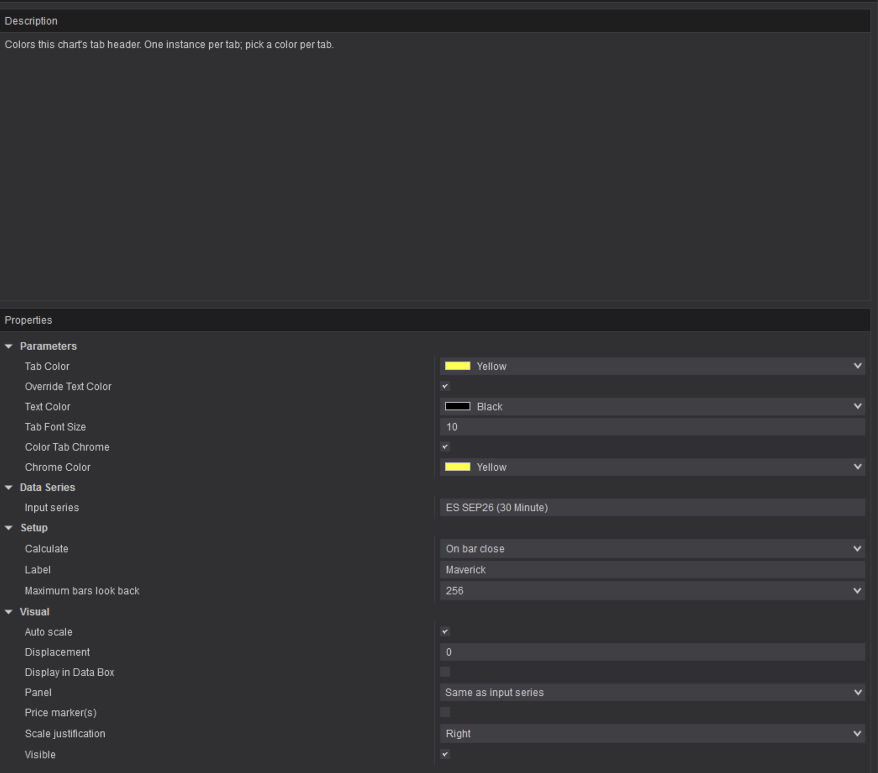
I updated the code so that you can now color the exterior, the benefit of that is that you can have a full square flush coloration and you can see the difference in the example of the first picture and the second

#region Using declarations
using System;
using System.Collections.Generic;
using System.ComponentModel;
using System.ComponentModel.DataAnnotations;
using System.Linq;
using System.Text;
using System.Threading.Tasks;
using System.Windows;
using System.Windows.Controls;
using System.Windows.Documents;
using System.Windows.Input;
using System.Windows.Media;
using System.Xml.Serialization;
using NinjaTrader.Cbi;
using NinjaTrader.Gui;
using NinjaTrader.Gui.Chart;
using NinjaTrader.Gui.SuperDom;
using NinjaTrader.Gui.Tools;
using NinjaTrader.Data;
using NinjaTrader.NinjaScript;
using NinjaTrader.Core.FloatingPoint;
using NinjaTrader.NinjaScript.DrawingTools;
#endregion

namespace NinjaTrader.NinjaScript.Indicators
{
    /// <summary>
    /// Colors this chart's tab header. Add one instance per tab and pick a color per tab.
    ///
    /// Why header-content wrap instead of TabItem.Background / Style / Template:
    ///  - Style setters lose to the skin's IsSelected triggers (color reverts when the tab is selected).
    ///  - Replacing the ControlTemplate removes the tab's X close button.
    ///  - Wrapping the Header CONTENT in a colored Border is untouched by the chrome triggers,
    ///    so the color holds in all states (selected / unselected / hover) and the X survives.
    /// NT's original header object is preserved inside the wrapper, so @INSTRUMENT-style
    /// tab-name updates continue to work. A HeaderProperty change hook re-wraps if NT
    /// replaces the header (rename, workspace restore ordering).
    /// </summary>
    public class Maverick : Indicator
    {
        private const string WrapperName = "MaverickWrapper";

        private Chart      chartWindow;
        private TabItem    tabItem;
        private object     originalHeader;
        private bool       isWrapping;   // reentrancy guard: our own Header writes must not re-trigger the hook
        private bool       subscribed;
        private System.Windows.Threading.Dispatcher uiDispatcher;   // captured at apply time; Terminated can fire with ChartControl null
        private readonly List<FrameworkElement> paintedChrome = new List<FrameworkElement>();   // template chrome elements we painted, for exact restore

        protected override void OnStateChange()
        {
            if (State == State.SetDefaults)
            {
                Description                 = @"Colors this chart's tab header. One instance per tab; pick a color per tab.";
                Name                        = "Maverick";
                Calculate                   = Calculate.OnBarClose;
                IsOverlay                   = true;
                IsChartOnly                 = true;
                DisplayInDataBox            = false;
                PaintPriceMarkers           = false;

                TabBrush                    = Brushes.Gold;
                ApplyTextBrush              = false;
                TextBrush                   = Brushes.Black;
                TabFontSize                 = 0;
                ApplyChromeColor            = false;
                ChromeColor                 = Brushes.DimGray;
            }
            else if (State == State.Historical)
            {
                // UI work must run on the chart's dispatcher (official WPF-modifications sample pattern)
                if (ChartControl == null)
                    return;
                ChartControl.Dispatcher.InvokeAsync((Action)(() => { FindTabAndApply(); }));
            }
            else if (State == State.Terminated)
            {
                if (ChartControl != null)
                {
                    // Chart survives (F5 reload, indicator removed) — restore the original header
                    ChartControl.Dispatcher.InvokeAsync((Action)(() => { RemoveAndRestore(); }));
                }
                else if (subscribed)
                {
                    // Tab/window closing — the TabItem dies with it, nothing visual to restore,
                    // but the DPD value-changed table strongly roots the TabItem AND this instance
                    // until unsubscribed. Release it, on the window dispatcher if still alive.
                    if (uiDispatcher != null && !uiDispatcher.HasShutdownStarted)
                        uiDispatcher.InvokeAsync((Action)(() => { ReleaseHeaderHook(); tabItem = null; }));
                    else
                    {
                        ReleaseHeaderHook();
                        tabItem = null;
                    }
                }
            }
        }

        #region Tab location / wrap / restore
        private void FindTabAndApply()
        {
            chartWindow = Window.GetWindow(ChartControl.Parent) as Chart;
            if (chartWindow == null)
                return;

            // Match this indicator's ChartControl to its owning tab (official sample pattern)
            foreach (TabItem tab in chartWindow.MainTabControl.Items)
                if ((tab.Content as ChartTab) != null && (tab.Content as ChartTab).ChartControl == ChartControl)
                {
                    tabItem = tab;
                    break;
                }

            if (tabItem == null)
                return;

            uiDispatcher = tabItem.Dispatcher;

            ApplyWrap();

            // Re-wrap if NT replaces the header out from under us (tab rename, restore ordering)
            DependencyPropertyDescriptor dpd = DependencyPropertyDescriptor.FromProperty(TabItem.HeaderProperty, typeof(TabItem));
            if (dpd != null)
            {
                dpd.AddValueChanged(tabItem, OnHeaderChanged);
                subscribed = true;
            }
        }

        private void OnHeaderChanged(object sender, EventArgs e)
        {
            if (isWrapping)
                return;
            ApplyWrap();
        }

        private void OnWrapperLoaded(object sender, RoutedEventArgs e)
        {
            if (!ApplyChromeColor || ChromeColor == null || tabItem == null)
                return;

            // The tab chrome (the black around the pill) is painted by NT's internal template,
            // which consumes frozen skin brushes (e.g. BluePrint.xaml's "TabBackground") as
            // template-applied values. Local values outrank template-applied values AND the
            // template's selection triggers — so painting the chrome elements directly holds
            // in all tab states. Those elements are exactly our wrapper's visual ancestors.
            DependencyObject node = VisualTreeHelper.GetParent((DependencyObject)sender);
            while (node != null && !ReferenceEquals(node, tabItem))
            {
                Border b = node as Border;
                Panel  p = node as Panel;
                if (b != null)
                    b.Background = ChromeColor;
                else if (p != null)
                    p.Background = ChromeColor;

                FrameworkElement fe = node as FrameworkElement;
                if ((b != null || p != null) && fe != null && !paintedChrome.Contains(fe))
                    paintedChrome.Add(fe);

                node = VisualTreeHelper.GetParent(node);
            }

            // Re-assert the TabItem-level value: Loaded fires after template application,
            // so this lands after anything NT assigned during tab construction.
            tabItem.Background = ChromeColor;
        }

        private void ApplyWrap()
        {
            if (tabItem == null)
                return;

            // Chrome, TabItem level: covers the case where the template binds its chrome
            // to TabItem.Background. The template's own elements are painted in
            // OnWrapperLoaded once the visual tree exists. 
            if (ApplyChromeColor && ChromeColor != null)
                tabItem.Background = ChromeColor;

            isWrapping = true;
            try
            {
                // Already ours (e.g. a second instance, or hook re-entry after restore) — recolor only
                Border existing = tabItem.Header as Border;
                if (existing != null && existing.Name == WrapperName)
                {
                    existing.Background = TabBrush;
                    if (ApplyTextBrush)
                        TextElement.SetForeground(existing, TextBrush);
                    if (TabFontSize > 0)
                        TextElement.SetFontSize(existing, TabFontSize);
                    return;
                }

                originalHeader = tabItem.Header;

                ContentPresenter presenter = new ContentPresenter();
                Border wrap = new Border
                {
                    Name         = WrapperName,
                    Background   = TabBrush,
                    CornerRadius = new CornerRadius(2),
                    Padding      = new Thickness(2, 0, 2, 0),   // minimal: horizontal padding is stolen from the width-constrained tab text
                    Child        = presenter
                };
                if (ApplyTextBrush)
                    TextElement.SetForeground(wrap, TextBrush);
                if (TabFontSize > 0)
                    TextElement.SetFontSize(wrap, TabFontSize);

                // The chrome elements are only walkable once the wrapper is in the
                // visual tree, so chrome painting runs on Loaded.
                wrap.Loaded += OnWrapperLoaded;

                // Order matters: detach the original from the TabItem's logical tree first,
                // then attach it inside the wrapper — never two parents at once.
                tabItem.Header    = wrap;
                presenter.Content = originalHeader;
            }
            finally { isWrapping = false; }
        }

        private void RemoveAndRestore()
        {
            if (tabItem == null)
                return;

            ReleaseHeaderHook();

            Border existing = tabItem.Header as Border;
            if (existing != null && existing.Name == WrapperName)
            {
                isWrapping = true;
                try
                {
                    // Restore from the wrapper's live content — the true original even if
                    // another instance recolored this wrapper after we created it.
                    ContentPresenter presenter = existing.Child as ContentPresenter;
                    object orig = presenter != null ? presenter.Content : originalHeader;
                    if (presenter != null)
                        presenter.Content = null;    // detach before reattaching as Header
                    tabItem.Header = orig;
                }
                finally { isWrapping = false; }
            }

            // Return chrome control to NT's skin (no-op if ApplyChromeColor was never enabled)
            tabItem.ClearValue(System.Windows.Controls.Control.BackgroundProperty);
            foreach (FrameworkElement fe in paintedChrome)
            {
                Border b = fe as Border;
                if (b != null)
                {
                    b.ClearValue(Border.BackgroundProperty);
                    continue;
                }
                Panel p = fe as Panel;
                if (p != null)
                    p.ClearValue(System.Windows.Controls.Panel.BackgroundProperty);
            }
            paintedChrome.Clear();

            tabItem        = null;
            originalHeader = null;
            chartWindow    = null;
            uiDispatcher   = null;
        }

        private void ReleaseHeaderHook()
        {
            if (!subscribed || tabItem == null)
            {
                subscribed = false;
                return;
            }
            try
            {
                DependencyPropertyDescriptor dpd = DependencyPropertyDescriptor.FromProperty(TabItem.HeaderProperty, typeof(TabItem));
                if (dpd != null)
                    dpd.RemoveValueChanged(tabItem, OnHeaderChanged);
            }
            catch { }   // best-effort on the shutdown fallback path; on-dispatcher this never throws
            subscribed = false;
        }
        #endregion

        #region Properties
        private Brush tabBrush;
        [XmlIgnore]
        [Display(Name = "Tab Color", Description = "Background color applied to this chart's tab header", Order = 1, GroupName = "Parameters")]
        public Brush TabBrush
        {
            get { return tabBrush; }
            set { tabBrush = value; }
        }
        [Browsable(false)]
        public string TabBrushSerialize
        {
            get { return Serialize.BrushToString(tabBrush); }
            set { tabBrush = Serialize.StringToBrush(value); }
        }

        [NinjaScriptProperty]
        [Display(Name = "Override Text Color", Description = "Also force the tab text color (enable if the tab text is unreadable on the chosen fill)", Order = 2, GroupName = "Parameters")]
        public bool ApplyTextBrush
        { get; set; }

        private Brush textBrush;
        [XmlIgnore]
        [Display(Name = "Text Color", Description = "Tab text color when Override Text Color is enabled", Order = 3, GroupName = "Parameters")]
        public Brush TextBrush
        {
            get { return textBrush; }
            set { textBrush = value; }
        }
        [Browsable(false)]
        public string TextBrushSerialize
        {
            get { return Serialize.BrushToString(textBrush); }
            set { textBrush = Serialize.StringToBrush(value); }
        }

        [NinjaScriptProperty]
        [Range(0, 72)]
        [Display(Name = "Tab Font Size", Description = "Tab text size in points; 0 = platform default. Reduce if a long tab name gets trimmed.", Order = 4, GroupName = "Parameters")]
        public double TabFontSize
        { get; set; }

        [NinjaScriptProperty]
        [Display(Name = "Color Tab Chrome", Description = "Also paint the tab's surrounding chrome (the dark tab body around the label), not just the label area", Order = 5, GroupName = "Parameters")]
        public bool ApplyChromeColor
        { get; set; }

        private Brush chromeColor;
        [XmlIgnore]
        [Display(Name = "Chrome Color", Description = "Color for the tab chrome when Color Tab Chrome is enabled", Order = 6, GroupName = "Parameters")]
        public Brush ChromeColor
        {
            get { return chromeColor; }
            set { chromeColor = value; }
        }
        [Browsable(false)]
        public string ChromeColorSerialize
        {
            get { return Serialize.BrushToString(chromeColor); }
            set { chromeColor = Serialize.StringToBrush(value); }
        }
        #endregion
    }
}