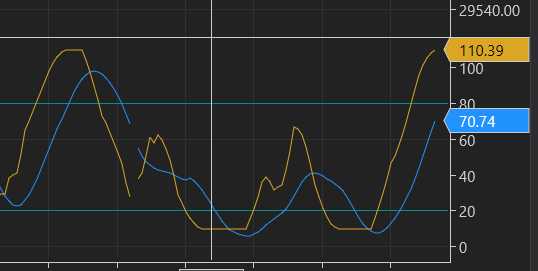
I have a strategy that uses the stochastics indicator. When I move up the speed a bit then the scale of the stochastics indicator suddenliy offsets and goes from 10 to 110 instead of 0 to 100. I even encountered offsets of up to 20 which makes my strategy not work anymore. I run my chart with ninzarenko bars. Any ideas why this happens?
Thank you!
Hi @happytrader76 , If you shows your code we can help you abouth this
Are you talking about moving the speed of market replay?
Or are you setting the %K and %D length to shorter look back ?
Some types of moving averages (well, actually all moving averages) will over shoot when the underlying data changes direction. If you look inside the stochastics code using the Ninjascript Editor you might find the answer.
Sorry to be of little help with limited information.
~Robotman
When I increase the speed of market replay, NT8 does not take all the data anymore. NT8 then takes like “screenshots” and uses that data.
I noticed this when I did the following test:
I made a chart and added a MA. I then ordered NT8 to buy/sell each time the price would cross the MA. I did this at low speed and afterward at a high speed. The result was that the executions of the trades had different times and different prices depending on the speed used. The high speed execution was always later. If NT8 took account of all the data, the prices and timing should have been identical no matter what speed was used. But they were not .
That might explain why you have gaps or broken lines. The data used is not the correct and complete data range anymor e.
The fact that the 0 to 100 limits are not respected confirms that the data used is not the exact market data, but data with gaps. A stochastic should never go below 0 or over 100.
1 Like
Playback speed should not make NinjaTrader drop Market Replay events. At Max speed, the UI redraw is reduced, but indicators and strategies should still process the replay stream. I would separate the plotted result from the calculated result.
- Replay the same date range from the same start point and warm-up.
- Set the strategy to Calculate.OnBarClose for this test.
- Print Time[0], CurrentBar, K[0], and D[0] once per closed bar at 1x and Max speed, then compare the two logs.
If the logs match but the chart still shows the spike, the problem is in plotting or rendering. If the logs differ, inspect the NinjaRenko bar construction, any state kept in OnMarketData, and the strategy’s Calculate setting. A hosted indicator inherits that setting from its parent strategy.
A standard Stochastics plot is bounded from 0 to 100. A value around 110 is therefore a reason to inspect the exact series or custom value assigned to the plot, not evidence by itself that Playback skipped ticks.
The relevant NinjaTrader Help Guide sections are “Playback” and “Calculate”.
I did the following test:
- MES 09-26
- Playback
- First 500x speed
- Next 1x speed
- 15 min charts
So if there is no skipping of data, the two tests should give the same price at the same time, when the price crossed some indicator.
Reality is that at 1x speed the signal was generated at 0:20:22 executed at 7754.
At 500x speed the signal was generated at 0:21:40 executed at 7753,75.
This clearly proofs that increasing the speed, increases the inaccuracy of the execution.
The most realistic executing price is at the lowest speed.
At 500x the playback skips data all the time. That explains also why at 500x speed the execution is 42 seconds later. That can give a hugely different price in active markets. I did my test in ETH, so when realtime markets are closed. The difference can be between 1 and 15 ticks in RTH.
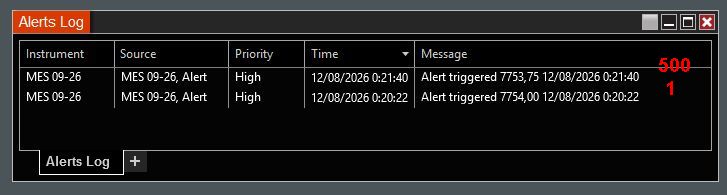
Those two fills prove that your current test path is not deterministic at 500x. But they do not yet prove that Playback dropped core market-data events. The Playback Help Guide says Market Replay keeps the provider event sequence and reduces only the UI refresh rate.
The next check is to remove order simulation and rendering from the comparison:
- Use Market Replay,
Playback from start, the same downloaded day, and the same warm-up. - Run a tiny script with no orders. In
OnMarketData, log a counter,e.Time,e.MarketDataType,e.Price, ande.Volume. - In
OnBarUpdate, logCurrentBar,Time[0],Close[0], and the exact crossover operands. - Compare the 1x and 500x files.
If the market-data and bar logs match but the signal times differ, the decision path likely depends on UI or Dispatcher timing, DateTime.Now, an Alert, or another time-based state. NinjaTrader’s Alerts guide says increased Playback speed can miss alert checks because they are evaluated every 200 ms.
If the raw event logs differ in Market Replay from start, that is a reproducible platform defect. Send the two logs, version, exact replay file and date, and a minimal script to NinjaTrader support. That is stronger evidence because the fill screenshots still mix signal timing, order handling, and rendering.
Thanks for your reaction. My problem is that I don’t have a real education in programming. So your test is like Chinese for me, I have no clue how to do the test you propose. As my strategy works fine I don’t need to do any Playback anymore. Maybe someone else, who has the necessary knowledge, can do the test.
I saw the problem when I did a very simple test:
- 15 min chart
- any EMA
- run it in 1x speed and log the alerts (time and price)
- run the same data in 500x and log the alerts (time and price)
- I use intrabar data for the execution of signals, so not “on bar close”. Any time when the conditions are fulfilled I execute, so mostly intrabar.
The execution prices are completely different, so depending on the speed, I get 2 completely different returns as all executions are different.
What I don’t understand (with my non-existing knowledge of programming) is the following:
- If the data and the executions are correct, but it is only a question of delay from the UI or Dispatcher timing, shouldn’t the execution price then not be identical (which is not the case)?
- I have to download day by day the data to use it for marketreplay, so the data for both speeds should then at least result in the same execution price? Every data comes from the same downloaded file.
- “NinjaTrader’s Alerts guide says increased Playback speed can miss alert checks because they are evaluated every 200 ms.” If it is a 200ms delay, why is the execution time in the log file then always much bigger? Or is the logfile wrong? The difference between the 1x and 500 x was 1 minute and 18 seconds, which is a huge delay. And priority was put at “high” to reduce any lag.
Yes, the same downloaded replay file is used. The key point is that your test is not measuring the file alone. It is also measuring the Alerts engine.
At 500x, NinjaTrader can advance roughly 100 seconds of replay time during one 200 ms alert-check interval. So the alert may first evaluate the condition long after the original crossover. It then logs the later replay time and submits at the price available at that later evaluation. The 200 ms is real processing time, not 200 ms on the replay clock. That is why a difference of 1 minute 18 seconds is possible.
So your different alert prices do not show that the downloaded file changed. They show that chart Alerts are not suitable for deterministic high-speed Playback tests. NinjaTrader’s own guide says Alerts are not intended for increased Playback speed because they are checked every 200 ms:
The Playback guide makes a separate claim for indicators and NinjaScript strategies: core data is replayed while the UI refresh is reduced. Playback101 orders are processed synchronously:
That distinction matters. A chart Alert at 500x can miss the crossing check even when the underlying replay events are still processed. A NinjaScript strategy using OnEachTick or OnMarketData is the right test for event-driven execution. Your current 1x versus 500x Alert comparison is valid evidence about the Alerts engine, but not yet evidence that Market Replay skipped or changed the source data.
Setting process priority to High does not change the alert scheduler’s 200 ms design. For checking chart Alerts, use 1x. For deterministic strategy validation, use the same replay file, Playback from start, the same warm-up, and an event-driven NinjaScript strategy instead of chart Alerts.
Exactly, that was my conclusion. So I never used any other speed then 1. That’s the closest to reality.
But apparently some/a lot of traders try to use high speed to save time, but their results are then not reliable anymore. That’s what I wanted to warn people for.