My installation was corrupted and I had to reinstall. I downloaded the installation msi from the account dashboard so I have the latest version.
After installation, when I launch Ninjatrader it goes into light mode instead of dark mode, the styles are also different (fonts, background color, etc.). How do I get the dark mode back?
Thanks!
[deleted by author]
Not really applicable after OP updated his original complaint.
Hi @Caesar_Samsi,
You can get NinjaTrader back into dark mode like this:
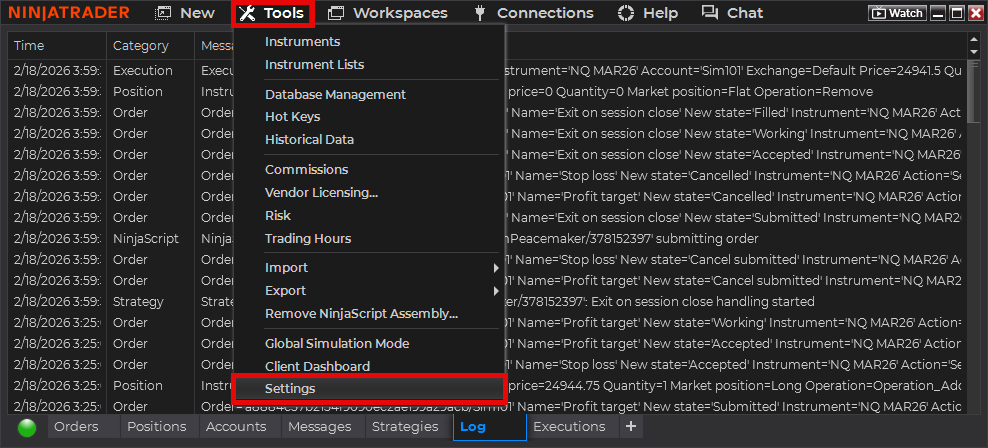
Click on the “Tools” main menu’s “Settings” menu item:
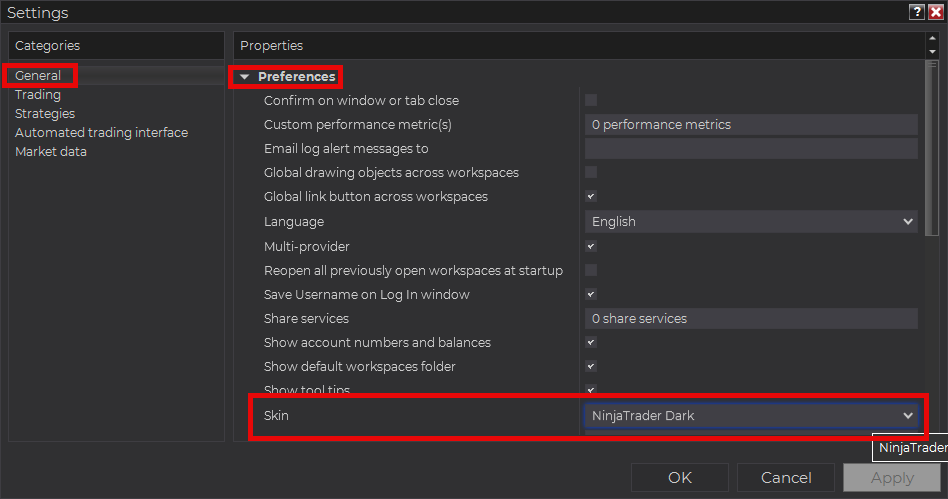
In the Settings window, in the “General” tab, under the “Preferences” group header, select your preferred dark mode theme from the “Skin” setting:
1 Like
Hi, Thank You! I got it back to the way it was. I thought my installation was broken.
1 Like