Helllo, having trouble restoring a NTBK file. did a pc reset and saved the NTBK to a external hard drive. Now I am having trouble importing the NTBK restore file to a fresh NT 8 platform, It is giving me an error of the file path name is too long ( over 260 characters). I have 10 separate previous restore points. And all are giving me the same error. thank you in advance for any insight. THX.
First copy one backup from the external drive to a short local folder, such as C:\NTBackup. Keep the original safe and keep the file’s actual extension. Then use Tools > Import > Backup File in NT8. This checks whether the backup’s location causes the long-path error.
If it still fails, the long path may be inside the archive or at the restore destination. Paste the exact error text and the path it names, with your Windows username removed.
Also, is the actual extension .ntbk or .nt8bk, and which NinjaTrader version created it? That matters after a fresh install. The official restore guide notes that backups from older releases can have import issues: Operations > Backup & Restore > Restoring a Backup Archive
1 Like
It is a NT8BK file. I have about 10 different restore files from the last month and i get the same error message of file name too long. I attached the displayed error message. I have heard of perhaps converted it to a zip file and going in a retrieve a workspace , for example, manually. But I don’t how to do that. My most recent backup file is reading at 4.2 Gb. Which seems to the average size of my previous back up’s. I hope the file is not corrupted. do you think the file is still retrievable if it showing ~ 4.2 Gb in size. I mean, hopefully there is still some retrievable data on it. should i perhaps set a remote help appointment ? Thanks so much !!
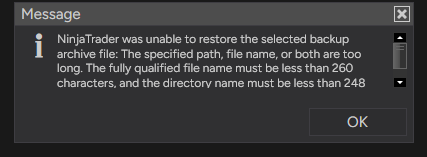
Yes, some data may still be recoverable, but 4.2 GB alone cannot tell us whether the archive is intact. Your screenshot shows a path-length error, not a corruption verdict.
Keep the original. Try the ZIP idea only on a copy: enable File name extensions in Explorer, name the copy a.zip, then try opening it. Renaming is not a repair. If it opens, extract only one workspace XML into C:\NTRecovered. Import it through Workspaces > Import if your NT8 version has that menu; don’t overwrite your current workspace files. If it won’t open, stop there.
Official NinjaTrader support can help with remote troubleshooting. Send them this error and your installed NT8 version first. Does the ZIP copy show a workspaces folder?
1 Like
I think I may have to just contact support. It converted to a compressed zip file. but it did not extract correctly. & Still getting the error message. thank you for trying to help me though . will email support… THX !!