Basically what the title says. It’s been like this since I’ve been using NT for the past year, just kind of sick of alt tabbing multiple times through these infinitely loading windows. I’ve tried reinstalling, clearing cache, re-importing workspaces and a bunch of others. Anyone know how to fix this?
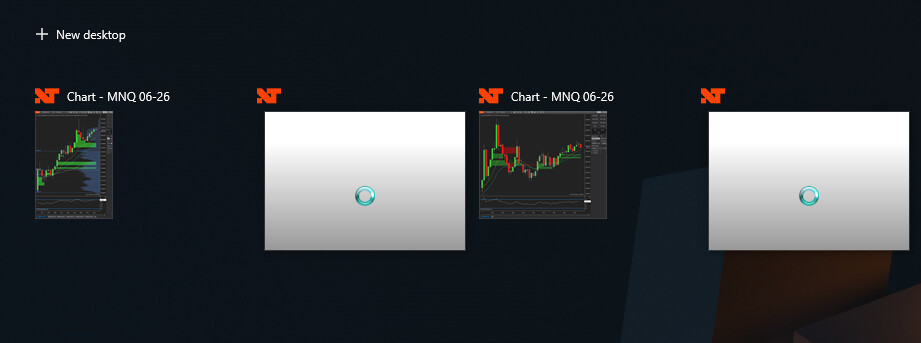
I don’t know, friend, but it’s probably some error in the code.
Bumping if anyone knows
This is another fine example of lazy NT programming - And it can be mitigated.
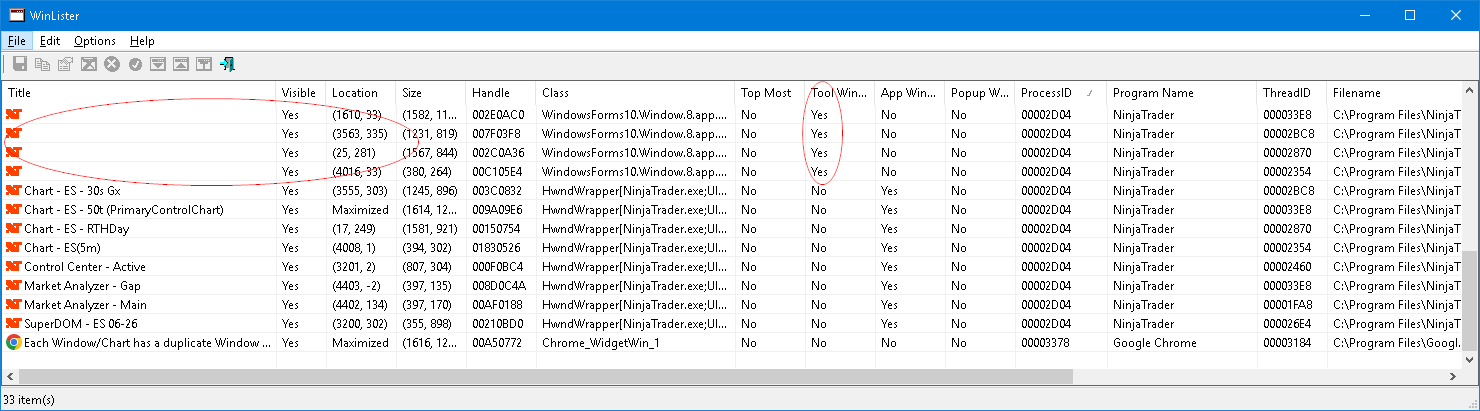
In the Nirsoft window utility screen below the top 4 entries are the Winform class windows corresponding to the 4 charts which are usually open in this NT workspace. The tool window column below by default will be “no” meaning they will be visible to various displays throughout windows. I wrote a program to switch the tool setting from No to Yes which makes them invisible to the Alt-Tab windows switcher. I used an AutoIt script but it can be done in most any language because in the end it is just invoking WIN32 api calls.
2 Likes
Oh my god, I just saw this notification.
Super super late reply but this seems like an issue that has been existing and I need an external program to help solve this?
I’ve noticed this issue also but I have no idea what that program is or how it operates to resolve the issue.
The problem seems to freeze NT
That’s weird, I’ve done clean reinstalls of Windows and re-installed Ninjatrader and just opened a new workspace and it immediately has this issue.
Try rolling back NT to a pre current version. Something in the latest versions are likely the cause
The same thing has always happened to me, and it only occurs when you open a new chart. Although I don’t have a definitive explanation, I believe it’s related to the way NinjaTrader renders charts. NinjaTrader uses SharpDX, which is a wrapper around the native DirectX C++ libraries, and I suspect that the second object associated with each chart (the one that appears blank, with no details, in Task Manager) is created by the DirectX rendering engine and exists underneath the NinjaTrader chart itself.
This is what Claude AI says, and it’s apparently confirmed by an NinjaTrader in their sunset forum:
Cause (official, NinjaTrader support): Core platform architecture, not third-party code. Support states this is an expected symptom of how NinjaTrader builds charts and how Windows detects items to include in the ALT+TAB menu — a chart is like a picture hanging on a wall with two components, the frame and the picture inside it, and the white ‘loading’ windows can be ignored. Escalated to developers, the answer was that it’s a known limitation between WPF and NinjaTrader, on the roadmap for future releases, but no easy fix — it would require an entire overhaul of the charting code. Each chart carries a second HWND — the inner render-surface host for the SharpDX/D3D content.
1 Like
It’s been like this for 1.5yrs now, ever since I’ve downloaded it basiclaly
Wait so you don’t have the issue when you have a new workspace that has not been tampered?
Does this stop the spinning and lockup of NT?
I find each day, I must EndTask for NT and reset the computer to get NT to finally load a workspace that worked when NT was closed the day before.
when you say clean reinstalls of NinjaTrader, are you also deleting your NinjaTrader folder in My Documents? If not, then it’s not really a reinstall.
Try opening ninja in safe mode, that doesn’t load any addons, and then try opening a chart to see if you still have the same problem when the 3rd party addons aren’t loaded
Yes, completely everything. Even any hidden files. I’ll give safe mode a try later but highly doubt that would do anything.