Order Flow Highlight is now here
1 Like
I think you have a small typo in your second sentence.
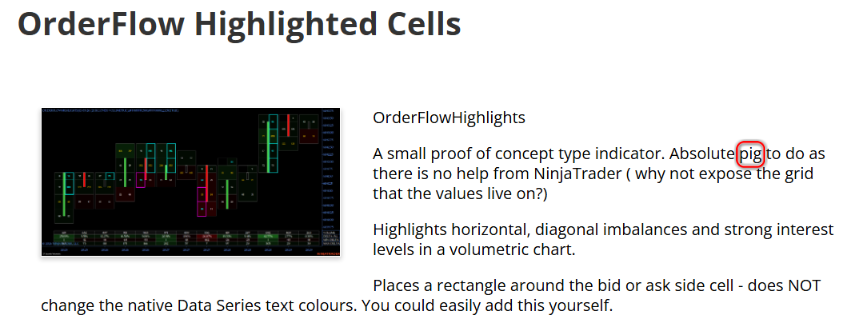
“A small proof of concept type indicator. Absolute pig to do as…”
No it really was a tricky one as the top and bottom cells change through the life cycle of the bar - and without access to the actual grid had to do a kind of guesstimate etc - got there in the end but it took a lot longer than it should have 
For those interested i made a small adjustment and refinement to the ONRender method
#region DrawLevels
private void DrawLevels(List levels, ChartScale chartScale, SharpDX.Direct2D1.SolidColorBrush askBrush,
SharpDX.Direct2D1.SolidColorBrush bidBrush)
{
foreach (var level in levels)
{
if (level.BarIndex < ChartBars.FromIndex || level.BarIndex > ChartBars.ToIndex) continue;
/// Have to manipulate barDistance in an ugly way as there are no publically exposed Grid variables
float barDistance = ChartControl.Properties.BarDistance;
float centreX = ChartControl.GetXByBarIndex(ChartBars, level.BarIndex);
float halfWidth = barDistance * 0.42f;
float LeftGridEdge = centreX - barDistance0.465f;
float RightGridEdge = centreX + barDistance0.465f;
	        int ticksPerLevel = BarsPeriod.Value > 0 ? BarsPeriod.Value : 1;
	        int priceTick     = (int)(level.Price / TickSize);
	        int barLowTick    = (int)(Low.GetValueAt(level.BarIndex) / TickSize);

	        int cellStart = barLowTick;
	        while (cellStart + ticksPerLevel <= priceTick)
	            cellStart += ticksPerLevel;

	        int cellBottom = cellStart;
	        int cellTop    = cellStart + Math.Min(ticksPerLevel, level.BarHighTick - cellStart + 1);
	        int ticks      = cellTop - cellBottom;

	        if (ticks <= 0) continue;

	        float bottom = (float)chartScale.GetYByValue(cellBottom * TickSize) + (_tickHeight * 0.5f);
	        float top    = (float)chartScale.GetYByValue(cellTop    * TickSize) + (_tickHeight * 0.5f);
	        float cellY  = top;
	        float cellH  = bottom - top;

	        if (cellH <= 0) continue;

	        SharpDX.RectangleF rect = level.IsAsk
			       ? new SharpDX.RectangleF(RightGridEdge - halfWidth, cellY, halfWidth, cellH)
	               : new SharpDX.RectangleF(LeftGridEdge,              cellY, halfWidth, cellH);
			   SharpDX.Direct2D1.SolidColorBrush brush = level.IsAsk ? askBrush : bidBrush;


	        if (brush != null)
	            RenderTarget.DrawRectangle(rect, brush, StrokeWidth);
	    }
	}
	#endregion
Updated indicator as i found a couple of bugs and a couple of edge issues where the cell wasn’t highlighted which are now sorted
1 Like
@Mindset - Excellent work pushing through that build, you hit the exact architectural wall that AI models (Claude/GPT) cannot solve without deep domain training.
The reason AI struggles to give you the “grid” code for Volumetric Bars is that NinjaTrader does not expose the VolumetricBar rendering matrix to the public API layer, it is a proprietary sealed class. The “ghost volume” bug you saw (values dropping or shifting live) happens because NT8 recalculates the bid/ask delta tick-by-tick within the session cache, and if your custom rendering loops don’t hook directly into the OnRender method using SharpDX vectors anchored to the ChartControl.GetYByValue offset, the boxes will detach from the ladder when zooming or panning.
We had to bypass the native Volumetric series entirely for our prop firm algorithms and build a raw array that constructs the bid/ask footprint from scratch using TickReplay and MarketDepth.
It is a nightmare to code initially, but it’s the only way to get sub-millisecond diagonal imbalance detection without the UI stuttering, if you ever want to upgrade that logic from a visual indicator into an automated execution engine that triggers off those specific cell imbalances, shoot me a DM. I specialize in custom C# architecture and B2B order routing
2 Likes
thanks for the feedback Eduardo. There is a limit to how far i need to go and this iteration works fine for me in a practical sense. I am also aware that me spending a hundred hours or so to build something perfect is not an effective use of my time. It goes wrong about once a week and then only in a minor way I find.
I am better utilising my time trading and looking for edges than anything else.
Kudos to you for building from the ground up though, must have been a nightmare!!
1 Like