Hello,
Does anyone know how I can display the Strategy Name, Entry Name and Exit Name in the relevant columns in the Trade Performance window.
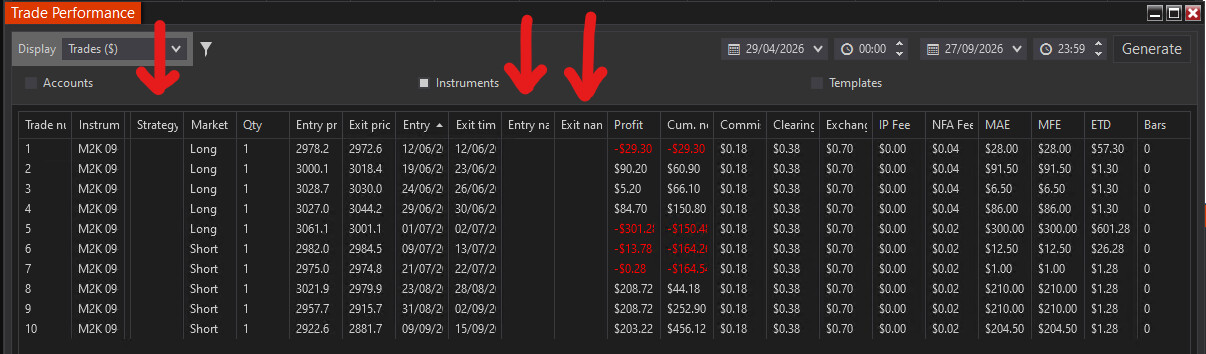
The snapshot below is of the trade performance of one of my strategies on my live account. You can see that the fields in these three columns are blank.
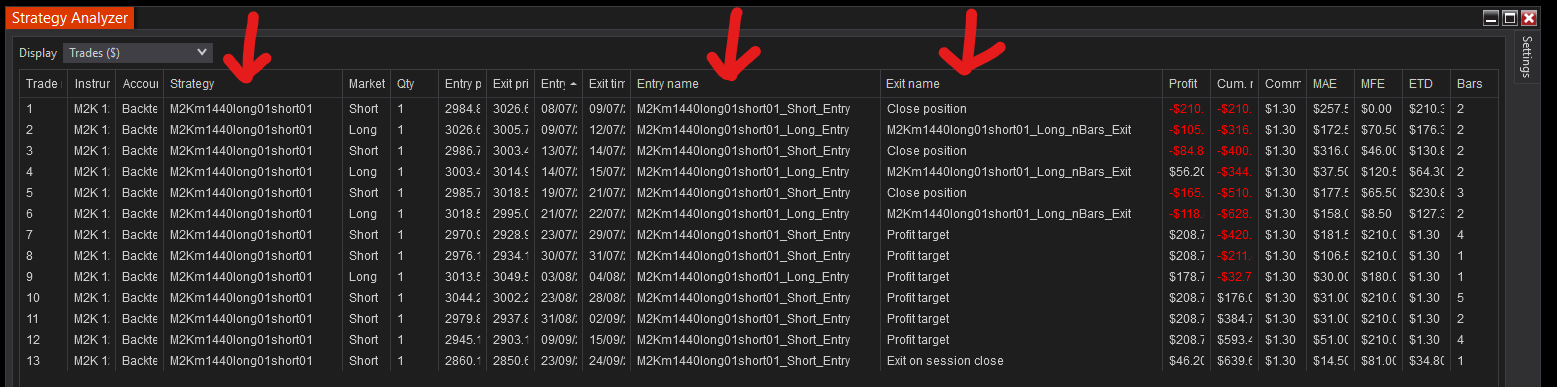
When I run a backtest in Strategy Analyzer the Strategy Name, Entry Name and Exit Name all appear in the relevant columns.
My code is as below:
- Strategy Name defined as “Name = “M2Km1440long01short01”;” in State.SetDefaults within OnStateChange().
- Entry Name defined as "EnterLong(“M2Km1440long01short01_Long_Entry”);" and “EnterShort(M2Km1440long01short01_Short_Entry");”
- Exit Name defined as “ExitLong(“M2Km1440long01short01_Long_nBars_Exit”, M2Km1440long01short01_Long_Entry");” and “ExitShort(“M2Km1440long01short01_Short_nBars_Exit”, M2Km1440long01short01_Short_Entry");”
Your help is appreciated.
Neil, the Analyzer result suggests the strategy is assigning signal names. Trade Performance is a different view: it pairs completed trades at the account level. NinjaTrader’s Trades Display help says that when multiple NinjaScript strategies share an account, this pairing does not follow each strategy’s own executions. The same help page points to the individual performance view under Control Center > Strategies.
I’d compare one live fill in that strategy’s individual performance view with the same trade in the account-wide Trade Performance window. If the names appear in the first view, the report pairing is the first thing to investigate. If both are blank, check the matching entry and exit executions for that one trade before changing the signal-name code.
Were any other strategies, ATM or manual orders, or partial closes active on the same account and instrument during those fills?