How to get the chart trader active instrument in an indicator ?
I am coding an indicator showing a chart watermark of the active instrument, to avoid trading mistake on charts with several instruments overlay
The only way I know of is to navigate the wpf control tree through the ChartPanel indicator property. The chartTrader is a sibling to the tabControl and they both live under the grdChart element. Chart panel is nested fairly far down in the tabControl so you’ll need to walk up the tree to find grdChart, then find chartTrader (and cbxIntruments) as children from there. The selected value of the cbxInstruments control is what you are looking for I think.
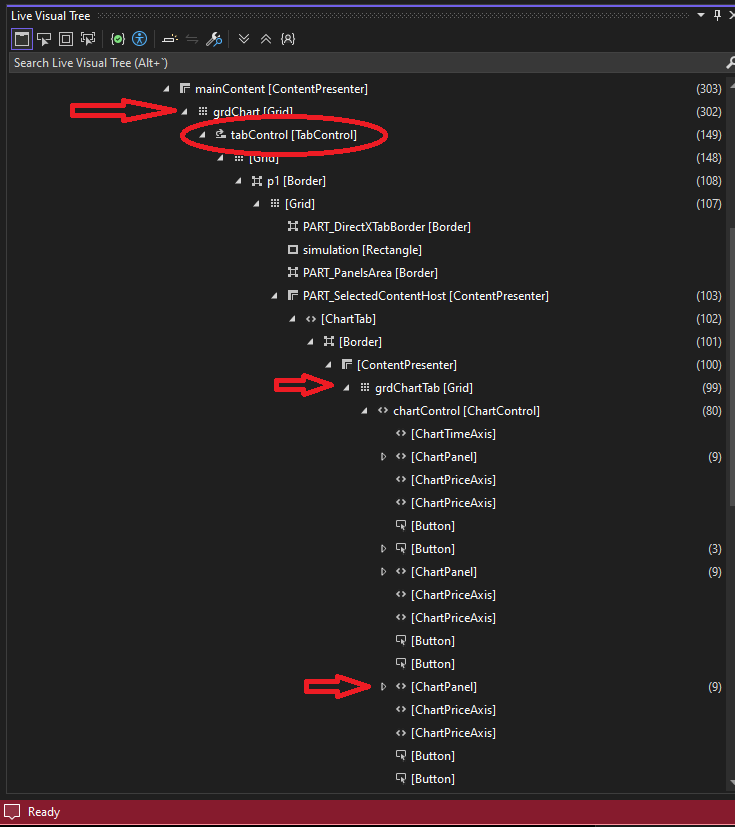
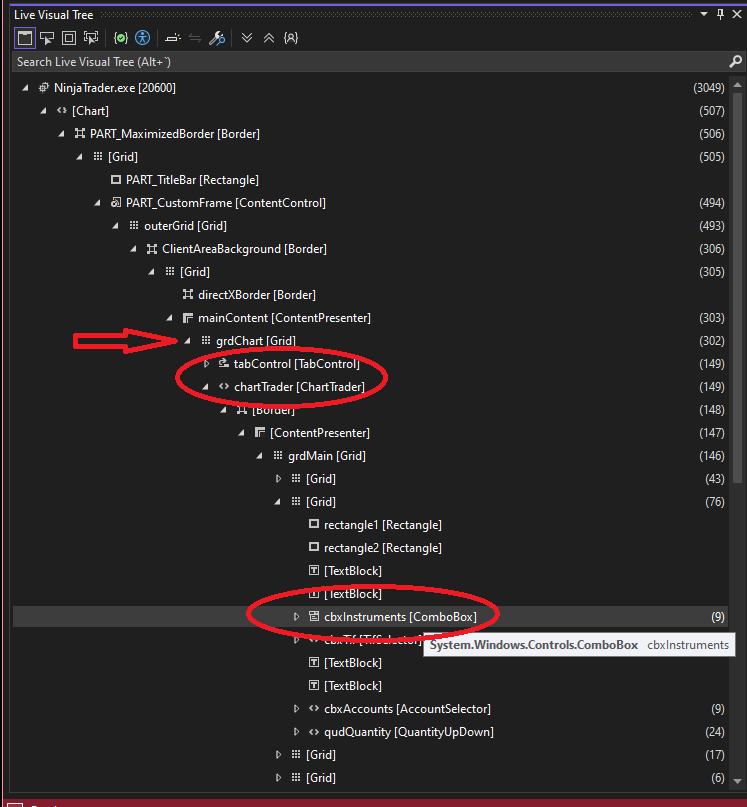
Thank you very much …
You can also try this;
		// Instrument Selector
	private System.Windows.Controls.ComboBox myInstrumentSelector;
	private string myChartTraderInstrumentName;
In State Data Loaded:
		// Instrument Selector
		ChartControl.Dispatcher.InvokeAsync((Action)(() =>
		{
			myInstrumentSelector = Window.GetWindow(ChartControl.Parent).FindFirst("ChartTraderControlInstrumentSelector") as System.Windows.Controls.ComboBox;

			if (myInstrumentSelector != null)
			{
				// Subscribe to SelectionChanged event
				myInstrumentSelector.SelectionChanged -= InstrumentSelector_SelectionChanged;
				myInstrumentSelector.SelectionChanged += InstrumentSelector_SelectionChanged;

				// Store as string
				if (myInstrumentSelector.SelectedItem != null)
				{
					myChartTraderInstrumentName = myInstrumentSelector.SelectedItem.ToString();
					Print("My Selected Instrument = " + myChartTraderInstrumentName);
				}
			}
		}));
Event Handler to update Changes in Realtime:
	private void InstrumentSelector_SelectionChanged(object sender, SelectionChangedEventArgs e)
	{
		if (myInstrumentSelector?.SelectedItem != null)
		{
			myChartTraderInstrumentName = myInstrumentSelector.SelectedItem.ToString();
			Print("The Instrument was changed to: " + myChartTraderInstrumentName);

			// Force Refresh
			ChartControl.Dispatcher.BeginInvoke(new Action(() =>
			{
				ChartControl.InvalidateVisual();
			}));
		}
	}
State terminated:
				if (myInstrumentSelector != null)
					myInstrumentSelector.SelectionChanged -= InstrumentSelector_SelectionChanged;
2 Likes
Perfect, thank a lot. It works now thanks to your code
Another example is here.
This method is much much simpler, completed undocumented, not listed at all in the editor either.
I know.
If you mine the old forums, you can find it there.
I saw when it was mentioned by Chelsea, I think.
[Update: Not Chelsea, twas Jim in NT Support, see link below]
I was ‘OMG, so simple, so elegant!’ and immediately
started using it.

1 Like
I saved the link to where I first saw it mentioned by NT Support.
See here.
1 Like
I found that there’s actually a support document on how to get all the UI elements from ChartTrader:
The test document works, but oddly …except for the method they use for getting the Instrument selector. It doesn’t work at all for me. So I don’t know if this is an old method.
private NinjaTrader.Gui.Tools.InstrumentSelector instrumentSelector;
instrumentSelector	= chartWindow.FindFirst("ChartTraderControlInstrumentSelector") as InstrumentSelector;
					if (instrumentSelector != null)
					{
						instrumentSelector.InstrumentChanged	+= InstrumentSelector_InstrumentChanged;
						currentInstrument						= instrumentSelector.Instrument;
					}

	// The instrument selector would only come into play when multiple instrument series are added to the data series window
	private void InstrumentSelector_InstrumentChanged(object sender, CancelEventArgs e)
	{
		currentInstrument	= instrumentSelector.Instrument;
		Print("ChartTraderControlInstrumentSelector Instrument " + currentInstrument + " assigned to local variable");
	}
2 Likes