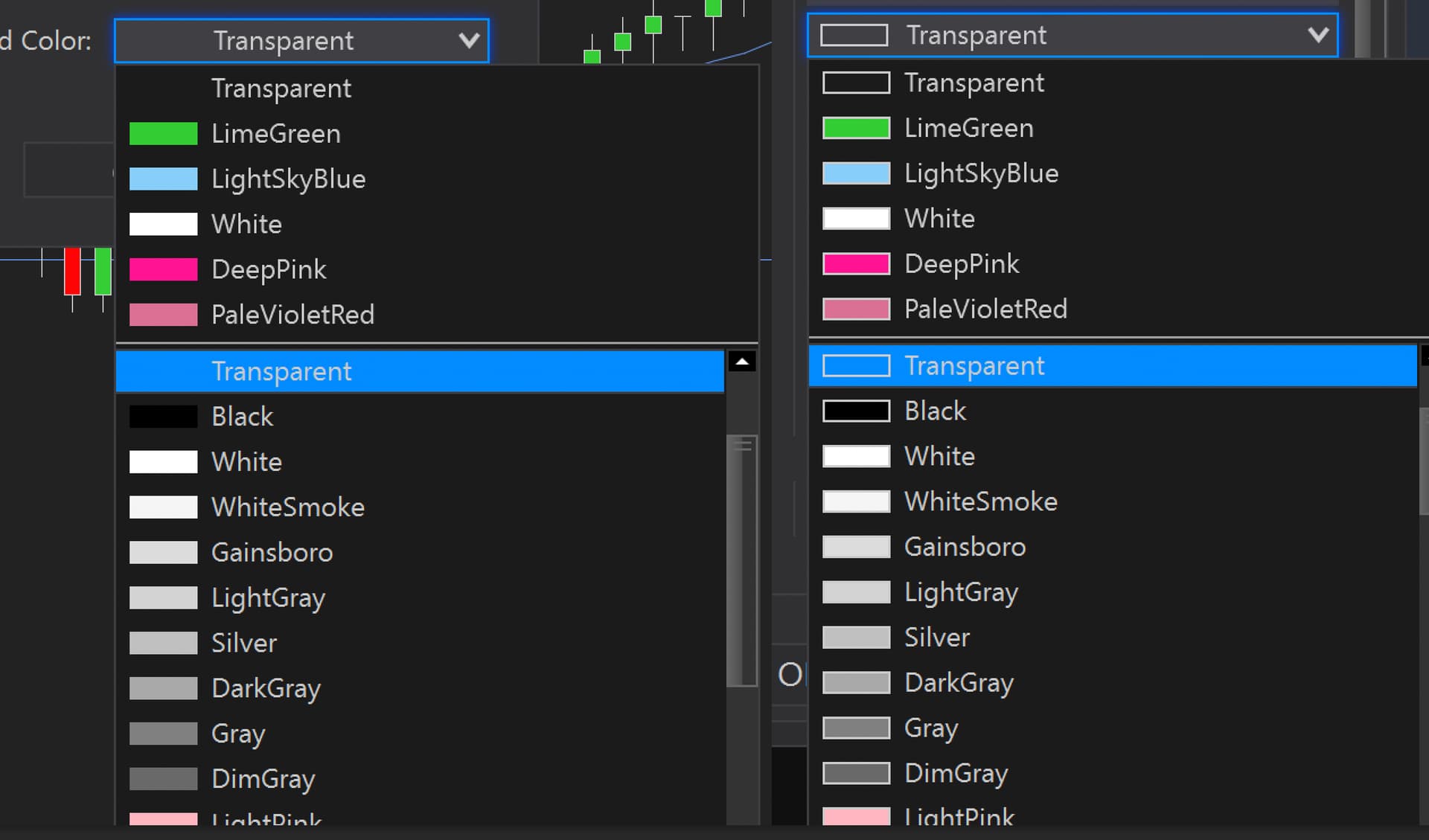
I’m inserting a Brush Picker control inside a dialog box as part of an AddOn. Works fine but has some slight differences compared to the BrushPicker you find throughout NT, namely, the swatches have borders. How do I apply the correct NT styling to BrushPicker controls in a custom NTWindow so they match the appearance of native NT color pickers? Is there a specific Style resource I should reference, or does the control need to be hosted differently?
public class SettingsWindow : NTWindow
{
    private System.Windows.Controls.WpfPropertyGrid.Controls.BrushPicker colorPicker;

    public SettingsWindow(Color currentColor)
    {
        Caption = "Settings";
        Width = 400;
        Height = 250;
        ResizeMode = ResizeMode.NoResize;
        WindowStartupLocation = WindowStartupLocation.CenterOwner;

        Grid grid = new Grid { Margin = new Thickness(15) };

        colorPicker = new System.Windows.Controls.WpfPropertyGrid.Controls.BrushPicker
        {
            SelectedBrush = new SolidColorBrush(currentColor),
            VerticalAlignment = VerticalAlignment.Center
        };

        grid.Children.Add(colorPicker);
        Content = grid;
    }
}
Mine Left, NT Right