Bars ago Help "new bar"

When doin the math for bars ago i use a variable, problem is that the value of variable is changing on each price change instead of bars close.

What would be the easiest way to deretmine if bars is new before “doing math”?

my strategy is set to update on price change which i want.

i only want the math to update on new bar not price change.

Thanks in advance.

There is a boolean flag you can check to see if the incoming data is starting a new bar: IsFirstTickOfBar

1 Like

Exactly. IT. Thank you for expanding the lane.

You might also want to consider GetValueAt() instead of barsAgo. It works everywhere and is more predictable. You access the value at a specific bar. Bars ago has its limitations and may not always give you the correct value that you’re anticipating. Look at NT Best Practices page for details.

2 Likes

seems like im getting extra bars from somewhere. “spoofing my RAM” i changed my code to only update on bar 2, but my bars ago kreeps backwards on the ERROR, I have extreme amounts of ULTRASOUND in my room that is affecting my memory stack with no one to report it to ..

not sure that is the answer as i dont need a price, i only need a reference to time. for draw region purpose. " asks for bars ago" which is variable changing on new bar.

if i was able to draw region starting at “time” instead of bars ago this would be AWESOME.

Draw.Region(NinjaScriptBase owner, string tag, DateTime startTime,
DateTime endTime, ISeries series, double price, Brush areaBrush, int areaOpacity)
Draw.Region(NinjaScriptBase owner, string tag, DateTime startTime,
DateTime endTime, ISeries series1, ISeries series2, Brush outlineBrush, Brush areaBrush, int areaOpacity)

This syntax is confusing to me, i wish i had example with start time of [0],[0],[0] or its correct input.

Thankyou for responding.

What’s confusing about the syntax? It gives you exactly what you’re looking for.

You can get Time at a specific bar using Time.GetValueAt(barNumber) or Times[0].GetValueAt(barNumber). GetValueAt() isn’t just for price.

To get time for the starting bar on the chart (I assuming this is what you mean by time of [0]), then access Time.GetValueAt(0).

snippet

Draw.Ray(this, “Projection”, false, RSIOlive, SMA1[5],-10, SMA1[0], Brushes.HotPink,DashStyleHelper.Dash, 2);

need to say

Draw. Ray(this"", false, (time now), SMA1[5],-10, SMA1[0], Brushes.HotPink,DashStyleHelper.Dash, 2);

im not good with the time value .
Thanks in advance

Time now > Time.GetValueAt(CurrentBar)

Time 10 bars ago: Time.GetValueAt(CurrentBar-10)

This is the syntax if you have a single data series. If there are multiple data series in your code, then you’ll have to use the right Times[index] for the bars that are in progress.

You can probably simplify it as below and this should work in all cases assuming your indexing is correct.

Time now > Times[BarsInProgress].GetValueAt(CurrentBars[BarsInProgress])

Time 10 bars ago: Times[BarsInProgress].GetValueAt(CurrentBars[BarsInProgress]-10)

Hope this helps.

this is the Propper syntax:

DrawRay(string tag, bool autoScale, DateTime anchor1Time, double anchor1Y, DateTime anchor2Time, double anchor2Y, Color color, DashStyle dashStyle, int width)

but i have not seen an example used. so my code is erroring when i go this route.

just using an anchor time of (now) is sufficient.

OK, I’m trying to help here, but maybe I don’t understand all the details. I just gave you the syntax of how to grab the time for a given bar. You’ll need to figure out the rest of the syntax since I don’t have your code.

Explain to me in English what you’re trying to do and I’ll give you the syntax you need. Are you trying to draw a ray that starts on the last bar of the chart (or a few bars back) and point to the right?

Or maybe post your exact Draw.Ray() line and tell me what error you’re getting and maybe I can help.

1 Like

I agree with fc77, posting the error and the exact code would be very helpful. One question I have is: are you doing your draw work in OnBarUpdate() or OnRender()? There can be some subtle differences depending on the context you’re using.

there is no error to speak of but the value of the variable should not change but remain the same anchor point.

The error is the spoofing, which causes extra bars to be introduced. thus causing the script to repeat the math logic because it runs on price change not bar close,

solution: change anchor to time , or change math to only run on “new bar” this may still get spoofed.

Draw.Ray() example above is the actual snippet im working on, i know it involves [0],[0],[0] or something like that.

Thank you for responding

this should not be complicated,

this is working code:
Draw.Ray(this, “Projection”, false, RSIOlive, SMA1[5],-10, SMA1[0], Brushes.HotPink,DashStyleHelper.Dash, 2);

just need to replace RSIOlive the “variable” with TIME NOW.

so that the "bars ago " won’t change but be locked to a specific time.

I cannot explain it any simpler than that.

Thanks for the time and efforts.

just an example code will work showing draw ray at now till then.

Snippet is from on bar update

-10 for the end bars ago would actually be in the future. I’m not sure that’s defined behavior. Ray’s automatically extend infinitely in the direction they point.

If you want the ray pointed left (from now to 10 bars ago):
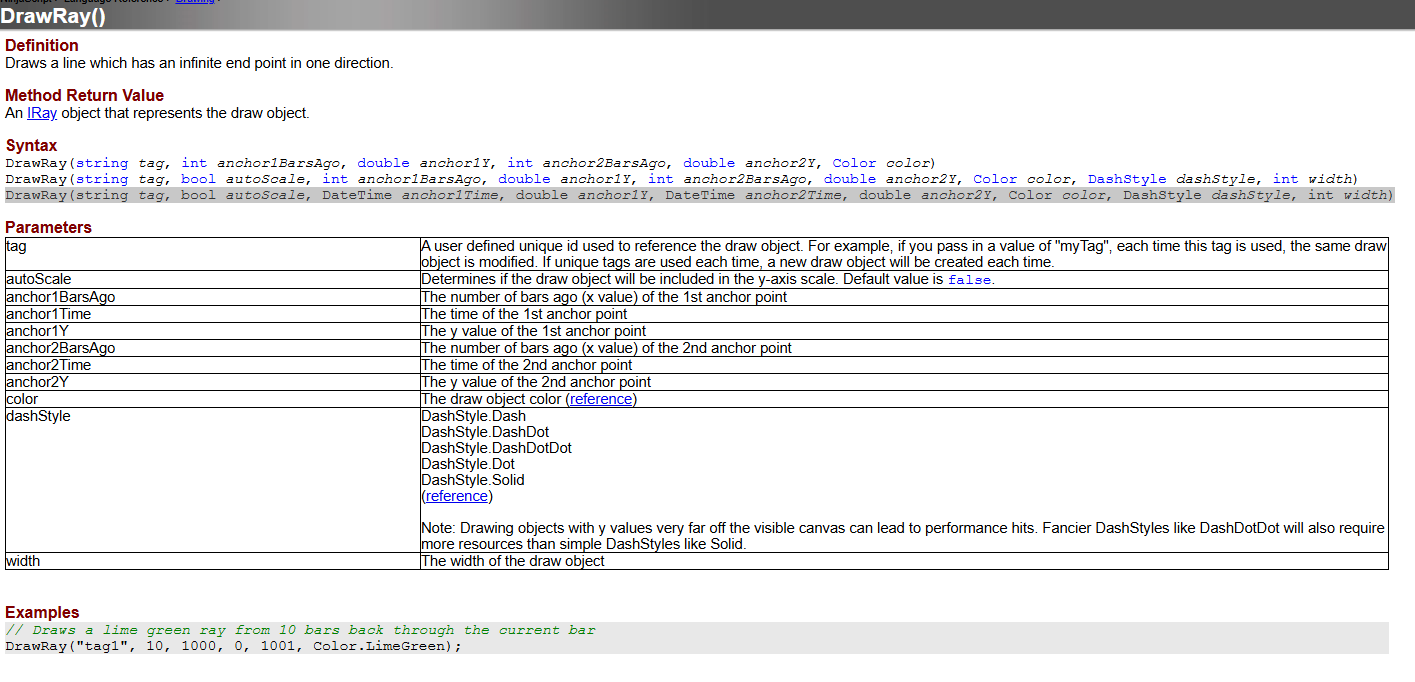
Draw.Ray(this, “Projection”, false, Time[0], SMA1[5],Time[10], SMA1[0], Brushes.HotPink,DashStyleHelper.Dash, 2);

If you want the ray pointed right (from 10 bars ago to now):

Draw.Ray(this, “Projection”, false, Time[10], SMA1[0],Time[0], SMA1[5], Brushes.HotPink,DashStyleHelper.Dash, 2);

Draw.Ray(this, “Projection”, false, Time[0], SMA1[5],Time[10], SMA1[0], Brushes.HotPink,DashStyleHelper.Dash, 2);

With this example the - Time[0], will be repopulated on next bar to a new time of [0]

I need the Time to Remain same value not changing on next bar,

or maybe a variable set with time instead of Bars Ago