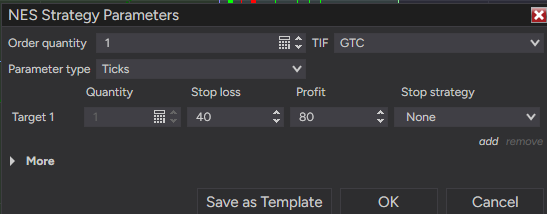
The ATM Strategy for NES is triggerring incorrectly.
Here is what I observed.
-
Placed a buy limit order
-
Use the following ATM for the oder
- Quantity =1
- Parameter Type = Ticks
- Target1 - Stop Loss = 40 Profilt = 80
-
For NES Each Tick is 1/4 of a point. Stop Loss of 40 should be 10 points below and take profit of 80 ticks should be 20 points above.
-
The placeds trade and the SL and TP shows 40 points above for TP and 20 popints below for SL.
-
See the log statement below for th executed trade
-
| Time |
Category |
Message |
| 10/25/2026 11:30:25 PM |
Order |
Order=‘9c72cfcd3b794a7daf8639891f63d83e/SimAccount1’ Name=‘Target1’ New state=‘Submitted’ Instrument=‘NES 12-26’ Action=‘Sell’ Limit price=7713.5 Stop price=0 Quantity=1 Type=‘Limit’ Time in force=GTC Oco=‘252799b8cbd34a40b77ce3d4963a8c4c’ Filled=0 Fill price=0 Error=‘No error’ Native error=‘’ |
-
| Time |
Category |
Message |
| 10/25/2026 11:30:25 PM |
Order |
Order=‘eb69f648564a4a2286686bc9c0fafdd8/SimAccount1’ Name=‘Stop1’ New state=‘Submitted’ Instrument=‘NES 12-26’ Action=‘Sell’ Limit price=0 Stop price=7653.5 Quantity=1 Type=‘Stop Market’ Time in force=GTC Oco=‘252799b8cbd34a40b77ce3d4963a8c4c’ Filled=0 Fill price=0 Error=‘No error’ Native error=‘’ |
| Time |
Category |
Message |
| 10/25/2026 11:30:25 PM |
Execution |
Execution=‘50625b7e49044ff69e0d07dd5836ad86’ Instrument=‘NES 12-26’ Account=‘SimAccount1’ Exchange=Default Price=7673.5 Quantity=1 Market position=Long Operation=Operation_Add Order=‘bbcc05d86a7549359ebebf0de9dd33dc’ Time=‘10/25/2026 11:30 PM’ |
Please explaain why the discrepany in TP and SL order. Attached the ATP strategy screen shot
Your log shows a consistent factor of two:
- Entry: 7673.5
- Target: 7713.5, a 40-point gap
- Stop: 7653.5, a 20-point gap
With your stated 0.25 tick size, 80 ticks would put the target at 7693.5 and 40 ticks would put the stop at 7663.5. The submitted prices instead correspond to 0.50 per tick. That points to the instrument definition or the settings actually applied to this entry; it does not establish which one is wrong.
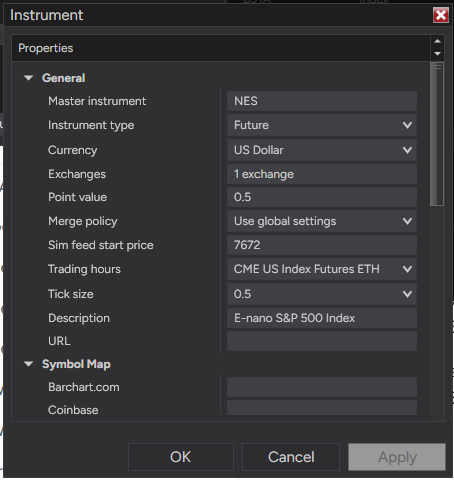
Your screenshot does show Ticks, 40 and 80. I would next inspect Tools > Instruments for the exact NES master instrument used by NES 12-26, especially its Tick size and provider symbol mapping. Compare those with the provider’s specification before changing anything. NinjaTrader defines Tick size as the instrument’s price increment: https://ninjatrader-devel.ninjatrader.com/support/helpguides/nt8/editing_instruments.htm
If it is already 0.25, save a fresh ATM template with 40/80 and select it explicitly for a new SimAccount1 entry. Record the fill and the initial submitted stop/target again. This separates an instrument-size mismatch from a different or older ATM instance. Keep the check in simulation.
What Tick size does the exact NES instrument show?
It shows .5 in Tools → Instrument - What should the correct setting for the instrument?
0.50 is correct for NES. CME specifies a 0.5-point price increment, not 0.25:
https://www.cmegroup.com/articles/faqs/faq-e-nano-equity-index-futures.html
Keep the instrument unchanged. For your stated 10-point stop and 20-point target, use 20/40 ticks in a new SimAccount1 ATM.
From 7673.5, expect stop 7663.5 and target 7693.5. Does that simulation produce those prices?