Hi,
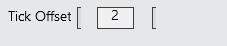
I’m adding some additional buttons on the chart trader for order entries and want to add a tick offset feature where hitting the + button increases the tick offset and - decreases it. The functionality currently works but instead of showing + and - on the panel, it shows as a left bracket ’ [ '.
- Why do WPF Button controls in NinjaScript show bracket characters
[instead of the actual text content like “+” and “-”? - Is there a specific font or styling needed for button text to display correctly in NinjaTrader’s WPF environment?
Here is an excerpt of the code i’m using for the + sign as example:
// Create offset up button
btnOffsetUp = new System.Windows.Controls.Button
{
Content = “+”,
Background = BrushOffsetButton,
BorderBrush = BrushButtonBorder,
BorderThickness = new Thickness(1),
FontSize = 16,
FontWeight = FontWeights.Bold,
Width = 28,
Height = 22,
Padding = new Thickness(0),
Margin = new Thickness(0, 0, 2, 0),
Focusable = false,
Cursor = Cursors.Hand,
Foreground = Brushes.Black
};
btnOffsetUp.Click += OffsetUpButton_Click;
btnOffsetUp.IsEnabled = false;
System.Windows.Controls.Grid.SetRow(btnOffsetUp, 2);
System.Windows.Controls.Grid.SetColumn(btnOffsetUp, 3);
Thank you for the help.