Vendor Help with Agile.net error

I get this error pop up every once in a while, and even when I don’t, NinjaTrader just closes, I mean, bam, gone. Sometimes when I’m working in the editor, sometimes when opening/loading an indicator, Sometimes I’m not even doing anything and the program just closes without warning.

It also takes hellaciously long to startup NT.

Sometimes I get this Agile.net popup when trying to start up NT or right as NT closes unexpectedly:
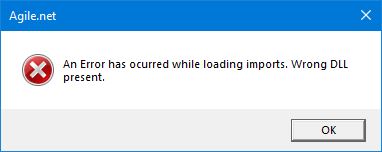
I figure it has something to do with a recent update to NT8 (I’m currently running 8.1.8.4 64-bit)

I’ve run powershell to fix Windows 10

DISM /Online /Cleanup-Image /RestoreHealth

sfc /scannow

Restarted computer and run Settings > Apps > Search “Visual” and done a Modify/Repair of both MSVisual Redistributals (x64 & x86) and restarted the computer.

I have a feeling Agile.net has something to do with vendor add-on protection, but I am stumped as what to do. I try to search online and get many referrals to the old forum but of course that leads back here. Is there a better .dll to replace it?

Any Vendors that are familiar with Agile.net .dll that might suggest help?

Log file looks fine. The last Trace file has one error on the last line: System.Data.SQLite (Log): SQLite error (17): statement aborts at 50: database schema has changed;

Should I just go back to 8.1.7.2, deal with “Connection Lost” and wait for a few months or can I fix this?
I would not replace an Agile.net DLL or roll back NT based on the last SQLite line alone. That leaves several possible causes mixed together.

Before changing anything, preserve the Log and Trace files covering one exact crash time. Then separate three cases: a clean startup with no vendor indicator loaded, opening the editor, and loading the particular indicator. Record which case crashes and which add-on was being loaded.

Could you paste the exact wording inside the AgileNet popup, plus the affected add-on/vendor name? Remove any licence key, account number or personal path. The NT build is already clear: 8.1.8.4.

That gives the vendor a specific compatibility case to investigate. I would keep the original DLLs intact and get a supported replacement from that vendor rather than substitute a DLL found online. Full logs can go privately to official support; the forum only needs the relevant redacted error lines.

1 Like

Thanks, @StratCoreAlpha

I did some of the things you mentioned and finally reinstalled 8.1.8.4, cleared my cache and rebooted.

Seems to be running fine all day today. I guess the initial required update a week ago did not go well.

I will continue to monitor the situation. Thank you for your help!

~Robotman

Still having problems.

Reinstalled 8.1.7.2 - Still having same problems. I do not think it is C:\program files. Reinstalled 8.1.8.4.

Looking into D:\Documents\NinjaTrader 8 folder

Deleted cache, db\cache, day, minute, tick files & restarted. Still same problems. No listing in Log or trace files of any errors except for brief mention of sqlite.

Renamed NinjaTrader.sqlite to NinjaTrader.OLD.sqlite and restarted. - still crashing.

Next stop. totally uninstalling everything. program, documents, cleaning out regedit and re-installing from scratch.

I REALLY MISS THE OLD FORUM !!! Frustrating.
----- So much knowledge lost -----

~Robotman

The recurrence after both NT versions and after renaming the database makes the SQLite line too weak to identify the cause. Before removing the Documents folder or changing registry entries, keep a backup of your workspaces, templates and custom files.

The next useful clue is the Windows crash report at the exact time NinjaTrader disappears. In Event Viewer, look under Windows Logs > Application for the matching application error and note the faulting module and exception code. Remove personal paths and licence details before posting.

Also keep the exact AgileNet popup wording separate from that crash report. A popup during one startup and a silent crash later may be different failures. Those details give the add-on vendor or official support a specific case to check, rather than another reinstall.

What faulting module and exception code does the matching Windows event show?

1 Like

Thanks for the insights @StratCoreAlpha

When the Agile.net pops up and instantly crashes NT, I could not find an error in the Event Viewer. I looked for any errors dealing with missing or wrong .dll errors.

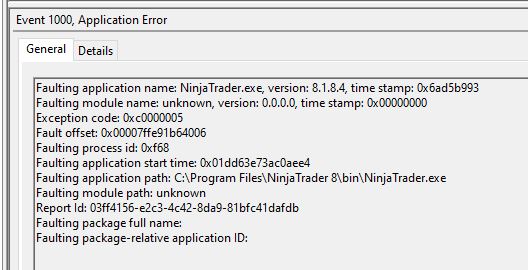
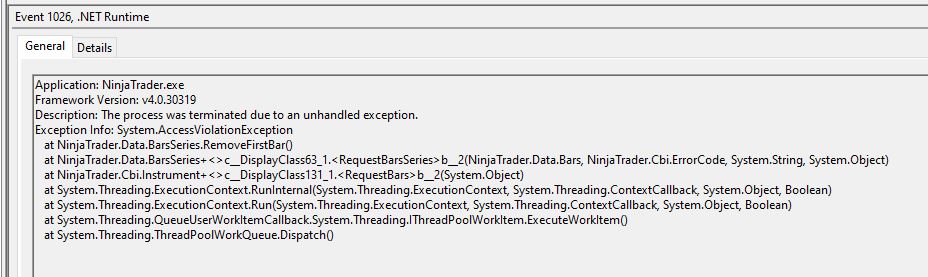
However, when the NT Trace file suddenly stopped abruptly without recording any actions, I noted the time and went into the Event viewer and pulled up this:

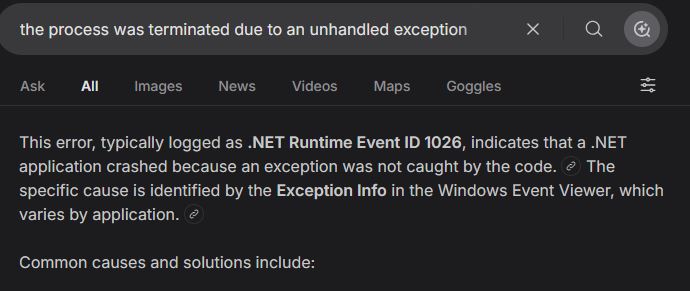
I have no idea what all this means, but I searched for the reason and got the following:

04 process terminated 02

I have already run :

DISM /Online /Cleanup-Image /RestoreHealth and

sfc /scannow and it came back as: no issues found.

I would hate to think that I have an issue with the CPU/memory. The computer works flawlessly except for recent issues with NT.

I then checked “Programs and Features” to find what version of .NET runtime I had and if it was up to date. I have been running the following for quite a while ever since I built the computer 2 years ago and have not had any problems with any programs until a month or so ago. I do regular Windows 10 updates. (I do not know why the date for the .NET runtime is showing today’s date).

Now, NinjaTrader Help references .NET 4.8 as a requirement to run, but I relied on Windows to install the correct version since installing NT8 two years ago when I built the computer and it has always run just fine.

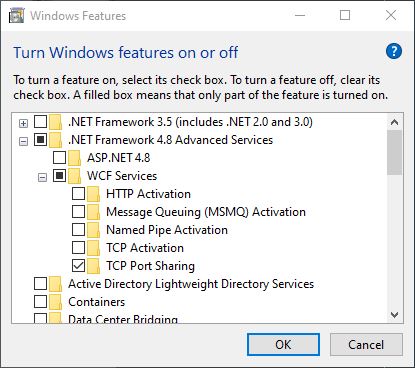
Here is a shot of what features are turned on/off:

I am not running .NET 4.8 and have not ever run it I don’t think.

I have imaged the current C: partition, made a backup copy of the /Documents/Ninjatrader 8 directory on another drive and made a .ntbk file also. I have not yet done a deep dive uninstall of NT8 yet.

I hesitate to contact NT support because of many of the negative remarks by users on this and the prior forum. But I am at the end of my rope on this and have no clue on how to solve this crashing issue ( that does not effect any other program or operation of Windows ).

Hopefully, someone might know a little bit about how to solve this. I imagine it’s probably something pretty simple.

~Robotman

Your screenshots show System.AccessViolationException at NinjaTrader.Data.BarsSeries.RemoveFirstBar(), with 0xc0000005 and an unknown faulting module. That identifies a crash path, not a bad CPU or memory. It also does not establish that the separate Agile.net popup has the same cause. The v4.0.30319 line is the CLR version, not proof that Framework4.8 is missing. Microsoft identifies the installed Framework using the registry Release value; at least528040 means4.8 or later: Determine which .NET Framework versions are installed - .NET Framework | Microsoft Learn

Keep your backups and pause the registry cleanup. Compare the same instrument and historical-data load in Safe Mode with one plain chart, no custom indicators and no automated strategy running. Close NinjaTrader, hold Ctrl while opening it until the login screen, then confirm Safe Mode under Help > About. If that clean case still crashes, the instrument, interval, exact time and BarsSeries stack give official support a reproducible case. NinjaTrader’s instructions: Help

I can also make you a small free, read-only diagnostic demo for the Framework version and matching Windows application errors. It would run locally and leave the decision about sharing any output with you. Would that help you avoid another round of reinstalling and hunting through Event Viewer?

Thanks again @StratCoreAlpha

You have helped eliminate false paths that I would otherwise have tried to go down. Although even going into safe mode caused crashing.

I could not stop the crashing and then I dug down into the error code 0xc0000005. It lead me to check my RAM. Although I already did 2 years ago when I was overclocking my new Intel i9-14900K with 32GB of 6000MT/s Corsair RAM.

I tested the RAM with Memtest86 and it is flawless. Then I checked my CPU with Cinebench and it passed fine. But I have read so many posts about how Intel screwed the pooch with this processor and how it degrades over time that I tried re-setting the (most recent and current) BIOS from the ASUS overclocking specs back to the Intel recommended specs and also disabled XMP for the RAM. Voila, no more errors. Everything runs fine, even when I am trying to do all the things that were crashing it before. In fact, Event Viewer is showing no errors of any kind since.

I am going to consider this solved and stable for the foreseeable future.

So, not a software problem. I plan on keeping the computer for at least another year and then probably build another one (with an AMD CPU). Everything costs about 5X more right now and I suppose it will be even worse in a year. But that’s business.

Again, thank you for your help and insight. I was really lost on this one.

~Robotman