Telegram Share Service

Hi,
here I share a Discord Share Service developed with help AI tools like Perplexity and DeepSeek and that enables sharing charts to a Discord channel or server.

Summary of the Telegram Share Service

The Telegram Share Service is a custom NinjaTrader 8 component that sends text alerts and/or chart screenshots to a specified Telegram chat, group, or channel using your own custom Telegram bot. It is called from indicators or strategies via Share("ServiceName", text, imagePath).

Core Capabilities:

  • Text Delivery: Sends alert text inside a monospace block (<pre>...</pre>) so that padded columns and tables align perfectly, just like Discord’s code blocks.

  • Image Delivery: When an image path is provided, the chart is sent as a photo via Telegram’s sendPhoto endpoint. The alert text is delivered as the photo’s caption, using the same monospace and bold formatting.

  • Length Handling: Text-only messages are truncated at 4096 characters (Telegram’s limit), while photo captions are truncated at 1024 characters (Telegram’s stricter caption limit). Truncation is done safely without cutting off formatting tags.

Configuration Layout:

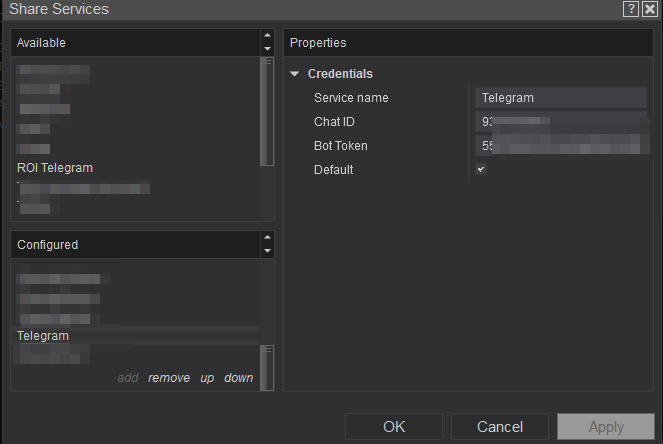
  • Credentials Group: Chat ID, Bot Token, plus NinjaTrader’s built-in Service name and Default fields. Share Service property fields includes help instructions for configuring the service.

Technical Design:

  • Uses Telegram’s HTML parse_mode instead of Markdown, because HTML only requires escaping three characters (&, <, >) and avoids the fragile formatting-symbol errors that Markdown causes with arbitrary alert text.

  • The bot must have been started at least once in the target chat (private, group, or channel) before the service can post; otherwise, Telegram returns a chat not found error.

Enjoy the sharing possibilities provided by NT8.
@ProyectoROI25

#region Using declarations
using System;
using System.IO;
using System.Net;
using System.Text;
using System.ComponentModel;
using System.ComponentModel.DataAnnotations;
using System.Threading.Tasks;
using NinjaTrader.NinjaScript;
using NinjaTrader.Gui;
#endregion

namespace NinjaTrader.NinjaScript.ShareServices
{
    [Gui.CategoryOrder("Credentials", 10000)]
    public class TelegramShareService : ShareService
    {
        private const string FooterText       = "Developed by @ProyectoROI25 (X/Twitter)";
        private const int    MaxCaptionLength = 1024;

        private string chatId;
        private string botToken;

        protected override void OnStateChange()
        {
            if (State == State.SetDefaults)
            {
                Name         = "ROI Telegram";
                Description  = "Telegram Bot Share Service by ROI";
                IsConfigured = true;
            }
        }

     
        [NinjaScriptProperty]
        [Display(Name = "Chat ID", Order = 1, GroupName = "Credentials",
                 Description = "Numeric identifier of the Telegram chat, group, or channel to post to. Obtain it by sending a message to your bot, then opening https://api.telegram.org/bot<TOKEN>/getUpdates in a browser and copying the number after \"chat\":{\"id\":. Group and channel IDs are negative; keep the minus sign.")]
        public string ChatId
        {
            get { return chatId; }
            set { chatId = value; }
        }

        [NinjaScriptProperty]
        [Display(Name = "Bot Token", Order = 2, GroupName = "Credentials",
                 Description = "Authentication token of your Telegram bot. Obtain it from @BotFather: send /newbot (or /token for an existing bot) and copy the token that looks like 123456789:ABC-DEF.... The bot must have been started at least once by the target chat before it can post.")]
        public string BotToken
        {
            get { return botToken; }
            set { botToken = value; }
        }

      
        public override async Task OnShare(string text, string imgFilePath)
        {
            try
            {
                if (string.IsNullOrEmpty(BotToken) || string.IsNullOrEmpty(ChatId))
                {
                    Print("TelegramShareService: Bot Token or Chat ID not configured");
                    return;
                }

                if (!string.IsNullOrEmpty(imgFilePath) && File.Exists(imgFilePath))
                    await SendPhoto(BuildCaption(text), imgFilePath);
                else
                    await SendMessage(BuildBody(text));
            }
            catch (Exception ex)
            {
                Print("TelegramShareService Error: " + ex.Message);
            }
        }


        private string BuildBody(string text)
        {
            return "<pre>" + EscapeHtml(text) + "</pre>\n\n" + EscapeHtml(FooterText);
        }

        private string BuildCaption(string text)
        {
            string footer = EscapeHtml(FooterText);

          
            int overhead   = 5 + 6 + 2 + footer.Length + 4;
            int maxContent = MaxCaptionLength - overhead;
            if (maxContent < 0) maxContent = 0;

            string escaped = EscapeHtml(text);
            if (escaped.Length > maxContent)
            {
                int cut = Math.Max(0, maxContent - 3);
                escaped = escaped.Substring(0, cut) + "...";
            }

            return "<pre>" + escaped + "</pre>\n\n" + footer;
        }

       
        private async Task SendMessage(string body)
        {
            try
            {
                string url = "https://api.telegram.org/bot" + BotToken + "/sendMessage";

                var request = (HttpWebRequest)WebRequest.Create(url);
                request.Method      = "POST";
                request.ContentType = "application/json";

                string payload =
                    "{"
                    + "\"chat_id\":\"" + EscapeJson(ChatId) + "\","
                    + "\"text\":\"" + EscapeJson(body) + "\","
                    + "\"parse_mode\":\"HTML\""
                    + "}";

                byte[] data = Encoding.UTF8.GetBytes(payload);

                using (var stream = await request.GetRequestStreamAsync())
                    await stream.WriteAsync(data, 0, data.Length);

                using (var response = (HttpWebResponse)await request.GetResponseAsync()) { }
            }
            catch (WebException wex)
            {
                string errBody = "";
                if (wex.Response != null)
                {
                    using (var reader = new StreamReader(wex.Response.GetResponseStream()))
                        errBody = reader.ReadToEnd();
                }
                Print("TelegramShareService Message Error: " + wex.Message + " | " + errBody);
            }
            catch (Exception ex)
            {
                Print("TelegramShareService Message Error: " + ex.Message);
            }
        }

    
        private async Task SendPhoto(string caption, string imagePath)
        {
            try
            {
                string url      = "https://api.telegram.org/bot" + BotToken + "/sendPhoto";
                string boundary = "---------------------------" + DateTime.Now.Ticks.ToString("x");

                var request = (HttpWebRequest)WebRequest.Create(url);
                request.Method      = "POST";
                request.ContentType = "multipart/form-data; boundary=" + boundary;

                using (var reqStream = await request.GetRequestStreamAsync())
                {
                    // chat_id
                    string chatIdPart =
                        "--" + boundary + "\r\n"
                        + "Content-Disposition: form-data; name=\"chat_id\"\r\n\r\n"
                        + ChatId + "\r\n";
                    byte[] chatIdBytes = Encoding.UTF8.GetBytes(chatIdPart);
                    await reqStream.WriteAsync(chatIdBytes, 0, chatIdBytes.Length);

                    // parse_mode = HTML  (needed for the <pre> block)
                    string parseModePart =
                        "--" + boundary + "\r\n"
                        + "Content-Disposition: form-data; name=\"parse_mode\"\r\n\r\n"
                        + "HTML\r\n";
                    byte[] parseModeBytes = Encoding.UTF8.GetBytes(parseModePart);
                    await reqStream.WriteAsync(parseModeBytes, 0, parseModeBytes.Length);

                    // caption
                    string captionPart =
                        "--" + boundary + "\r\n"
                        + "Content-Disposition: form-data; name=\"caption\"\r\n\r\n"
                        + (caption ?? "") + "\r\n";
                    byte[] captionBytes = Encoding.UTF8.GetBytes(captionPart);
                    await reqStream.WriteAsync(captionBytes, 0, captionBytes.Length);

                    // photo file
                    string fileHeader =
                        "--" + boundary + "\r\n"
                        + "Content-Disposition: form-data; name=\"photo\"; filename=\"chart.png\"\r\n"
                        + "Content-Type: image/png\r\n\r\n";
                    byte[] fileHeaderBytes = Encoding.UTF8.GetBytes(fileHeader);
                    await reqStream.WriteAsync(fileHeaderBytes, 0, fileHeaderBytes.Length);

                    byte[] fileBytes = File.ReadAllBytes(imagePath);
                    await reqStream.WriteAsync(fileBytes, 0, fileBytes.Length);

                    byte[] footerBytes = Encoding.UTF8.GetBytes("\r\n--" + boundary + "--\r\n");
                    await reqStream.WriteAsync(footerBytes, 0, footerBytes.Length);
                }

                using (var response = (HttpWebResponse)await request.GetResponseAsync()) { }
            }
            catch (WebException wex)
            {
                string errBody = "";
                if (wex.Response != null)
                {
                    using (var reader = new StreamReader(wex.Response.GetResponseStream()))
                        errBody = reader.ReadToEnd();
                }
                Print("TelegramShareService Photo Error: " + wex.Message + " | " + errBody);
            }
            catch (Exception ex)
            {
                Print("TelegramShareService Photo Error: " + ex.Message);
            }
        }

     
        private string EscapeHtml(string s)
        {
            if (string.IsNullOrEmpty(s))
                return "";
            return s.Replace("&", "&amp;")
                    .Replace("<", "&lt;")
                    .Replace(">", "&gt;");
        }

        private string EscapeJson(string s)
        {
            if (string.IsNullOrEmpty(s))
                return "";
            return s.Replace("\\", "\\\\")
                    .Replace("\"", "\\\"")
                    .Replace("\n", "\\n")
                    .Replace("\r", "\\r");
        }
    }
}

How to install the Telegram Share Service (quick start for beginners)

In NinjaTrader 8, open New → NinjaScript Editor.

In the left panel, right-click the ShareServices folder → New → Share Service.

Name it TelegramShareService (or any name you like) and click OK. A template file opens.

Select everything in the file (Ctrl+A) and delete it.

Paste the full code from the code block above (Ctrl+V). Make sure you include the entire file — from the first #region Using declarations line all the way to the closing brace at the bottom. Nothing in between should be omitted.

Press F5 to compile. A green check in the toolbar means success. If any error appears, it is almost always because a piece of the code was cut off during copy — re-select and paste again.

Now close NinjaTrader completely, including the tray icon (right-click it → Exit). Reopen NinjaTrader. This step is required — share services are only registered at startup.

Before configuring NinjaTrader, you need a bot and a Chat ID:

In Telegram, search for @BotFather, send /newbot, follow the prompts, and copy the token it returns (it looks like 123456789:ABC-DEF...).

Give the bot access to the target chat: for a private chat, open your bot and click Start then send any message; for a group, add the bot as a member and then send a message that mentions it (e.g. @YourBotName hello), because by default a bot only sees messages that mention it; for a channel, add the bot as an administrator, not just a member.

Send a message to the bot (or in the group, mentioning the bot), then open this URL in a browser, replacing <TOKEN> with your bot’s token: https://api.telegram.org/bot``<TOKEN>/getUpdates. In the response, find "chat":{"id": and copy the number. It is positive for private chats and negative for groups and channels — keep the minus sign.

In NinjaTrader, open Tools → Options → General → Share Services, click Add, and select Telegram.

Give the instance a Service name (for example Telegram1 — this is the name you will reference from your indicators). Paste the Chat ID and the Bot Token. Click OK.

From your indicator, call Share("Telegram1", "your text", "") for text only, or Share("Telegram1", "your text", @"C:\path\chart.png") to attach a chart. Wrap any label in **double asterisks** for bold — the service converts them to Telegram’s bold tag automatically, so do not write Telegram’s own HTML or Markdown tags. The whole body is sent inside a monospace block so padded columns align.

Note on renaming: if you rename the file, also update these two lines in the code — public class TelegramShareService : ShareService and Name = "Telegram";. Everything else can stay as-is.