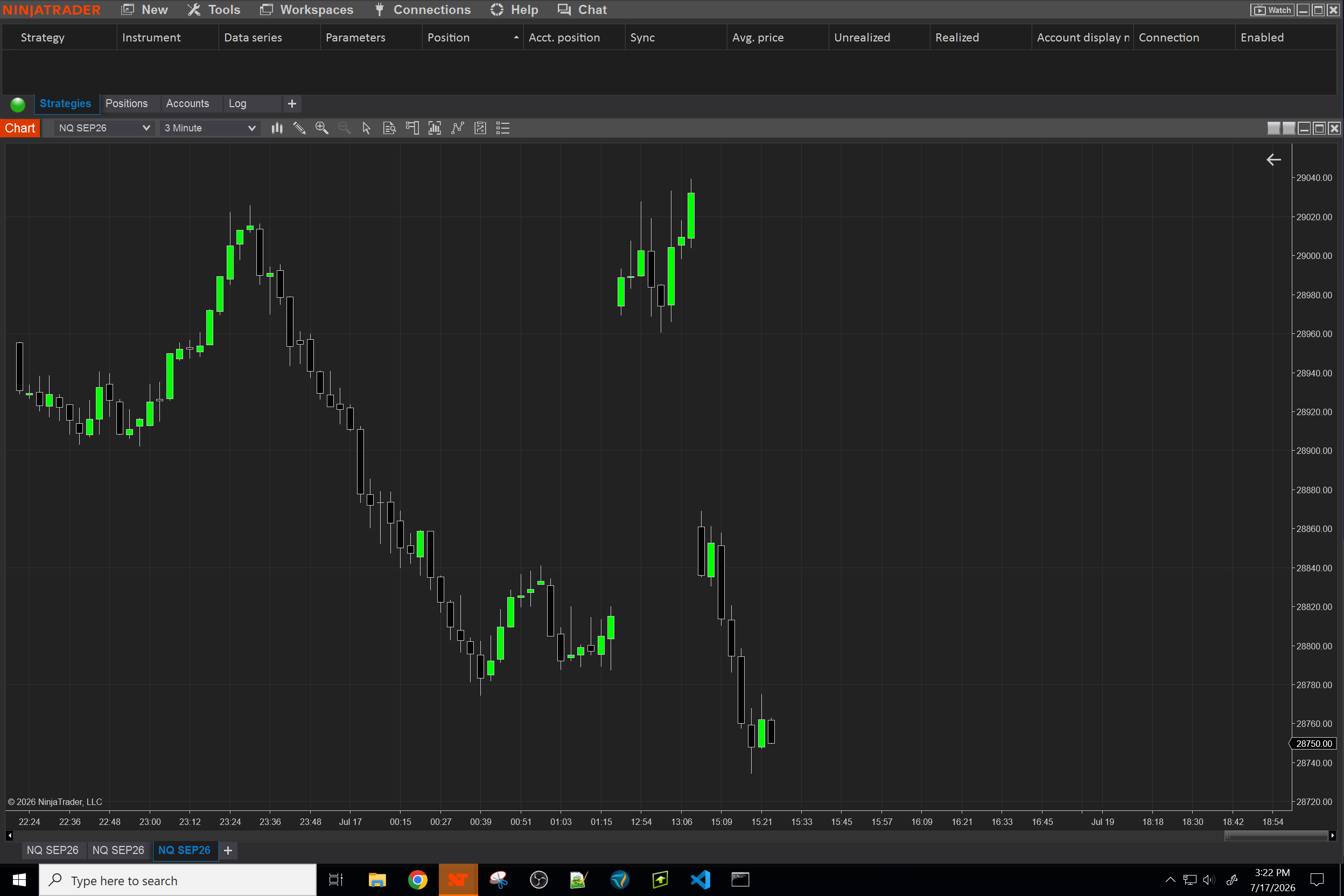
I’m experiencing an issue with NinjaTrader where historical data is missing for the period that I was disconnected from my data provider.
Details:
Platform: NinjaTrader Desktop
Instrument: NQ SEP26
Timeframe: 3 Minute
Data Provider: (Please specify)
Issue:
While connected, the chart displays normally.
If I disconnect from my data provider (or close NinjaTrader while disconnected), the market continues trading as expected.
When I reconnect later, the chart contains large gaps covering the entire period that I was disconnected. The missing candles are never downloaded, leaving permanent gaps in the chart.
Instead of backfilling the missing historical data, NinjaTrader jumps from the last bar before the disconnect to the first new real-time bar after reconnecting.
I’ve attached a screenshot showing the gaps.
What I’ve tried:
Reload Historical Data
Disconnect and reconnect to the data feed
Restart NinjaTrader
Open a new chart
The gaps remain even after reconnecting.
Questions:
Should NinjaTrader automatically download the historical data that was missed while disconnected?
Is this a NinjaTrader issue or a limitation/configuration of my data provider?
Is there a setting that enables automatic historical backfill after reconnecting?
Has anyone experienced this issue or found a solution?
I assume your provider gives you multi-day, 1-minute historical data.
I often use this method to correct historical data with custom bars and TickReplay. It wouldn’t normally be necessary for standard bars (e.g., like the minute bars you mentioned) and without TickReplay, but it will likely work and solve your problem (though you’d need to investigate the cause further).
Right-click on the chart and select ‘Reload All Historical Data’.
If that doesn’t work, go to the folder containing the historical data: …\Documents\NinjaTrader 8\db\cache\CME US Index Futures ETH.Romance Standard Time\MINUTE\NQ 09-26 (make sure it’s the folder containing the data you want to update) and delete the contents. Then return to the chart and repeat step 1.
Another possibility is that you have a problem with the database. Go to Tools/Historical Data and explore the data. You can delete them and reload them again from the datafeed.
Check the log files in …\Documents\NinjaTrader 8\log for any connection/data issues.
I had a similar issue with historical NQ data from 2024/2025.
While backtesting a simple trend-following rule on 10 years of NQ 1-minute data exported from NinjaTrader, I found bars that can’t be real trading: Friday after 17:00 ET, all of Saturday, Sunday before 18:00 ET, plus a few isolated bad prints more than 3% away from both neighbouring closes.
These bars sit on weekend gaps, so a strategy that trades through them records fills and stops that never existed. On my test, the same rules swung from about +$37k to −$88k to +$128k net over the period as I cleaned the data in stages. The strategy didn’t change, only the data did.
What I now filter before any test:
Drop Friday from 17:00 ET, all Saturday, and Sunday before 18:00 ET.
Drop the 17:00 to 18:00 ET daily halt.
Drop a bar if its close is more than 3% from both neighbours (isolated spikes).
Check the first and last bar of each week against the session calendar.
Check: count your bars by day of week and hour in ET. If you see Saturday bars, you have the same problem. Has anyone else seen this in their exports, and does it come from the data provider or the export settings?
The first thing I do when I have any problem is RESTART my computer. I already had problems and errors that told me to call support. Instead of doing that I restarted my computer and the problem was solved.
Restart your computer solves in general a lot of problems.