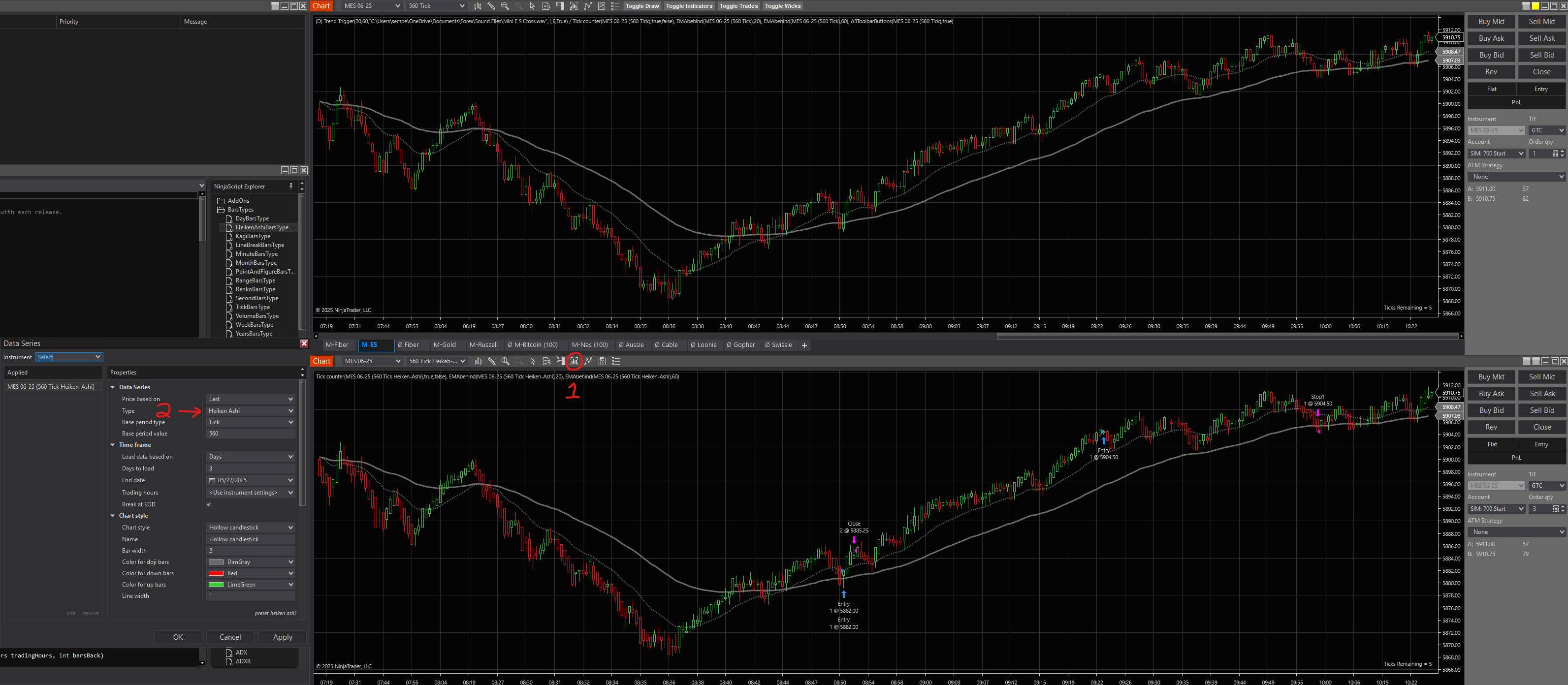
Edit: Original post was wrong. Here is the correct information.
There is a built-in Heiken Ashi. It is accessed by following this guide: https://support.ninjatrader.com/s/article/Understanding-Heiken-Ashi-Bars-NinjaTrader-Desktop?language=en_US
Ninjatrader makes it available as a Data Series Type, instead of as a bar type like the other bars. Not sure why, as that’s a bit backwards in my opinion, but it works nonetheless.
Here’s a quick screenshot. Top chart is regular hollow candles, bottom chart is the Heiken Ashi hollow candles. On the chart, click the button I have labeled as “1”, and change the Data Type in the Data Series window, labeled “2”, to Heiken Ashi.
Warning, if you change the Interval on your chart after you’ve done this, it will change to regular hollow candles, not Heiken Ashi. To change your interval, you will need to go back into the Data Series window and change the “Base Period Value and Base Period Type” to switch between intervals.
Happy Trading!