Does Ninja Trader have any plans to allow or integrate the usage of Grok Bot. I was wondering if NT plans on creating it’s own AI or leveraging existing AI to elevate the platform? I have been using AI for awhile and have recently created a few bots for other tasks. If anyone needs a tutorial on creating Bots with Grok Bot I plan on making one and putting it on my channel. @SharinganTradeJournal on Youtube
NinjaTrader now documents an official MCP beta for connecting compatible AI clients:
It is not yet generally available. The support article says it supports NinjaTrader/Tradovate brokerage demo and live accounts, but not prop-firm accounts:
I did not find Grok Bot named as a supported client in those pages. The key check for your tutorial is whether that client supports MCP and the required authentication. I would start with the separate Demo environment.
I’m not aware of any plans specifically for Grok Bot. The MCP beta mentioned above is designed to work with different AI clients, so that looks to be their approach for now.
If you’re looking to have an AI agent work directly with NinjaTrader Desktop itself, and would consider a commercial add-on, this might interest you.
I’ve developed HTAIBridge, which lets an AI agent work directly with your charts, indicators, drawings, settings, workspaces and templates. It can also help build NinjaScript and run backtests and optimizations in Strategy Analyzer, and so much more.
It isn’t tied to one AI provider. Whether you use Codex, Claude, Grok, Gemini or another AI coding agent, the requirement is the same: it needs to make local requests to the Bridge on the computer running NinjaTrader. I haven’t specifically tested Grok Bot, but if it has that capability, I’d expect it to work too.
I posted more about it and a video over in this thread: (Timestamps in video description)
Please Be Safe in this Crazy World!

1 Like
I think your solution makes much more sense for the NT desktop product. How do you handle security? Authentication, permissions, sandboxing?
1 Like
I put Claude Api into the charts
Thanks, Bill. The HTAIBridge only works with NinjaTrader 8 Desktop versions 8.1.2.1 and higher.
Security: The Bridge cannot be reached through the internet or even your own private network. It accepts only local HTTP requests at 127.0.0.1, on a port you set. A request from any other computer never reaches it. It relies on your computer’s localhost only. It is plain HTTP, not HTTPS, because the request never leaves your computer, so there is nothing on a wire to encrypt. There is no telemetry, and nothing you ask or retrieve through the Bridge ever goes to any outside source (other than your AI of course).
Any AI agent that runs commands on your computer, such as Codex, Claude Code, an AI app’s agent or code mode if it has one, or any agent you run on a local model, can send those local requests. You point it at the folder with the Bridge’s agent guide and it takes it from there. Note: A plain chat window, like ChatGPT or Grok in a browser, can NOT reach the Bridge. It can only talk back and forth with you. It has no way to run commands on your computer, so it has no way to send a local request.
Now with all that being said, I can’t control software you have or might install, nor anyone with local access to your computer. Either could send the Bridge a request. That is the same exposure as NinjaTrader itself. The Bridge is off when first installed, every permission starts off, and orders and deletions ask you first unless you set the Bridge not to.
Authentication: You log into NinjaTrader as usual, and you log into your AI as usual, Codex, Claude Code or whatever you run, under your own subscription. The Bridge adds NO login or API key of its own on top of that. Its protection is that it is local only, off by default, and controlled by the switches discussed below.
Permissions: The Bridge checks its permissions before every action. Reading is the base. Everything beyond reading is a separate switch, and they all start off: Charts, Workspaces, Chart Trader, Scripts, Orders, and Destructive. On top of that, the Bridge can only change a chart that carries its indicator, which you add to the chart yourself. Orders and Destructive ask you to confirm each one unless you tick their Unattended option. The image below shows the current switches with everything enabled, not the defaults:
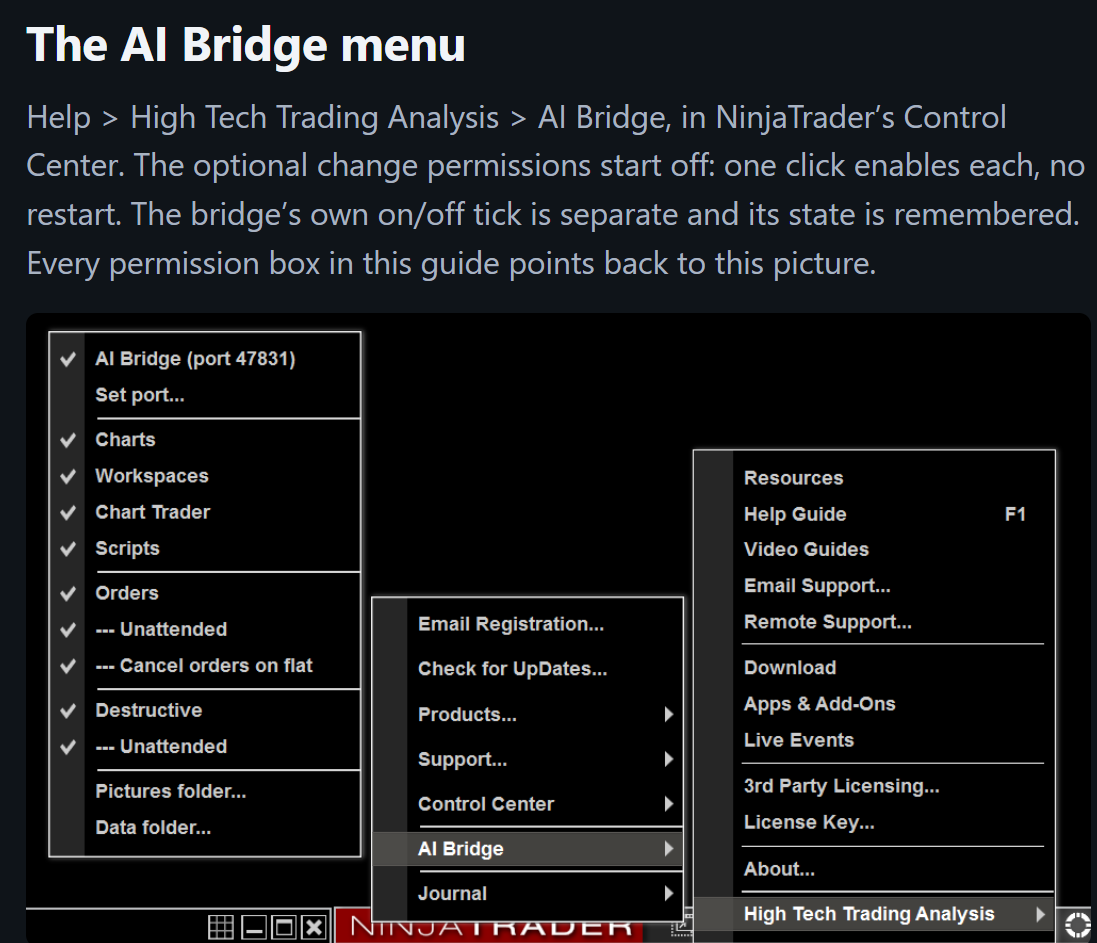
Sandboxing: The Bridge does not use any sandboxing. It is a normal add-on. It loads when NinjaTrader starts and comes up the way you left it, on or off, same port, same permissions. A restart never turns anything on by itself. The agent is its own program and only reaches NinjaTrader through the Bridge. Whatever the agent may do to the rest of your computer is set in that agent’s own settings, not in the Bridge. So you choose the agent, what it may touch on your machine, and separately, through the Bridge, what it can do inside NinjaTrader.
Please Be Safe in this Crazy World!
The Claude API route works, but it comes with a catch: API pricing. Every request is billed by the token, and chart data is a lot of tokens. That bill runs on top of whatever AI subscription you already pay for.
My Bridge goes the other way. It uses the coding app you already subscribe to, Claude Code, Codex, whatever you run, under that same subscription. No API key, no second bill, no meter running on every bar. And it is not tied to one AI company. If a better model shows up next month, you point a different agent at it and nothing changes on the NinjaTrader side.
The part I think matters most is the data. Through the Bridge, the agent can pull bar data for any instrument and period straight out of NinjaTrader into files on your own machine, no export dialog, no copy and paste. Your fills and trades come the same way. If you have Python installed, it writes and runs its own studies on that data, keeps the results, and comes back with the numbers. Ask a question about ten years of NQ daily data, or your last 30 trading days, and it goes and gets the answer.
It also interfaces with NinjaTrader itself. The agent reads every chart, indicator and drawing you have open, changes settings, adds or removes indicators and drawings, opens and switches workspaces, fills a Market Analyzer, sets up ATM strategies, and works orders through Chart Trader. It writes an indicator or strategy, compiles it in NinjaTrader, runs it through the Strategy Analyzer and brings the backtest numbers back.
Please Be Safe in this Crazy World!
1 Like
Good point on token cost, Edge. That’s exactly why we don’t stream the chart to the model.
In PEPA the real-time work happens in a local heuristic engine inside the chart: book imbalance, absorption, magnets, cumulative delta, regime. It runs on every tick, takes milliseconds, costs nothing and never waits on a network call.
The LLM is not in that loop. The engine turns what happened into compact events, something like “bid wall 68 lots at 29820 held 3 tests, delta flipped negative, regime CHOP”, and only those summaries go to Claude. A few hundred tokens instead of thousands of bars, so the bill stays small, and the few seconds an answer takes don’t matter because nothing time-critical depends on it.
So to Itachi’s original question: you don’t need Grok, or any specific AI, wired into NinjaTrader to get value from it. Let fast, deterministic local code do the repeatable part, and use the model for what it’s actually good at: explaining context, comparing sessions, writing a review in plain language. Any model with an API can sit at the end of that pipeline.
Different tools for different jobs. A bridge like yours makes sense when you want an agent operating NinjaTrader itself. Ours is about reading the market on the chart, where speed matters more than reach.
Took a look at your website. You’ve got some very interesting and sharp looking HUDs there.
I can see why you went the API route. You’ve built the analysis around your own tools, decided ahead of time what matters, the rules, conditions, and how that gets displayed. Then you send only the changes, or what’s needed at the time through the API. That makes sense for event driven tasks like what you’re doing.
My Bridge doesn’t have any automatic analysis like that built in. Designed it more around allowing someone to do their own analysis, on whatever data they want to look at. Most anything NinjaTrader has, your provider’s bar history, any exposed indicator or add-on values, drawings, accounts, trades, etc., current or historical, can all be gathered and passed to the AI agent for analysis on demand.
For instance, recently had couple trade ideas I wanted to test. Prompted the agent to pull the data, design and run couple Python backtests. Not great results, but positive overall, so had it build the same rules into a NinjaScript strategy and run that through Strategy Analyzer to compare. Results lined up well enough, figured I’d track through end of the year to see if they hold up. So had the AI build a results page, and a script to update it as time goes on.
That led to my curiosity about how market conditions have changed over time. Specifically how NQ’s range, volatility and volume have changed over the years, both RTH and ETH. Had the agent pull the data through the Bridge, run the analysis, then design and build an HTML dashboard for the results.
One observation among many: the old adage that a backtest should hold up for five or ten years doesn’t make much sense anymore, at least not in points. As a percent of price, NQ’s range and volatility stay far more consistent over time, but in points they’ve changed so much that a fixed stop or target from more than couple years back is trading a completely different market today. Just my two cents.
Now, neither of these came from a single prompt, and both could still use some tweaks. But the point is more that these were my personal thoughts and ideas at the time. Analyzed, designed, built and modified around how I wanted to see it. Someone else will undoubtedly have their own thoughts, opinions, and ideas on what data to analyze and how they want to visualize it.
Data gathering has always been a big bottleneck when working with AI. The Bridge was designed to help overcome this and make that whole process seamless, along with its many other features. No hands on, no manual steps! All I now have to concern myself with is coming up with the ideas and providing good prompts.
With today’s agents, your imagination along with how well you can put that into words is your only limit.
Please Be Safe in this Crazy World!
1 Like
Thanks, Edge, and I appreciate you taking the time to look at the site. To be fair to your point, the API route has its limits. The model isn’t in the real-time loop, so whatever it says comes a few seconds late. Where it earns its place is stepping back: taking snapshots of the book and running rolling-window calculations over different timeframes, like 1, 5 and 15 minutes, to see how the picture is changing rather than reacting to every tick. Your Bridge goes further in a direction I find really useful: pulling the full history and letting the agent run the research itself. I’d argue that’s where the deeper edge gets built. Different tools for different jobs, and I think they complement each other well. Glad to see this kind of work happening in the ecosystem.
1 Like
Came across this video and found it very interesting. Seem to fit the subject:
The concept of creating different agents for different tasks, then having them collaborate with each other. Just goes to show, your imagination really is the only limit.
Grok Bot isn’t unique in this. Many AI bots now make this setup easy, but most run in the cloud, and giving them access to your own computer opens it up.
Claude Code or Codex can do much the same, with the agents working right on your own PC and handing work back and forth. It just takes more work to set up yourself.
Maybe others will find this somewhat inspirational as well.
Please Be Safe in this Crazy World!
1 Like