Are the NT8 servers just not updated yet?
Last rollover they were updated on the Sat.
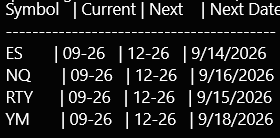
ESU26, NQU26, YMU26 and RTYU26.
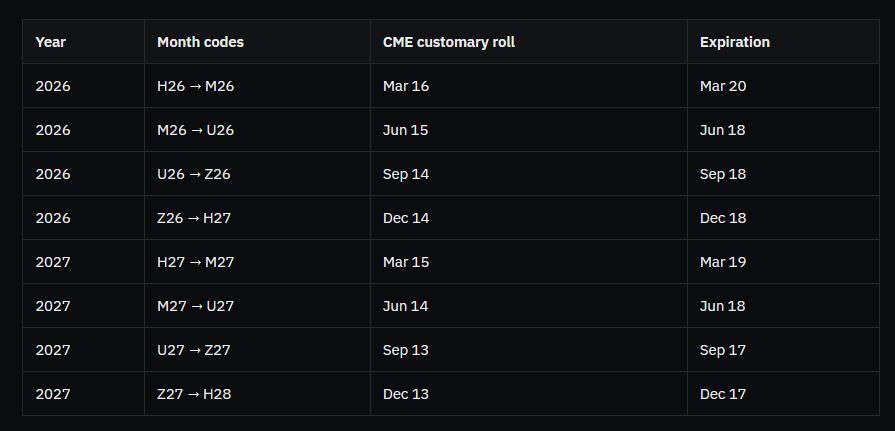
CME’s next customary roll date is Monday, September 14, 2026, when the December contracts become the customary lead month.
Yes, understood.
But last rollover the data for the new front month contract was available on the Saturday before.
That’s when I rolled all my charts over.
Maybe they got lazy this time.
NinjaTrader is set to roll ES, NQ, RTY, and YM on four separate days starting tomorrow and spanning the whole week. I contacted them about their drifting rollover dates two or three rollovers ago, pointing out the CME’s recommendation. The CME’s customary rollover dates are widely known and in this case would all be Monday, 9/14/2026. https://www.cmegroup.com/trading/equity-index/rolldates.html
The switch in higher volume actually occurs Sunday evening.
It doesn’t make sense to update the servers when people should be focused on trading and not rolling over charts.
Yes, I have suggested years ago that a Monday rollover date in the list should trigger the prompt to roll over at the start of the trading session with that trading date (which would be Sunday evening for ETH trading). It’s been years now, and that has never happened unfortunately. The prompt instead is triggered at midnight local time on the rollover date, which is not ideal. Changing the time zone on your computer or in your NinjaTrader options should not change when a rollover prompt occurs, yet it does, and the prompt is as you point out not until partway through the session when the rollover is scheduled.
This has always been flaky in NT.
Prior to rollover I physically go into Control Center > Tools > Instruments, and manually change the equity futures I trade to roll on the Sunday prior to expiration.
Usually, at the Monday open, the volume has flipped.
~Robotman
The servers have been updated.
I guess they’ve settled on the 6pm Sunday open for the update.
You always have control over this on your side.
Go to Tools > Settings > Market Data and set the Global Merge Policy to whatever suits you (merge back-adjusted, merge non back-adjusted, or no merge at all). After changing it, reload your historical data, otherwise the chart will keep showing the old series: right-click the chart > Reload All Historical Data.
You can also define your own rollover dates and price offsets per instrument: Tools > Instruments, search for the instrument, Edit, then the Contract Months / Roll Over section.
2 Likes
Great info. I never new this.
For whatever reason the rollover date for SEP26 was set to 06/12/2026 which was the Friday of the prior week to rollover week. That’s why I was able to update my charts on Saturday last rollover.
DEC26 rollover date was set to 09/14/2026 which explains why I wasn’t able to update my charts until 6pm Sunday this rollover.
I had no idea I could control the NT8 rollover date.
Thanks.