Discord Share Service

Hi,
here I share a Discord Share Service developed with help AI tools like Perplexity and DeepSeek and that enables sharing charts to a Discord channel or server.

Summary of the Discord Share Service

The Discord Share Service is a custom NinjaTrader 8 component that sends text alerts and/or chart screenshots to a specified Discord channel using a webhook. It is called from indicators or strategies via Share("ServiceName", text, imagePath).

Core Capabilities:

  • Text Delivery: Sends alert text as a formatted Discord embed. It supports **bold** markers natively, preserves line breaks, and escapes special characters (backslashes, quotes, newlines) to prevent JSON errors. It includes an optional title.

  • Image Delivery: When an image path is provided, it is sent as a raw file attachment (not embedded). This means it appears full-width and borderless. The image is always placed above the text block.

  • Color Customization: The embed features a configurable accent color on its left border, selectable via NinjaTrader’s color picker.

Configuration Layout:

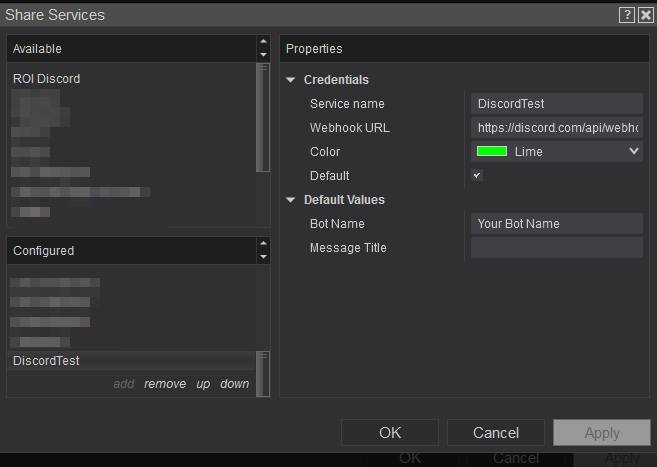
  • Credentials Group: Webhook URL, Color, plus NinjaTrader’s built-in Service name and Default fields.

  • Default Values Group: Bot Name (display name in Discord) and Message Title (optional bold header).

Technical Design:

  • The color property includes a hidden serialization companion to ensure settings save correctly to NinjaTrader’s configuration file.

    Enjoy the sharing possibilities provided by NT8.
    @ProyectoROI25
#region Using declarations
using System;
using System.IO;
using System.Net;
using System.Text;
using System.ComponentModel;
using System.ComponentModel.DataAnnotations;
using System.Threading.Tasks;
using System.Windows.Media;
using System.Xml.Serialization;
using NinjaTrader.NinjaScript;
using NinjaTrader.Gui;
#endregion

namespace NinjaTrader.NinjaScript.ShareServices
{
    [Gui.CategoryOrder("Credentials",    10000)]
    [Gui.CategoryOrder("Default Values", 10200)]
    public class DiscordShareService : ShareService
    {
        private const string FooterText = "Developed by @ProyectoROI25 (X/Twitter)";

        private string webhookUrl;
        private Brush  embedColor;
        private string botName;
        private string messageTitle;

        protected override void OnStateChange()
        {
            if (State == State.SetDefaults)
            {
                Name         = "ROI Discord";
                Description  = "Discord Webhook Share Service by ROI";
                IsConfigured = true;

                EmbedColor   = Brushes.Red;
                BotName      = "Discord ShareService";
                MessageTitle = "";
            }
        }

        // -----------------------------
        // CONFIGURATION PROPERTIES
        // -----------------------------

        [NinjaScriptProperty]
        [Display(Name = "Webhook URL", Order = 1, GroupName = "Credentials",
                 Description = "Discord webhook URL. In your Discord server go to Channel Settings -> Integrations -> Webhooks -> New Webhook, then Copy Webhook URL and paste it here. This URL is what identifies the target channel.")]
        public string WebhookUrl
        {
            get { return webhookUrl; }
            set { webhookUrl = value; }
        }

        [NinjaScriptProperty]
        [Display(Name = "Color", Order = 2, GroupName = "Credentials",
                 Description = "Accent color for the left border of the Discord embed. Click the field to open the color picker. This has no effect on the text or the image itself.")]
        [XmlIgnore]
        public Brush EmbedColor
        {
            get { return embedColor; }
            set { embedColor = value; }
        }

        [Browsable(false)]
        public string EmbedColorSerialize
        {
            get { return Serialize.BrushToString(embedColor); }
            set { embedColor = Serialize.StringToBrush(value); }
        }

        [NinjaScriptProperty]
        [Display(Name = "Bot Name", Order = 1, GroupName = "Default Values",
                 Description = "Display name shown as the sender of the message in Discord. It overrides the default webhook name. Free text, up to 80 characters.")]
        public string BotName
        {
            get { return botName; }
            set { botName = value; }
        }

        [NinjaScriptProperty]
        [Display(Name = "Message Title", Order = 2, GroupName = "Default Values",
                 Description = "Optional title shown in bold above the message body in Discord. Leave empty to send the message without a title.")]
        public string MessageTitle
        {
            get { return messageTitle; }
            set { messageTitle = value; }
        }

        // -----------------------------
        // MAIN SHARE ENTRY POINT
        // -----------------------------
        public override async Task OnShare(string text, string imgFilePath)
        {
            try
            {
                if (string.IsNullOrEmpty(WebhookUrl))
                {
                    Print("DiscordShareService: Webhook URL not configured");
                    return;
                }

                if (!string.IsNullOrEmpty(imgFilePath) && File.Exists(imgFilePath))
                    await SendImageEmbed(text, imgFilePath);
                else
                    await SendEmbed(text);
            }
            catch (Exception ex)
            {
                Print("DiscordShareService Error: " + ex.Message);
            }
        }

        private async Task SendEmbed(string text)
        {
            try
            {
                var request = (HttpWebRequest)WebRequest.Create(WebhookUrl);
                request.Method      = "POST";
                request.ContentType = "application/json";

                string payload =
                    "{"
                    + "\"username\":\"" + Escape(BotName) + "\","
                    + "\"embeds\":[{"
                    +   TitlePart()
                    +   "\"description\":\"" + Escape(text) + "\","
                    +   "\"color\":" + ColorToInt()
                    +   FooterPart()
                    + "}]"
                    + "}";

                byte[] data = Encoding.UTF8.GetBytes(payload);

                using (var stream = await request.GetRequestStreamAsync())
                    await stream.WriteAsync(data, 0, data.Length);

                using (var response = (HttpWebResponse)await request.GetResponseAsync()) { }
            }
            catch (Exception ex)
            {
                Print("DiscordShareService Embed Error: " + ex.Message);
            }
        }

        private async Task SendImageEmbed(string text, string imagePath)
        {
            try
            {
                string boundary = "---------------------------" + DateTime.Now.Ticks.ToString("x");

                var request = (HttpWebRequest)WebRequest.Create(WebhookUrl);
                request.Method      = "POST";
                request.ContentType = "multipart/form-data; boundary=" + boundary;

                using (var reqStream = await request.GetRequestStreamAsync())
                {
                    string json =
                        "{"
                        + "\"username\":\"" + Escape(BotName) + "\","
                        + "\"embeds\":[{"
                        +   TitlePart()
                        +   "\"description\":\"" + Escape(text) + "\","
                        +   "\"color\":" + ColorToInt()
                        +   FooterPart()
                        + "}]"
                        + "}";

                    string jsonPart =
                        "--" + boundary + "\r\n"
                        + "Content-Disposition: form-data; name=\"payload_json\"\r\n\r\n"
                        + json + "\r\n";

                    byte[] jsonBytes = Encoding.UTF8.GetBytes(jsonPart);
                    await reqStream.WriteAsync(jsonBytes, 0, jsonBytes.Length);

                    string header =
                        "--" + boundary + "\r\n"
                        + "Content-Disposition: form-data; name=\"file\"; filename=\"chart.png\"\r\n"
                        + "Content-Type: image/png\r\n\r\n";

                    byte[] headerBytes = Encoding.UTF8.GetBytes(header);
                    await reqStream.WriteAsync(headerBytes, 0, headerBytes.Length);

                    byte[] fileBytes = File.ReadAllBytes(imagePath);
                    await reqStream.WriteAsync(fileBytes, 0, fileBytes.Length);

                    byte[] footerBytes = Encoding.UTF8.GetBytes("\r\n--" + boundary + "--\r\n");
                    await reqStream.WriteAsync(footerBytes, 0, footerBytes.Length);
                }

                using (var response = (HttpWebResponse)await request.GetResponseAsync()) { }
            }
            catch (Exception ex)
            {
                Print("DiscordShareService Image Embed Error: " + ex.Message);
            }
        }

        private string TitlePart()
        {
            return string.IsNullOrEmpty(MessageTitle)
                ? ""
                : "\"title\":\"" + Escape(MessageTitle) + "\",";
        }

        private string FooterPart()
        {
            return ",\"footer\":{\"text\":\"" + Escape(FooterText) + "\"}";
        }

        private int ColorToInt()
        {
            var scb = EmbedColor as SolidColorBrush;
            if (scb == null) return 0xFFFFFF;
            return (scb.Color.R << 16) | (scb.Color.G << 8) | scb.Color.B;
        }

        private string Escape(string s)
        {
            if (string.IsNullOrEmpty(s))
                return "";
            return s.Replace("\\", "\\\\")
                    .Replace("\"", "\\\"")
                    .Replace("\n", "\\n")
                    .Replace("\r", "\\r");
        }
    }
}

How to install the Discord Share Service (quick start for beginners)

In NinjaTrader 8, open New → NinjaScript Editor.

In the left panel, right-click the ShareServices folder → New → Share Service.

Name it DiscordShareService (or any name you like) and click OK. A template file opens.

Select everything in the file (Ctrl+A) and delete it.

Paste the full code from the code block above (Ctrl+V). Make sure you include the entire file — from the first #region Using declarations line all the way to the closing brace at the bottom. Nothing in between should be omitted.

Press F5 to compile. A green check in the toolbar means success. If any error appears, it is almost always because a piece of the code was cut off during copy — re-select and paste again.

Now close NinjaTrader completely, including the tray icon (right-click it → Exit). Reopen NinjaTrader. This step is required — share services are only registered at startup.

In NinjaTrader, open Tools → Options → General → Share Services, click Add, and select Discord.

Give the instance a Service name (for example DiscordTest — this is the name you will reference from your indicators). Paste your Discord Webhook URL (obtained in Discord under Channel Settings → Integrations → Webhooks → New Webhook → Copy Webhook URL). Optionally adjust Color, Bot Name, and Message Title. Click OK.

From your indicator, call Share("DiscordTest", "your text", "") for text only, or Share("DiscordTest", "your text", @"C:\path\chart.png") to attach a chart. Wrap any label in **double asterisks** for bold, and wrap the whole table in triple backticks to get a monospace block so padded columns align.

Note on renaming: if you rename the file, also update these two lines in the code — public class DiscordShareService : ShareService and Name = "Discord";. Everything else can stay as-is.