I am struggling to remove the drawn rays from the chart. The indicator has drawn succeffully the rays on the chart and I want these under given condition to be removed.
I have the following functions:
If(myCondition1)
{
Draw.Ray (this, “myRay”+CurrentBar, 4, yStart, 0, yEnd, Brushes.DarkCyan);
}
If(myCondition2)
{
DeleteDrawObject(“myRay”);
}
With the first condition (Condition1), I have not only one ray on the rays on the chart, but multiple rays, each of which appearing evertime (myCondition1) is met.
With the condition2, the rays are not disappearing. In ordert o check if the error was in the condition2, I just called DeleteDrawObject() outside oft he condition2. Even here, the rays remain on the chart.
In the documentation, I have seen that it is possible to allow the removal of the drawn objects by adding AllowRemovalOfDrawObjects = true in protected override void OnStateChange(). Even after this addition, I am failing to remove the rays.
I am wondering if there is an #include I am missing somewhere and that I hat to add to make the DeleteDrawObject() funtional.
Hi @Stanfillirenfro, The code above needs to be changed such that the DeleteDrawObject method’s parameter uses the same “Tag” as the Draw.Ray method’s Tag, but in your code, the Draw.Ray method’s Tag is set to…
“myRay”+CurrentBar
…but the DeleteDrawObject method’s Tag is set to “myRay”.
To delete this specific Ray drawing object from the NinjaTrader chart, change the DeleteDrawObject method call to be this:
II am observing weird behaviour of the function DeleteDrawObject();
When I use the function DeleteDrawObject(“myRay”+CurrentBar); the rays are not deleted.
When I have:
I would really appreciate if you could point out where I am mistaking.
Many thanks in advance!
You are most welcome. From reading your response to my post, I believe that you are mistaken about the following:
My advice to change the “DeleteDrawObject(“myRay”);” to “DeleteDrawObject(“myRay”+CurrentBar);” had the underlying premise that you wouldn’t change any other code, but while your initial post called Draw.Ray like this:
My advice to change the DeleteDrawObject method call to use a Tag parameter of “myRay”+CurrentBar instead of “myRay” would only work if your Draw.Ray tag parameter was also “myRay”+CurrentBar, but you changed it to “myRay” between your two posts.
I.e. the code needs to be changed such that the DeleteDrawObject method’s parameter uses the same “Tag” as the Draw.Ray method’s “Tag” parameter.
As specified in my previous post, when I have the same parameter in
Draw.Ray (this, “myRay”+CurrentBar, 4, yStart, 0, yEnd, Brushes.DarkCyan); and in
DeleteDrawObject(“myRay”+CurrentBar);
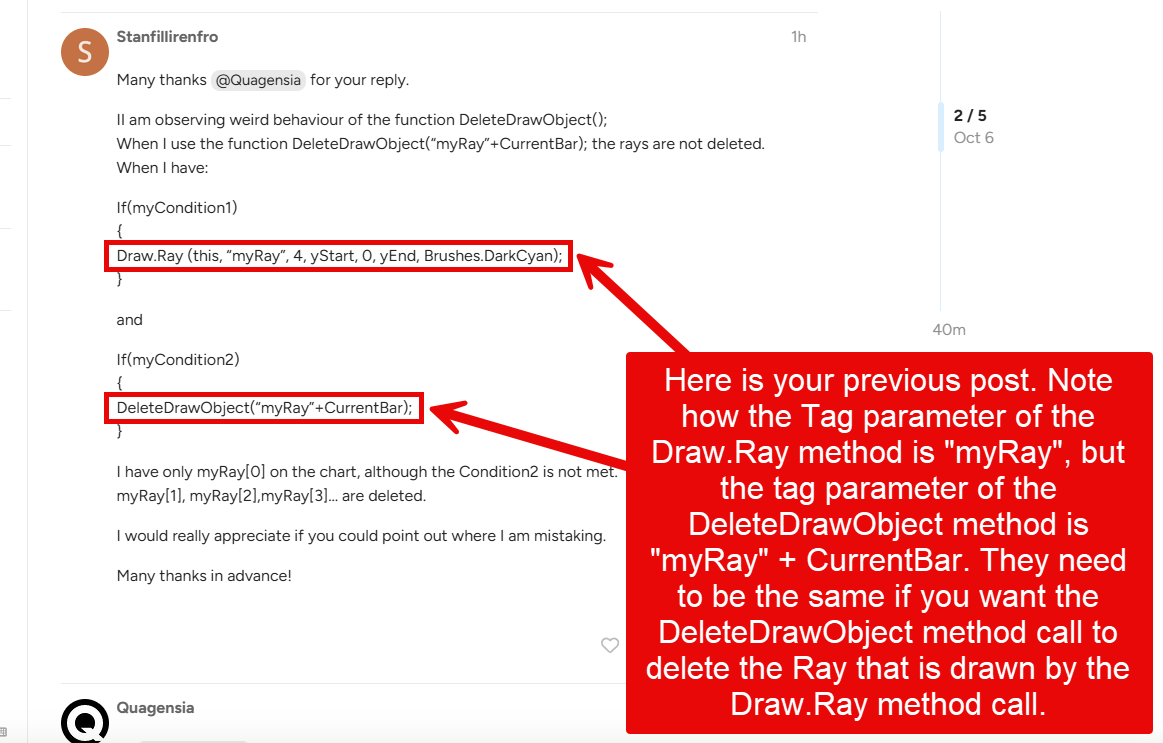
No @Stanfillirenfro, in your previous post you do not have the same parameters in both methods. Please look very carefully at your previous post and see if you can see the difference, which I described in my previous post, and which I have highlighted in the screenshot below.
You cannot use CurrentBar in the tag if you are trying to delete it on a different bar. At that time CurrentBar will be a different number and the tag will not match.
@eDanny: Yikes, you are right! I totally missed that, thank you for correcting my logic. I must have been under-caffeinated! @Stanfillirenfro , just like @eDanny said, the tag used needs to use the exact same int (Whole Number) in the Draw.Ray and DeleteDrawObject, but CurrentBar number changes as the strategy encounters new bars, so you cannot use “CurrentBar” for the Whole Number suffix of “myRay”, and instead would need to use an int variable that was set to CurrentBar before the Ray was drawn, and then that variable would need to be used in the suffixes of the Tag parameter both the Draw.Ray and DeleteDrawObject methods.
Or like you just posted while I was writing up this post, you could just not use a whole number suffix at the end of the tag name “myRay” at all.
Congrats on figuring out your problem and sorry that the fact that CurrentBar changes slipped my mind when I attempted to help you. The one thing I did get right was that in your original question the Tag parameters passed to the Draw.Ray and DeleteDrawObject methods were different, as one had a whole number suffix and one didn’t, and the Tag parameters in both methods must match.
I have learned from your take home message that the tag’s name must be the same in the Draw.Ray() method as welll as in the DeleteDrawObject() method. It is very significant for my other codes.